
 Book Free Consultation

Get Ready For Salesforce Winter'27 Release
From Key Dates to Key Features: Your Winter ’27 Preparation Guide
By Anandhakumar Thangasamy
Senior Salesforce Developer
Get Ready For Salesforce Winter'27
If you're a Salesforce professional, you may already know Salesforce delivers three major releases every year that includes enhancements as well as new features to shape up the product. The next major release is Winter '27 and it's the right time for Salesforce Admins and Developers to start preparing their orgs. Getting ready for Salesforce update includes a few steps for the Salesforce Admins to prepare their Salesforce orgs to avoid disruptions and utilize the improvements/new features. In this blog, we'll look at the key Winter ’27 dates and some of the important updates that Salesforce professionals should keep on their radar.
Key Dates - Winter'27
The first and foremost thing the Admin should know is the key dates of the Salesforce releases. That helps admin to plan for sandbox testing, review release notes, validate customizations, and prepare users before the production rollout. Below are the key dates for Salesforce Winter'27 release.
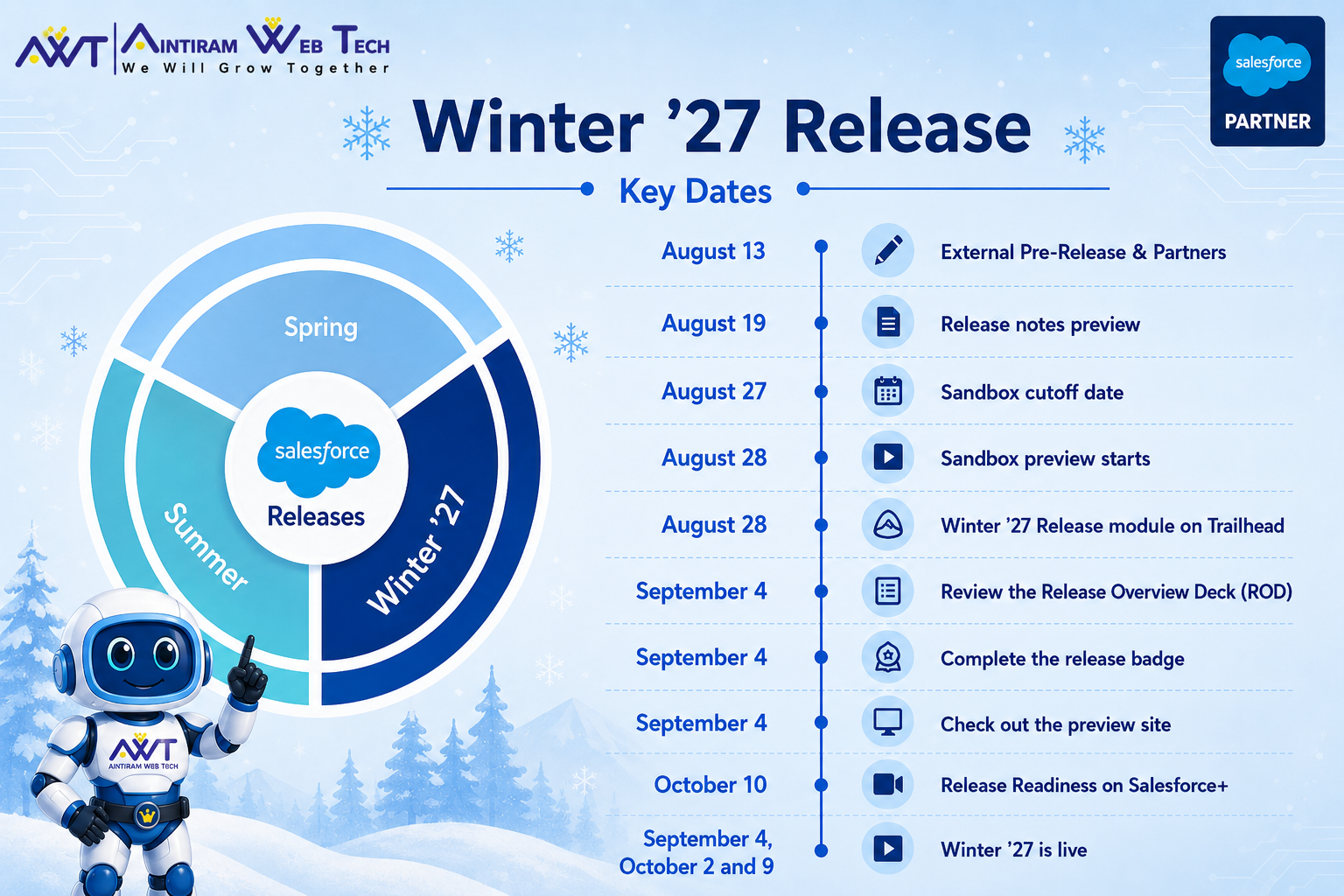
Let's know about these key action items and what all are needs to be done by Salesforce Admin to get ready for the release.
External Prerelease & Partner: From August 13, 2026 Admins can sign up for a new developer edition that has all the feature updates of Winter '27 enabled for practicing them.
Release Note Preview: The most awaiting Salesforce release notes for Winter '27 set to released by August 19. The release notes contains all the updates comes under the particular release. The admins can find the updates based on their products.
Sandbox Cut-off Date: You got a pre release org and explored the features through release notes. Then it's time for test your features in the sandbox. Sandbox cutoff date is the date when the sandboxes must be refreshed or created to be on a preview instance and get the features as part of the release. If the sandboxes are refreshed after this date, will be stay on the previous release. For Winter '27, the sandbox cutoff sate will be August 27.
Sandbox Preview: From August 28, the Winter '27 features will be available in the preview-enabled sandboxes so that the admins can enable the updates and test the updates to know if anything affects their instance before rolling out.
Also, as an Admin keep an eye on Winter '27 release trailhead module(August 28), Release Readiness on Salesforce+(October 10) to get more idea on the key updates.
The Winter '27 Production rollout will be live on three phases depending on your Salesforce instance. The release dates are September 4, October 2 and October 9.
What To Expect As Part of Winter '27
Enforcement on Profile Name Filter
Starting with the Winter ’27 enforcement, users without the View All Profiles permission can view only their own profile name. Users who need to access profile names across the org must have the View All Profiles permission. Sounds simple, but not. If there are any logic in apex or flow, to query the Profile that not belongs to the current user profile, then that returns empty. So an admin and developer needs to validate the impact against this update.
Retirement of Username - Password Flow in OAuth 2.0
Salesforce is retiring the OAuth 2.0 Username-Password Flow for Connected Apps as part of its ongoing security improvements. Although this retirement was originally scheduled to be enforced with the Winter ’27 release, Salesforce has moved the enforcement date to February 20, 2027.
This change can have a significant impact on integrations that still rely on the Username-Password Flow. Salesforce recommends migrating these integrations to more secure alternatives, such as the OAuth 2.0 Web Server Flow with PKCE for user-based authorization or the OAuth 2.0 Client Credentials Flow for server-to-server integrations.
Mass Quick Action Support for Flow
The wait over now. Salesforce always keep an eye on IdeaExchange and based on the priority they didn't fail to fulfill the customers requirement from the IdeaExchange. As part of this process, an idea that has more than 650+ votes is coming to live through Winter '27. As part of this update, now we can invoke the Screen flow from the list view or related list actions and pass the collection of records to process along with the parent object record field. This will be very useful feature for the admins and as well as end users on the operations aspect.
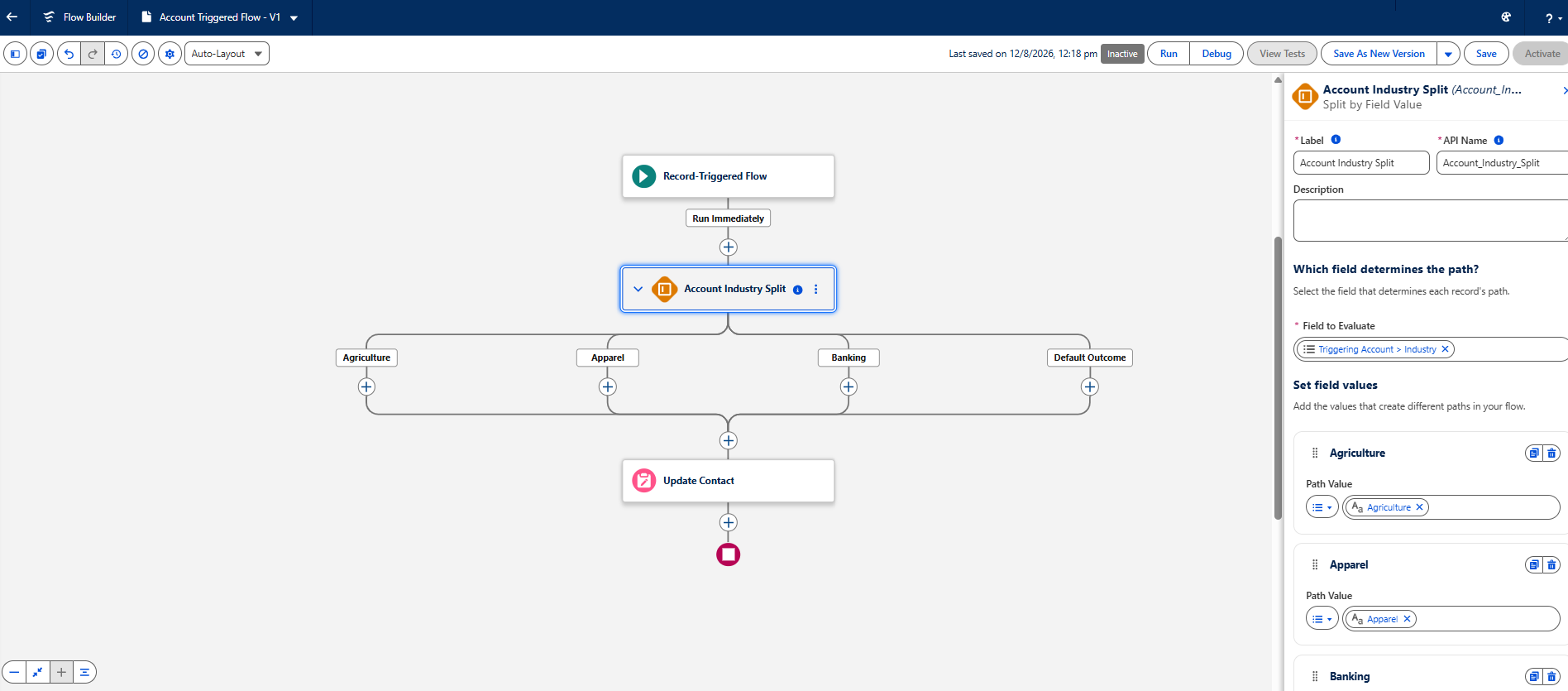
Split by Field Value
As part of Winter '27 we are going to have a brand new element called Split by Field Value. It is used to avoid the decision element if we need to check the value of specific field and perform some operations, most-likely switch-case in coding.
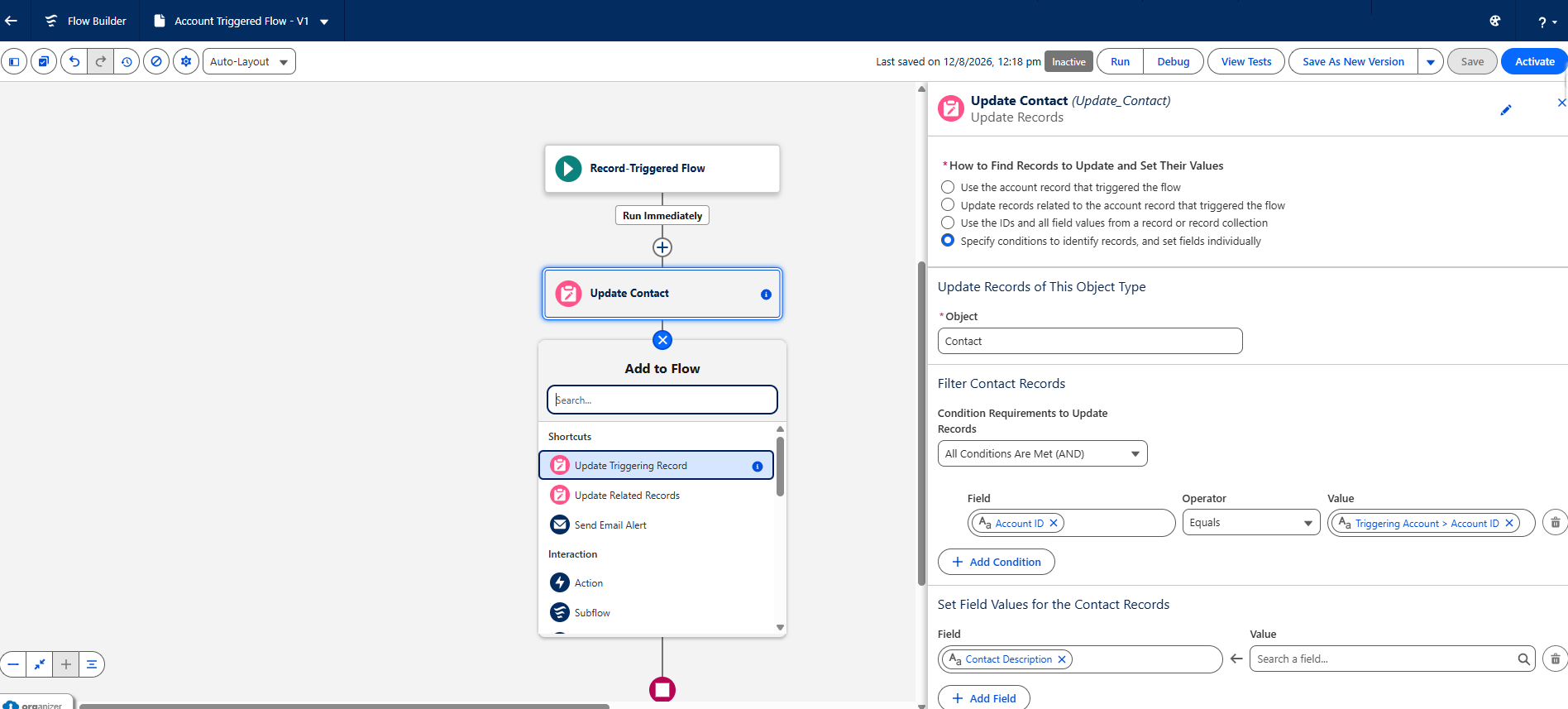
Flow Builder UI Update
The flow builder UI is shaping up through each and every release. Winter '27 also has an update and comes with the some modern UI experience in the flow builder as below.
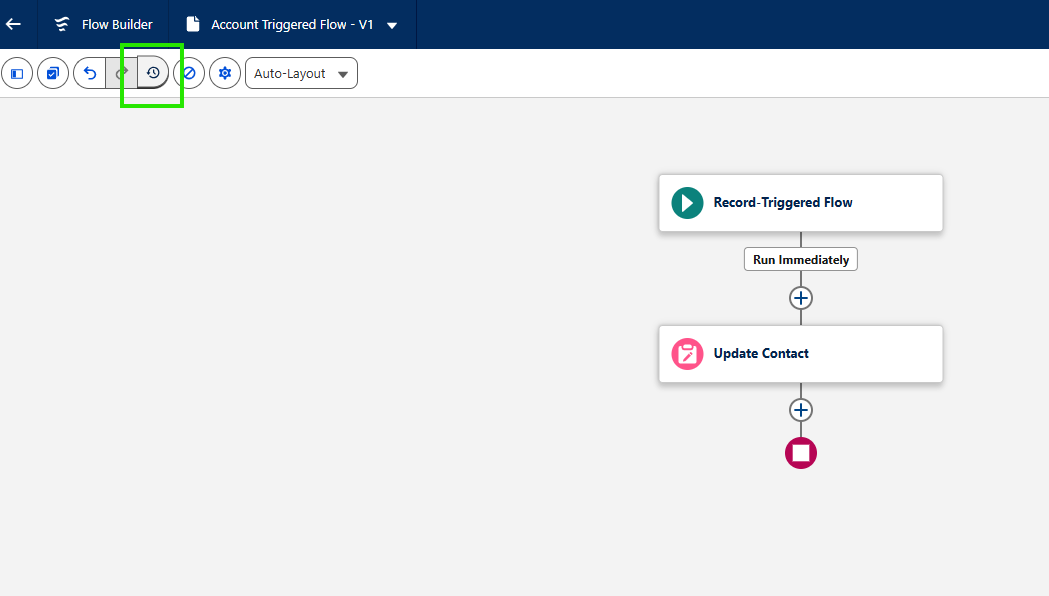
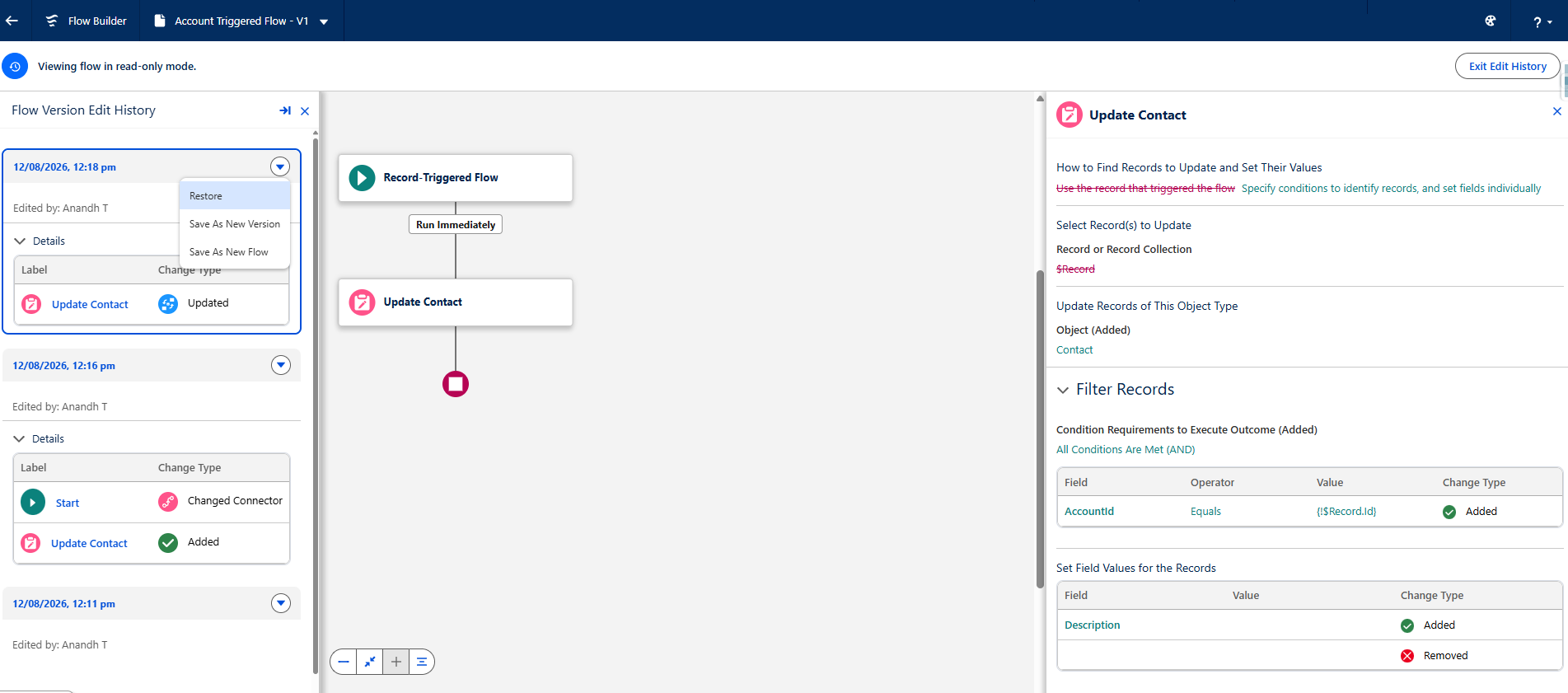
Flow Version Edit History
There is a new button added to the flow builder named Edit History. By clicking that, the admins can view the changes made on the each element during flow edit. Also we can restore the particular changes.
Filter Elements in Resource Manager
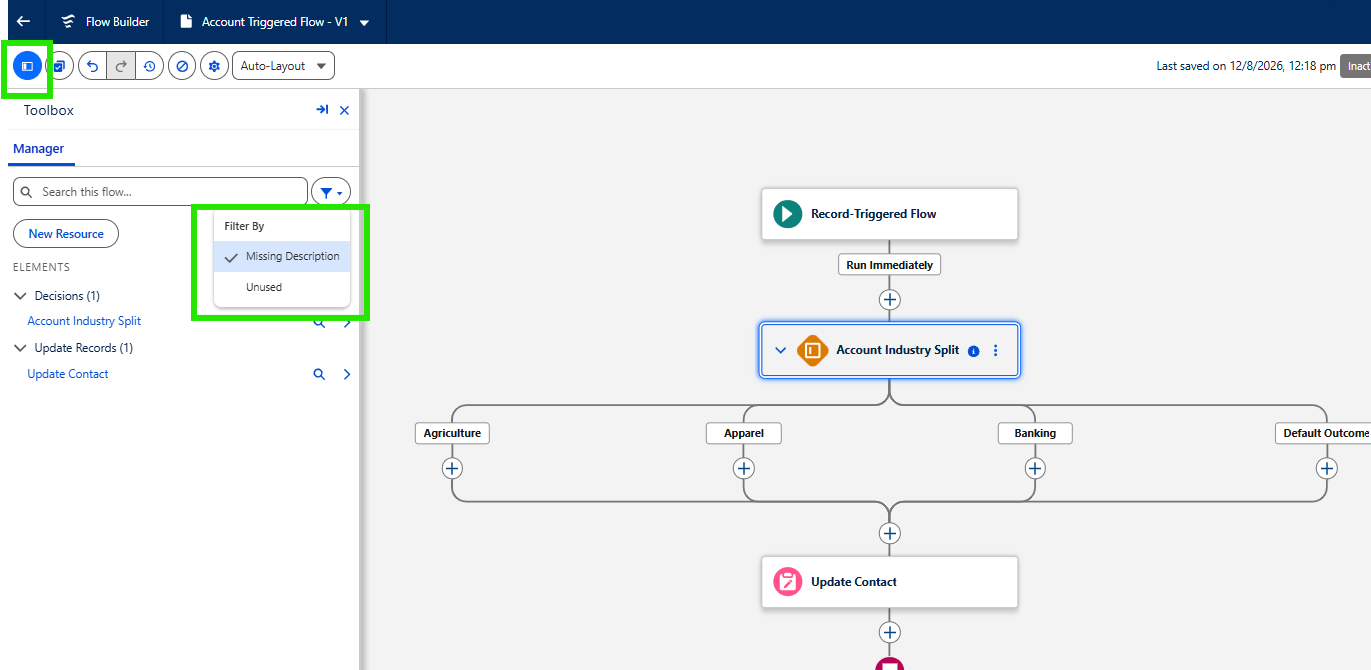
This option is purely to avoid the tech debt. In the Toolbox option inside the flow builder, a new filter option is intrduced to filter the elements by two options for now,
- Missing Description: The elements those don't have description added.
- Unused: To identify the unused elements and clean up them.
Conclusion
As usual Salesforce Winter '27 release coming with a lot of surprises. As a Salesforce Admin, it’s important to keep an eye on the key dates for every Salesforce release, not just Winter ’27. Make sure to follow the recommended steps provided by Salesforce to stay informed about new features and enhancements, and more importantly, to avoid any potential disruption caused by feature retirements, such as the OAuth Username-Password Flow retirement. Track. Prepare. Adapt. Stay ahead!
