
 Book Free Consultation

Salesforce Connectors in MuleSoft: Key Features & Uses
Explore the key features of salesforce connectors in Mule which allows integrate Salesforce with external systems, automate workflows, and scale faster.
By Nishanth Sargunam
Senior Salesforce Developer
Salesforce Connectors in MuleSoft: Key Features & Uses
Being a Salesforce developer, I have always been comfortable working with Salesforce features, automation processes, and custom developments. When I began my journey of learning MuleSoft, I was particularly interested in understanding how Salesforce communicates with external systems and what are the underlying processes. During the process, I referred to several resources, articles, and videos.
In this article, I will be sharing the learnings that I made on key MuleSoft Salesforce Connectors. The post will highlight what is the authentication process of Salesforce with MuleSoft, different features of each connector, and use cases.
Let’s explore the world of MuleSoft and learn how we can leverage it to make our lives easier while working with Salesforce!
What are salesforce connectors?
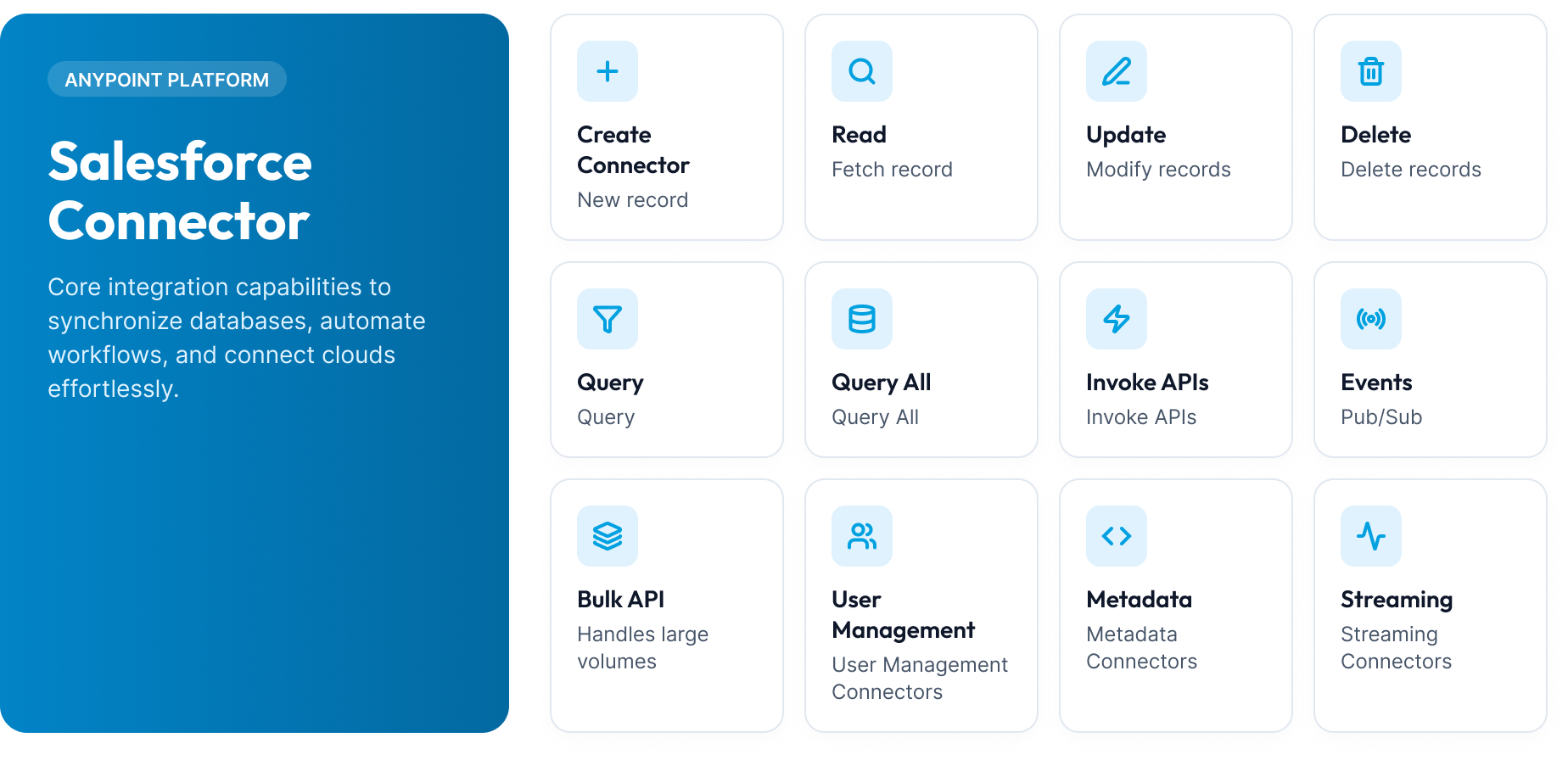
Salesforce connector in MuleSoft is a pre-built connector that aids in designing and developing your Mule applications to connect to salesforce.com without building custom APIs. This connector serves as an intermediary between Salesforce and other applications, databases, or enterprise systems, enabling developers to perform critical functions like
The need for Salesforce connectors emerges when developers want to utilize the functions and features of Salesforce programs. In addition, developers would have had to handle API calls manually if they lacked the appropriate tools. In addition, they would have had to manage tokens, responses, and requests manually. The Salesforce connector provides developers with ready-made operations that enable them to accomplish tasks more quickly and efficiently than they would have while working with the APIs directly.
For instance, suppose a customer places an order on your company’s e-commerce site. In that case, your MuleSoft application can receive the request, process it, create an account, contact, or opportunity in Salesforce, and respond to the request in one go with little coding effort.
Authenticating & Configuring Salesforce Connectors in MuleSoft
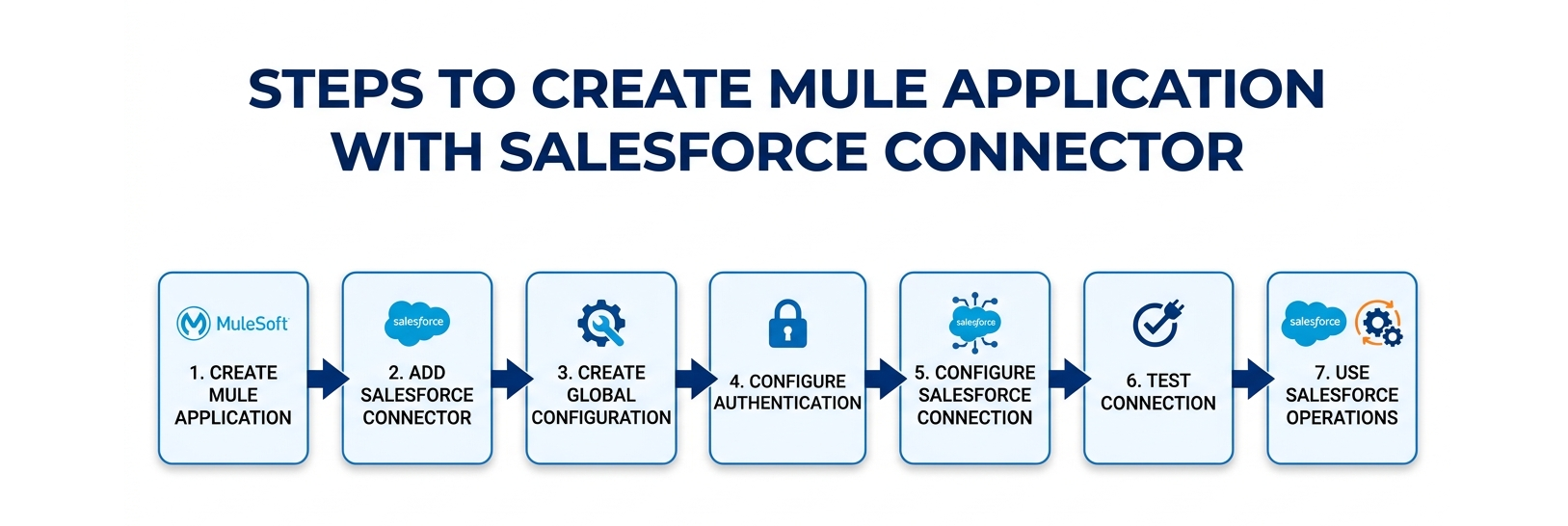
Authentication is the first step when establishing communication between MuleSoft and Salesforce. As a MuleSoft developer we should get the proper credential from the salesforce team to procced the MuleSoft connection setup
Integrating Salesforce with external applications requires secure authentication, reliable connectivity, and the ability to exchange data efficiently. MuleSoft’s Salesforce Connector simplifies this process by providing prebuilt operations that allow applications to communicate with Salesforce through MuleSoft Anypoint Studio.
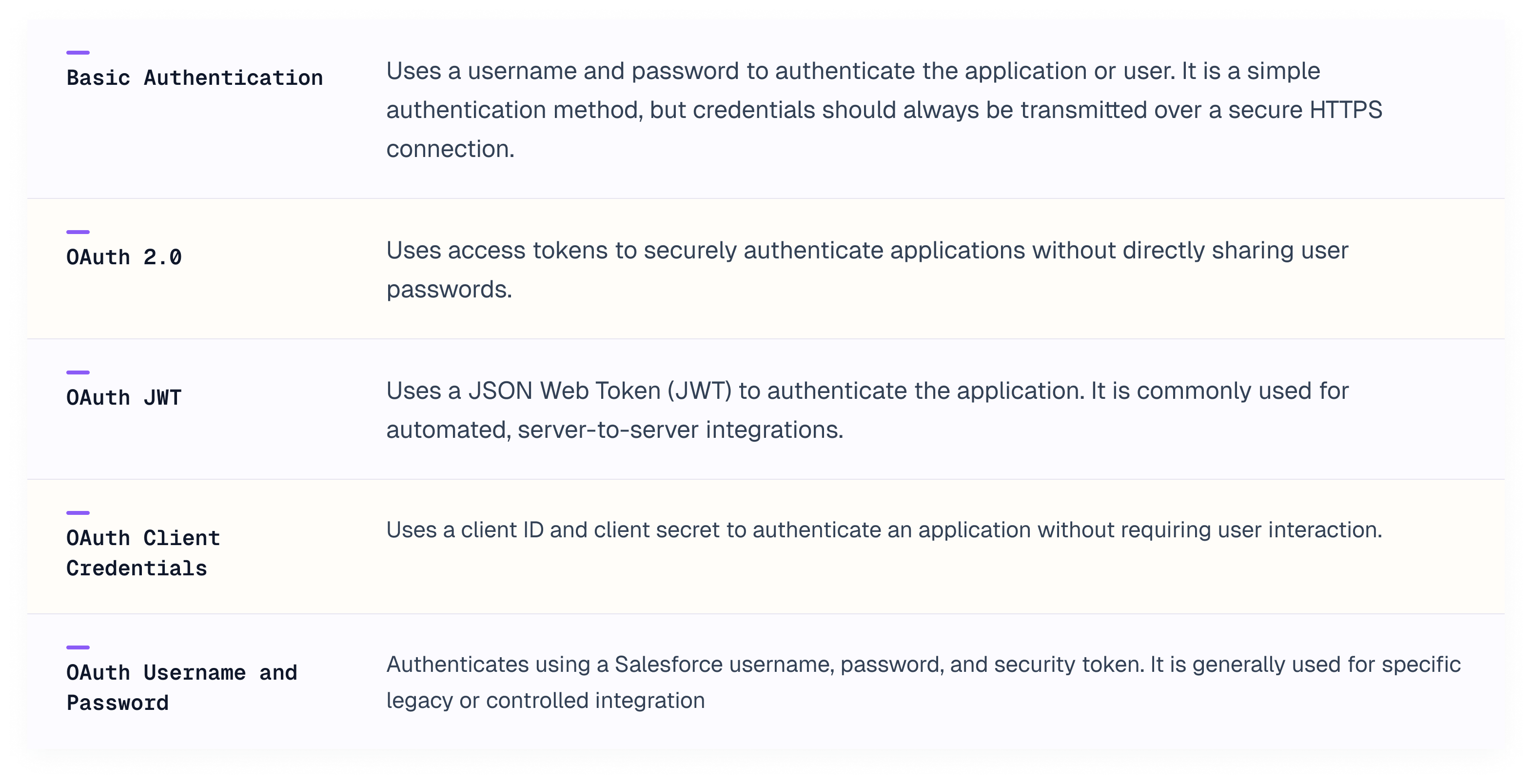
Types of authentications
Salesforce Connector supports multiple authentication methods to securely connect MuleSoft applications with Salesforce.
Salesforce Connector Operations Reference
Salesforce connectors in MuleSoft are explained below by grouping into the categories that would be helpful to understand and imagine the each and every connector with the apt use cases.
1. CRUD & Query Operations
Operation | Description |
|---|---|
Create | It is to add one or more new records to your organization’s data. |
Update | Modifies the existing records using their Salesforce Id. |
Upsert | Insert/Update in a single operation, matched by the Salesforce's internal Id. If Id present it will update the record or else insert the new records with the provided details |
Delete | Deletes one or more records from your organization’s data by Id (It moves them to the Recycle Bin not permanently delete the record). |
Retrieve | Fetches the specific fields for a known list of record Ids which is the fastest way to get exact data when you already know the Ids. |
Query | Search for records using SOQL query. |
Query All | Same as Query but also includes the archived records. |
Search | Runs a SOSL (Salesforce Object Search Language) which search across multiple object types at once, based on the matching keyword. |
2. Data Management & Object Utility Operations
Operation | Description |
|---|---|
Convert Lead | Converts a qualified Lead into an Account, Contact, and an Opportunity in one step. |
Merge | Combines up to 3 duplicate records of the same object into one record, |
Merge Multiple | Batch version of Merge — runs several merge operations in one call. |
Find Duplicates | Checks a record you're about to save against Salesforce's built-in duplicate rules, before committing it. |
Find Duplicates by IDs | Same functionality of duplicate check, but against records that already exist in Salesforce (by Id) rather than a new unsaved record. |
Describe Global | Returns a summary list of every object available in the org (standard and custom). |
Describe SObject | Returns full metadata for one specific object — its fields, data types, picklist values, and relationships |
Get Deleted | Returns the Ids of records deleted within a specified time window. |
Get Updated Objects | Returns Ids of records updated within a specified time window. |
Get Server Timestamp | Returns Salesforce's current server time. |
3. Bulk API Operations
We have two Bulk API in MuleSoft connectors where the primary purpose of both Bulk API 1.0 and Bulk API 2.0 is the same which to efficiently process large volumes of Salesforce data asynchronous. i have explained the Bulk API 2.0.
Operation | What it is & Purpose |
|---|---|
Create Job Bulk API v2 | Starts a new Bulk 2.0 ingest job (insert, update, upsert, or delete) — no manual batching needed. |
Create Query Job Bulk API v2 | Starts a Bulk 2.0 job for exporting large SOQL query results. |
Get All Jobs Bulk API v2 | Lists all Bulk 2.0 ingest jobs (running or completed) in the org. |
Get All Query Jobs Bulk API v2 | Lists all Bulk 2.0 query (export) jobs. |
Get Job State Bulk API v2 | Checks the current status of a specific ingest job (e.g., "InProgress," "JobComplete," "Failed"). |
Get Query Job Info Bulk API v2 | Checks the status of a query (export) job. |
Get Query Job Results Bulk API v2 | Retrieves the actual exported rows from a completed query job. |
Delete Job Bulk API v2 | Deletes a completed ingest job record from Salesforce's job history. |
Delete Query Job Bulk API v2 | Deletes a completed query job record. |
Abort Job Bulk API v2 | Cancels an in-progress ingest job. |
Abort Query Job Bulk API v2 | Cancels an in-progress export/query job. |
Retrieve Job Failed Results Bulk API v2 | Retrieves only the records that failed processing in an ingest job, along with error reasons. |
Retrieve Job Successful Results Bulk API v2 | Retrieves only the records that processed successfully, including their new Salesforce Ids. |
Retrieve Job Unprocessed Results Bulk API v2 | Retrieves records that were never processed at all — for example, if a job was aborted early. |
4. Metadata API Operations
Operation | What it is & Purpose |
|---|---|
Create Metadata | Creates new metadata components (like a new custom field or object). |
Read Metadata | Reads the definition of existing metadata components. |
Update Metadata | Updates existing metadata components. |
Upsert Metadata | Insert-or-update for metadata components. |
Delete Metadata | Deletes metadata components from the org |
Rename Metadata | Renames an existing metadata component |
Deploy Metadata |
|
Retrieve Metadata | Pulls a metadata package out of an org (the reverse of Deploy). |
Describe Metadata | Lists the metadata types available in the org (like "Custom Field," "Validation Rule," "Flow"). |
List Metadata | Lists existing components of a specific metadata type. |
5. Streaming, Change Data Capture & Platform Events
Operation | What it is & Purpose |
|---|---|
On New Object | A trigger source that fires whenever a new record of a chosen type is created. |
On Modified Object | Fires whenever an existing record is updated. |
On Deleted Object | Fires whenever a record is deleted. |
Publish Platform Event Message | Publishes a custom Platform Event — a lightweight, purpose-built business event — into Salesforce. |
Publish Streaming Channel | Publishes a message to a generic Streaming API channel. |
6. Apex Invocation Operations
Operation | What it is & Purpose |
|---|---|
Invoke Apex REST Method | Calls a custom Apex REST endpoint exposed in Salesforce. |
Invoke Apex SOAP Method | Calls a custom Apex SOAP web service. |
7. User Management Operations
Operation | What it is & Purpose |
|---|---|
Get User Info | Returns details about the currently authenticated integration user. |
Change Own Password | Let's the currently authenticated user change their own password. |
Reset Password | Resets another user's password (an administrative action). |
Set Password | Sets a specific password for a user (rather than generating a random reset). |
Unauthorize | Revokes the current OAuth session/token. |
Demo of simple scenario
Create a MuleSoft API that retrieves Salesforce Account details based on the Account Id received as a query parameter.
- Authentication type: Basic Authentication.
- The API consumer must provide a valid username and password in the Authorization header.
Conclusion
We are at the end, and I have shared the explanation of Salesforce Connectors in MuleSoft. In the future, I will be coming up with demonstrations of various Salesforce connector operations to help you understand the authentication mechanisms and the behavior of specific connectors in greater detail. Stay tuned for the next set of interesting blogs.
