
 Book Free Consultation

SOAP API login() Retirement: What to Prepare For?
Explore why Salesforce is retiring SOAP API login(), what Use Any API Auth changes, and what organizations should prepare for.
By Sadhana Selvaraj
Assistant Software Developer
SOAP API login() Retirement: What to Prepare For?
Introduction
An integration can run smoothly for many years without intervention, but what happens when the authentication method that it depends on is scheduled for retirement?
Salesforce is retiring the SOAP API login() call in API versions 31.0 through 64.0 with the Summer '27 release. The call is already unavailable in API version 65.0 and later. Many integrations still work today, but they will stop authenticating once the retirement takes effect.
A second change arrives sooner. From December 1, 2026, every user who authenticates through login() must hold the new Use Any API Auth permission. The two changes are easy to confuse, but they do different things: the permission controls who can use login() until then, and the retirement removes login() for everyone.
This blog will explain how SOAP API login() is used, what Salesforce is changing, how Use Any API Auth fits into the picture, and what organizations should review before Summer '27.
What Does SOAP API login() Do?
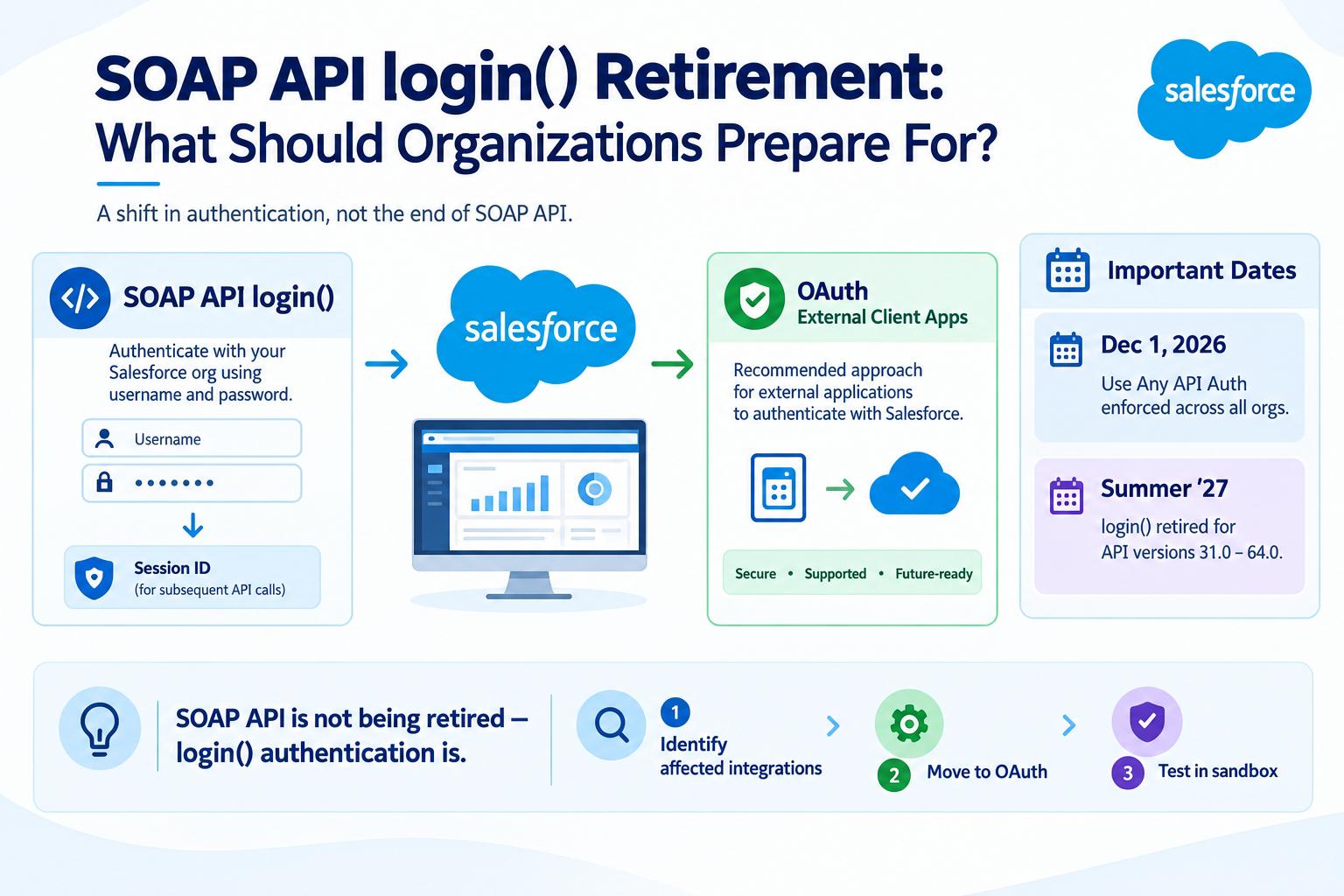
To understand why the retirement of login() matters, it is first important to understand what this operation actually does. When an external application connects to Salesforce using SOAP API, it needs to authenticate with the Salesforce org. The login() operation is used for this authentication by sending the Salesforce username and password in the login request. Salesforce verifies the credentials, and when authentication is successful, it provides a session ID. The application can then use this session ID in subsequent SOAP API requests to interact with Salesforce.
In other words, login() is the front door. Whatever the integration does afterward, it cannot do any of it without first getting through this step.
Why Is Salesforce Making This Change?
Why is Salesforce retiring login() after it has been used to authenticate external applications for many years?
Salesforce is now leaning towards a secure-by-default approach of authenticating external applications. According to Salesforce, SOAP API login() does not provide the security posture Salesforce wants for external application authentication. Because of this, Salesforce is retiring login() and recommending a different authentication approach for these applications.
In cases where existing applications rely on login(), Salesforce suggests adopting External Client Apps using OAuth. This provides a supported way for external applications to authenticate with Salesforce and obtain the access they need. This change is therefore not about retiring SOAP API itself. It is about moving integrations away from the login() authentication method and toward the authentication approach Salesforce recommends for external applications.
SOAP API can continue to handle data operations; integrations must migrate to a supported authentication method. This difference matters, since when the organization uses SOAP API, replacement of the whole integration is not necessary. In case the integration relies on login(), its authentication method has to be changed before the retirement takes effect. But login() staying available for now doesn't mean nothing else has changed Salesforce has also added a new permission that affects who can use it while it's still around.
What Does Use Any API Auth Mean for login()?
This is where the two changes can easily get mixed up. Before Use Any API Auth was introduced, an external application using SOAP API login() could authenticate with Salesforce using the credentials of a Salesforce user, subject to the existing authentication and security settings of the org. The user did not need a separate Use Any API Auth permission specifically for login().
Until Summer '26, any API-enabled user could authenticate through login(), subject to the org's normal security settings. Summer '26 introduced Use Any API Auth, a user permission that controls who may authenticate through login().
However, it did not become applicable everywhere immediately. The restriction was enabled by default only in new orgs created from Summer '26 onward. In existing orgs, the restriction was not turned on automatically an admin had to manually enable it. So immediately after Summer '26, whether this check applied to a given org depended on whether that org was new or already existed at the time.
So, the permission adds another check to the existing authentication process. For example, an external application may use a Salesforce user to authenticate through login(). When the Use Any API Auth requirement is enforced, Salesforce checks whether that user has the permission. If the permission is missing, the SOAP API login() request fails with an INSUFFICIENT_ACCESS error.
Salesforce says that starting December 1 2026, the Use Any API Auth requirement will be enforced across all orgs. Salesforce also provides a Release Update that organizations can use to test this requirement before it becomes mandatory. But this permission does not extend the life of login().
That is the key difference:
- Use Any API Auth controls whether a user can use login().
- The Summer '27 retirement removes support for login() in API versions 31.0 through 64.0.
So, Use Any API Auth is an additional access control around login() while the operation is still supported. It is not a replacement for login() and it does not change the retirement date.
Key Dates
When | What Changes |
Winter '26 | login() is not available in API version 65.0 and later. New orgs have login() disabled by default for the versions 31.0 to 64.0. Admins need to enable if needed. |
Summer '26 | Use Any API Auth introduced. The restriction is on by default in new orgs and optional in existing orgs. |
December 1, 2026 | Use Any API Auth enforced in all orgs. Users without it get INSUFFICIENT_ACCESS on login(). |
February 20, 2027 | OAuth 2.0 username-password flow for connected apps retired. Refer release note update. |
Summer '27 | login() retired in API versions 31.0–64.0. SOAP API versions 31.0–40.0 become deprecated and unsupported. Refer Salesforce notes. |
Summer '28 | SOAP API versions 31.0–40.0 retired. Refer Salesforce documentation. |
What Should Organizations Do Before the Retirement?
Knowing that login() is being retired is only one part of preparing for the change. The first step is to find out which integrations in the organization are actually using it.
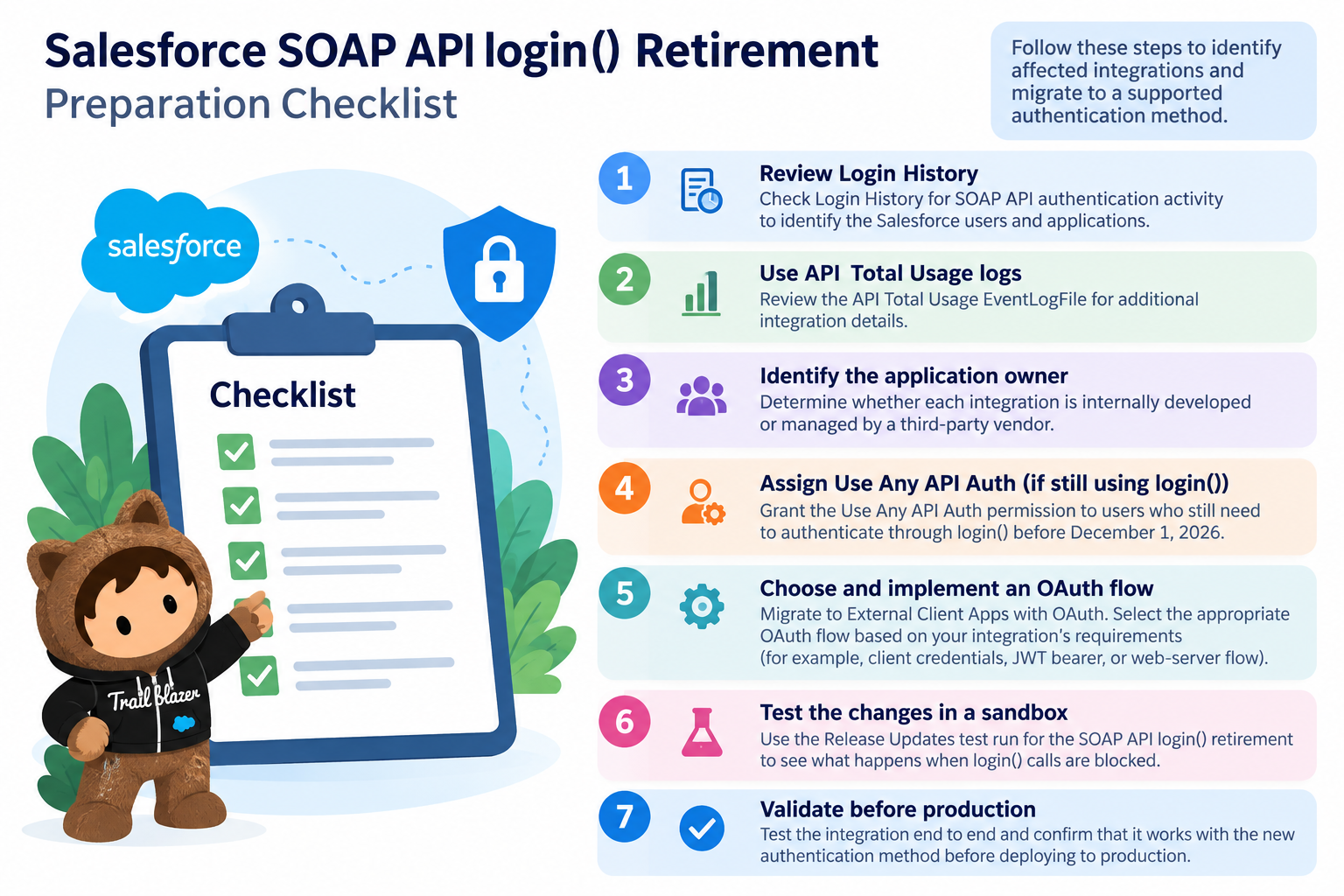
Salesforce recommends checking Login History to identify SOAP API login() activity. This can help organizations find the Salesforce users and applications associated with these login requests. The API Total Usage EventLogFile can also provide additional information about API usage and help with the investigation. Once the affected integrations are identified, the next step is to understand who maintains them.
If an integration was developed and is maintained by the organization, its authentication method needs to be moved from login() to a supported approach. Salesforce recommends using External Client Apps with OAuth for external applications. The appropriate OAuth flow depends on how the integration works and how it needs to authenticate with Salesforce.
If the integration comes from a third-party vendor, the organization will need to work with that vendor instead. The vendor can confirm whether the application uses SOAP API login(), whether an update is required, and how the application will support the retirement.
There is also a way to test the retirement before it actually takes effect. Salesforce provides a Test Run through Setup → Release Updates for the SOAP API login() retirement. Enabling the test allows organizations to see what happens when login() calls are blocked and can help identify integrations that still depend on this authentication method. Salesforce recommends testing the changes in a sandbox before applying them to production.
By doing this early, organizations have time to find the affected integrations, identify who needs to make the changes, move to a supported authentication method, and test the result before the Summer '27 retirement.
Conclusion
The retirement of login() is a change worth preparing for before it becomes a production issue. A quick review today can reveal which integrations need attention and give teams enough time to make the necessary changes. The earlier you identify the dependency, the smoother the transition will be!
