
 Book Free Consultation

Mastering RAML Reusability in MuleSoft
A hands-on walkthrough of Traits, Types, and Uses in MuleSoft API design, explained through a real-world Food Delivery App example - going beyond just theory.
By Giritharakannan Devaraj
Senior Salesforce Developer
Building Reusable MuleSoft APIs: Mastering RAML Types, Traits & Uses with a Real-World Food Delivery Project
In the Mule world, if you are designing an API using RAML, you will definitely come across Traits, Types and Uses with API-led architecture. Some of you may already know these well, but for many they stay confusing. This blog provides a complete overview of API-led architecture and designing RAML using the Traits, Types, & Uses concepts with real-world examples, making it easier for everyone to understand. I went through my own struggles while learning these, and to break through that confusion, I am sharing the clear understanding I eventually built up. So just sit back, relax and read the blog.
Let's dive in!
Real-world scenario
Before diving into Traits, Types, and Uses, let us explore a real-world scenario that you will commonly come across in real-world MuleSoft projects. This will help you naturally understand why these concepts are important and how they are used in the real time projects.
Let's consider a client who runs a food delivery application, similar to swiggy or zomato. They manage customer details in salesforce, handle payments through multiple payment gateways and track deliveries using the Google Maps. In this situation, MuleSoft acts as the central integration layer to connect all these systems for automating all end to end business processes to run a business easily with less effort. Business processes are,
Customer Verification: Once the request is received, MuleSoft checks the customer details in the Salesforce and retrieves the food menu.
Payment Process: Once the customer selects the items and proceeds to payment, MuleSoft redirects to another payment gateway system to pay the amount for the ordered items.
Order Confirmation: After successful payment, the order gets confirmed and a delivery person gets assigned automatically.
Delivery: The delivery person receives pickup and drop-off location details through Google Maps integration to complete the order.
To make all these steps successfully, MuleSoft must integrate multiple external system like Salesforce, Payment Gateways and Google Maps and connect them in the right order as per the business process.
Applying the API-led connectivity approach
If you are not familiar with the basics of API-led Connectivity Approach, please walk through our previously published blog https://www.aintiram.com/blog-mastering-apis-and-api-led-connectivity-in-mulesoft to get more idea and it would really help you to understand the below real world examples.
As you can see, there are a lot of APIs that need to be designed on our end to implement a successful food order business process, and this approach is completely used to keep the APIs manageable & scalable. For this, we have to apply the API-led architecture approach for this business use case and here is exactly how our business process splits across these below API levels:
Experience API Level:
Building the API for receiving the request from a web or mobile application is the experience level API.
Process API Level:
Building an API to verify the customer details and route to get food menus to display to the customer to pick the items.
Building an API to pay the amount via a payment gateway and route the orders to place the order, sending the location details to the delivery man.
System API Level:
Building an API to get the customer details from the Salesforce system.
Building an API to get the Food Menu details from their own database.
Building an API to pay the amount using payment gateway.
Building an API to order the foods and send a location using the map system.
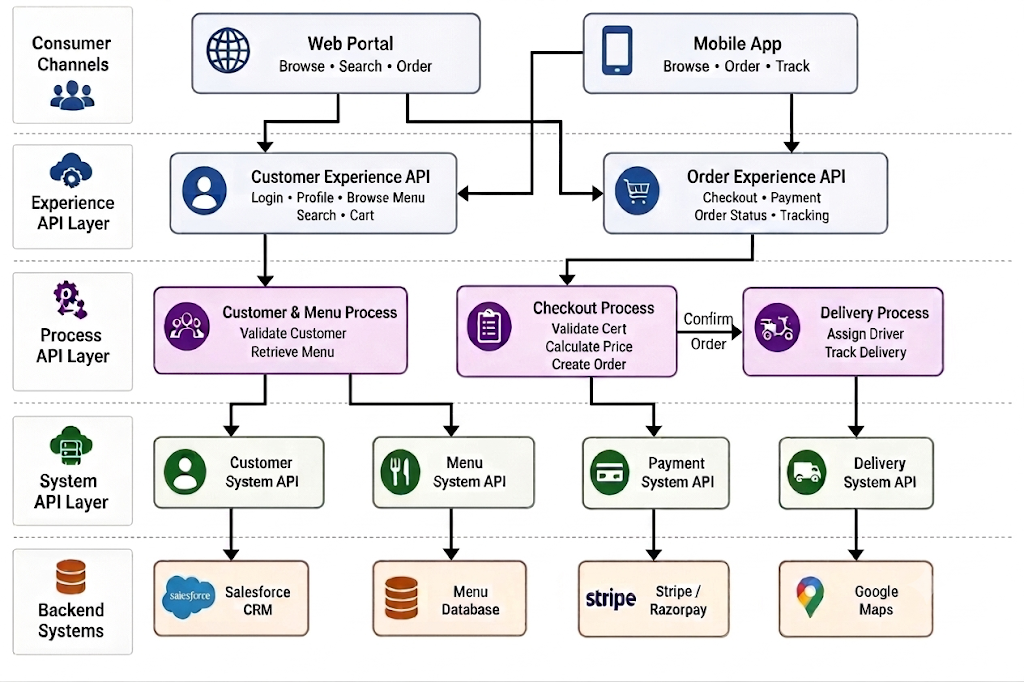
This is how the API-led architecture approach will split the business process. Consider we have to create an individual API for each scenario; in that case, there may be a possibility of causing code repetition, time consumption for building the same code, and it will be hard to manage the code when designing the API. To avoid these drawbacks, Traits, Types & Uses step into the picture in the API design. Let's just build the API using RAML and understand the use of Traits, Types, & Uses.
Design API using Design Center
In this food delivery application, we have to create 9 individual APIs to build the real time business process. But here I am going to explain the Triats, Types, & Uses with 3 API designs. In the real project, we must follow the best practices and procedures before starting to design an APIs like getting approvals for led architecture and process flow diagrams. Once approved, we should start first system API designs and once it is deployed to CloudHub, then we must proceed to design the process APIs likewise experience APIs too. This is the way we have to design the APIs and get the approvals from architects but here for the explanation, I am taking one experience API and two process API designs. Come on, hope you know the basics of API design. If not, please walk through our previously published blog https://www.aintiram.com/blog-api-design-using-mulesoft. Just see the api designs below,
Customer Experience API
#%RAML 1.0
title: Food Delivery Application - Customer Experience API
version: v1
baseUri: https://api.foodapp.com/exp/v1

# Security Scheme defined directly inline
securitySchemes:
  client-id-enforcement:
    description: Requires Client ID and Client Secret for authorization
    type: x-client-id-enforcement
    describedBy:
      headers:
        client_id:
          type: string
          required: true
          example: "9a8b7c6d5e"
        client_secret:
          type: string
          required: true
          example: "1a2b3c4d5e"
      responses:
        401:
          description: Unauthorized - Invalid or missing credentials.
          body:
            application/json:
              example:
                message: "Invalid or missing client credentials."
        403:
          description: Forbidden - Access denied.
          body:
            application/json:
              example:
                message: "Access to this resource is forbidden."

# Apply security scheme globally to all endpoints
securedBy: [ client-id-enforcement ]

/customer:
  get:
    displayName: Get Customer Details
    description: Fetches the customer details of the logged-in customer.
    responses:
      200:
        body:
          application/json:
            type: object
            properties:
              customerId: string
              fullName: string
              email: string
            example:
              customerId: "2342123"
              fullName: "testCustomer"
              email: "testcustomer@gmail.com"
       400:
        description: Bad Request - Malformed or invalid query parameters.
        body:
          application/json:
            example:
              errorCode: "BAD_REQUEST"
              message: "Invalid query parameters supplied."
      500:
        description: Internal Server Error.
        body:
          application/json:
            example:
              errorCode: "SERVER_ERROR"
              message: "An unexpected downstream database error occurred."
Here, we used the security schemes as common logic for this API level but what about it is going to be the same for all API wherever needed the same kind of security schemes throughout this business process. We do have some other items to be reused in this API and Come on...we will see in the later part of this blog.
Verify Customer Process API
#%RAML 1.0
title:  Food Delivery Application - Customer Validation Process API

version: v1
baseUri: https://api.foodapp.com/process/v1

# Security Scheme defined directly inline
securitySchemes:
  client-id-enforcement:
    description: Requires Client ID and Client Secret for authorization
    type: x-client-id-enforcement
    describedBy:
      headers:
        client_id:
          type: string
          required: true
          example: "9a8b7c6d5e"
        client_secret:
          type: string
          required: true
          example: "1a2b3c4d5e"
      responses:
        401:
          description: Unauthorized - Invalid or missing credentials.
          body:
            application/json:
              example:
                message: "Invalid or missing client credentials."
        403:
          description: Forbidden - Access denied.
          body:
            application/json:
              example:
                message: "Access to this resource is forbidden."

# Apply security scheme globally to all endpoints
securedBy: [ client-id-enforcement ]

/verifycustomer:
  post:
    displayName: Verify Customer
    description: Validates customer information against downstream system records.
    body:
      application/json:
        type: object
        properties:
          customerId: string
          fullName: string
          email: string
        example:
          customerId: "2342123"
          fullName: "testCustomer"
          email: "testcustomer@gmail.com"
    responses:
      200:
        body:
          application/json:
            type: object
            properties:
              isValid: boolean
              status: string
            example:
              isValid: true
              status: "ACTIVE"
       400:
        description: Bad Request
        body:
          application/json:
            example:
              errorCode: "BAD_REQUEST"
              message: "Invalid query parameters supplied."
      500:
        description: Internal Server Error.
        body:
          application/json:
            example:
              errorCode: "SERVER_ERROR"
              message: "An unexpected downstream database error occurred."
See, here also we used the same kind of security scheme and even it is good having the common logic in the file level, if we are using more resources in the same file but we can reuse this kind of logic even better across all API design projects, because these are very common to every API that follows the same kind of schemes. Now, you have got the idea what we repeated from the previous one to this one. Almost there...
Menu Process API
#%RAML 1.0
title:  Food Delivery Application - Customer Menu Process API
version: v1
baseUri: https://api.foodapp.com/process/menu/v1


# Security Scheme defined directly inline
securitySchemes:
  client-id-enforcement:
    description: Requires Client ID and Client Secret for authorization
    type: x-client-id-enforcement
    describedBy:
      headers:
        client_id:
          type: string
          required: true
          example: "9a8b7c6d5e"
        client_secret:
          type: string
          required: true
          example: "1a2b3c4d5e"
      responses:
        401:
          description: Unauthorized - Invalid or missing credentials.
          body:
            application/json:
              example:
                message: "Invalid or missing client credentials."
        403:
          description: Forbidden - Access denied.
          body:
            application/json:
              example:
                message: "Access to this resource is forbidden."


# Apply security scheme globally to all endpoints
securedBy: [ client-id-enforcement ]


/menu:
  get:
    displayName: Get Processed Menu Catalog
    description: Retrieves active menu items with calculated pricing and availability logic directly from backend systems.
    queryParameters:
      category:
        type: string
        required: false
        example: "Main Course"
    responses:
      200:
        body:
          application/json:
            type: array
            items:
              type: object
              properties:
                itemId: string
                itemName: string
                category: string
                price: number
                isAvailable: boolean
            example:
              - itemId: "MNU-104"
                itemName: "Paneer Butter Masala"
                category: "Main Course"
                price: 12.99
                isAvailable: true
              - itemId: "MNU-105"
                itemName: "Garlic Naan"
                category: "Breads"
                price: 3.49
                isAvailable: true
      400:
        description: Bad Request
        body:
          application/json:
            example:
              errorCode: "BAD_REQUEST"
              message: "Invalid query parameters supplied."
      500:
        description: Internal Server Error.
        body:
          application/json:
            example:
              errorCode: "SERVER_ERROR"
              message: "An unexpected downstream database error occurred."
Here too, Ahh! there is a lot of code repeated. It looks very large and not easy to digest, isn't it?. For example, security scheme, error responses, and body definitions. Here is the place where Traits, Types, & Uses matter. Hope you know the basics; if not, please read our previously published blog that tells about these concepts.
Considering this situation, follow the best practices to achieve code reusability and scalability. For this, I have to push all the repeated common items into a library file. As you know, we can create separate files based on the file types in the particular project like, we can choose Traits if we are going to keep only Traits. If we are going to use Resource Type as a separate file, we can choose resource type. If we are going to keep Security schemes as a separate file, we can keep it as separate. But by adding all into a library, I can import this one library into all projects which have single API designs. I can import that library project from Exchange and reuse it across all API designs. Since we are importing the library into all API designs, we don't need to write it every time, just importing works here. Additionally, if we need the same pattern in some other business process, we can just import and change the code that we built inside. This is how it works better here.
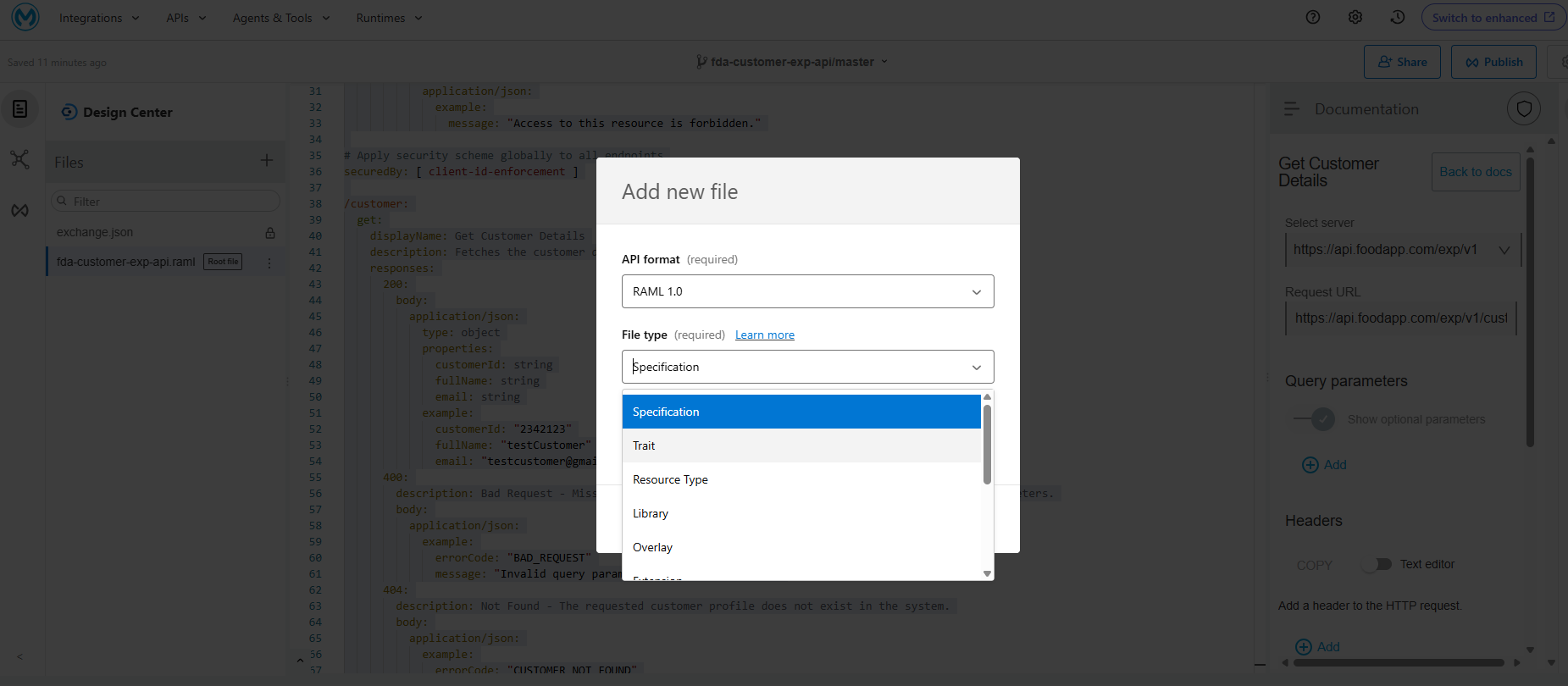
Let's create a separate project which holds the common items that we can reuse across all API designs wherever we want in API designing. Please see the library that I created to reuse. I created the below API Fragment with a Library Specification (API fragment will be used to publish common items with a specific file type that can be reused wherever needed).
#%RAML 1.0 Library
usage: Common data types, security schemes, and error traits for Food Delivery Application APIs


types:
  Customer:
    type: object
    properties:
      customerId: string
      fullName: string
      email: string
    example:
      customerId: "2342123"
      fullName: "testCustomer"
      email: "testcustomer@gmail.com"


  ValidationResult:
    type: object
    properties:
      isValid: boolean
      status: string
    example:
      isValid: true
      status: "ACTIVE"


  MenuItem:
    type: object
    properties:
      itemId: string
      itemName: string
      category: string
      price: number
      isAvailable: boolean
    example:
      itemId: "MNU-104"
      itemName: "Paneer Butter Masala"
      category: "Main Course"
      price: 12.99
      isAvailable: true


securitySchemes:
  client-id-enforcement:
    description: Requires Client ID and Client Secret for authorization
    type: x-client-id-enforcement
    describedBy:
      headers:
        client_id:
          type: string
          required: true
          example: "9a8b7c6d5e"
        client_secret:
          type: string
          required: true
          example: "1a2b3c4d5e"
      responses:
        401:
          description: Unauthorized - Invalid or missing credentials.
          body:
            application/json:
              example:
                message: "Invalid or missing client credentials."
        403:
          description: Forbidden - Access denied.
          body:
            application/json:
              example:
                message: "Access to this resource is forbidden."


traits:
  standard-errors:
    responses:
      400:
        description: Bad Request - Malformed request or invalid parameters.
        body:
          application/json:
            example:
              errorCode: "BAD_REQUEST"
              message: "Invalid query parameters or payload supplied."
      500:
        description: Internal Server Error.
        body:
          application/json:
            example:
              errorCode: "SERVER_ERROR"
              message: "An unexpected downstream database error occurred."
Including the library into the individual API designs by using the uses option.
Customer Experience API
#%RAML 1.0
title: Food Delivery Application - Customer Experience API
version: v1
baseUri: https://api.foodapp.com/exp/v1


# This imports the library from the exchange_modules folder
uses:
  fdalib: exchange_modules/f4c6773d-fb4d-4ab2-a2c3-0ade4fecf23a/fda-library/1.0.0/fda-library.raml


# Apply security scheme globally to all endpoints
securedBy: [ fdalib.client-id-enforcement ]


/customer:
  get:
    is: [fdalib.standard-errors]
    displayName: Get Customer Details
    description: Fetches the customer details of the logged-in customer.
    responses:
      200:
        body:
          application/json:
            type: fdalib.Customer
Customer Validation Process API
#%RAML 1.0
title:  Food Delivery Application - Customer Validation Process API
version: v1
baseUri: https://api.foodapp.com/process/v1


# This imports the library from the exchange_modules folder
uses:
  fdalib: exchange_modules/f4c6773d-fb4d-4ab2-a2c3-0ade4fecf23a/fda-library/1.0.0/fda-library.raml


# Apply security scheme globally to all endpoints
securedBy: [ fdalib.client-id-enforcement ]


/verifycustomer:
  post:
    is: [fdalib.standard-errors]
    displayName: Verify Customer
    description: Validates customer information against downstream system records.
    body:
      application/json:
        type: fdalib.Customer
    responses:
      200:
        body:
          application/json:
            type: fdalib.ValidationResult
Customer Menu Process API
#%RAML 1.0
title:  Food Delivery Application - Customer Menu Process API
version: v1
baseUri: https://api.foodapp.com/process/v1


# This imports the library from the exchange_modules folder
uses:
  fdalib: exchange_modules/f4c6773d-fb4d-4ab2-a2c3-0ade4fecf23a/fda-library/1.0.0/fda-library.raml


# Apply security scheme globally to all endpoints
securedBy: [ fdalib.client-id-enforcement ]


/menu:
  get:
    is: [fdalib.standard-errors]
    displayName: Get Menu Details
    description: Fetches the menu details of the logged-in customer.
    queryParameters:
      category:
        type: string
        required: true
        example: "Main Course"
    responses:
      200:
        body:
          application/json:
            type: fdalib.MenuItem
It's done. Now you can see the differences very clearly from the previous designs.See, now it is easy to read, very understandable, scalable too. If any items comes in future, we can accomadate that in the same design file and this is how architect plan the design solutions in terms of designing the API using the Design center to achieve the reusablity and scalability.
Likewise, RAML provides !includes option where we can resuse the common code within the project by creating the separate traits, types specification files. This helps keep your API specification organized and avoids the code repetition.
Conclusion
Ohh my God! It's done. This blog explains the API-led architecture approach, Types, Traits & Uses usage clearly using a real-world food delivery project and provides a better understanding of RAML design. I hope this blog helps you understand these concepts more easily. I will be back soon with more blogs featuring useful real-world examples to make MuleSoft concepts easier to learn.Stay tuned until meet in the next blog.
