
 Book Free Consultation

Mastering API Design with MuleSoft
Explore intermediate‑level API design concepts using MuleSoft, focusing on best practices, API‑led connectivity, governance, and scalable integration design.
By Nishanth Sargunam
Senior Salesforce Developer
Mastering API Design with MuleSoft
Getting started with the basics of Design API is explained in detail in the previous part of the blog series titled Getting Started with API Design Using MuleSoft and there you can enjoy and explore the fundamental concepts of API design; In this blog, we will deep dive into the API design with example modules. I hope this will make you gain the better understanding of these API design concepts as you read through the blog.
In this blog, I will be going to explain the Designing Api with scenario-based concept and the best practices. Imagine that you are going to build an API for an online store which is Simple E-Commerce Order API. Consumers of this API need to be able to
- Place a new order
- Get details of the specific order information
- List all the orders for a customer.
We will cover the each and every block which is data types, schemas, traits, resources, and examples. Also, we can explore the Anypoint mocking service for the scenario and test it without a code. This would be helpful to make understanding of the concepts better because the real-world scenario will connect us with core and makes us more comfortable to build and learn.
Let's move on to the core!
Specifications
Before start writing a single line of integration code, MuleSoft's API-led connectivity approach always says that design the contract first. That's where RAML comes in. RAML (RESTful API Modeling Language) is a YAML-based language for describing RESTful APIs. In MuleSoft's Anypoint Platform, you write RAML in Design Center, which validates your spec in real-time and lets you mock it instantly without any backend.
Setting Up in Design Center
- Log into Anypoint Platform at Design Center
- Click Create and then New API Spec
- Name it Order API, select RAML 1.0
- You'll land in the API Designer editor; this is the place we design everything related to the project
Folder Organization
Below are the E-Commerce Order API's folder structure and it shows the hierarchy. This is exactly how a production MuleSoft project organises its API spec in Anypoint Design Center. Each file has one responsibility — your main RAML stays clean, and your team can find anything instantly.
order-api/
│
├── order-api.raml              ← Root file - Main API spec (clean & slim)
├── types/
│   └── types.raml              ← All data types and schemas
├── traits/
│   └── traits.raml             ← secured + hasErrorResponses traits
└── examples/
    ├── order-list.json         ← Example: GET /orders response
    ├── order-single.json       ← Example: GET /orders/{orderId} response
    ├── order-create-req.json   ← Example: POST /orders request body
    ├── order-create-res.json   ← Example: POST /orders response
    └── error-response.json     ← Example: Error response shape
API Header
Every RAML file starts with a header that defines the identity of your API.
#%RAML 1.0
title: E-Commerce Order API
version: v1
baseUri: https://api.mystore.com/{version}
mediaType: application/json
- #%RAML 1.0: This is the RAML version declaration.
- title: The value is the one which is used as name of your API and also name that appears in Anypoint Exchange when you publish.
- version: Defines the API version.
- baseUri: The root URL of your API. All resource paths you define will be appended to this.
- mediaType: Sets the default content type for the entire API. By declaring it once here, you don't have to repeat application/json on every single endpoint.
Data Types (Your Schema Layer)
Instead of copy-pasting JSON structures everywhere, you define your data shapes once in the types block and reuse them across all your endpoints.
OrderItem is a nested type. Notice how Order references it as OrderItem[] — the [] means array of OrderItem. This is RAML's way of composing complex types from simpler ones, exactly like object-oriented thinking.
As the file organization, put this RAML into the types/types.raml.
#%RAML 1.0 Library

usage: Defines all data types used in the E-Commerce Order API

types:
  OrderItem:
    type: object
    description: Represents a single product line within an order
    properties:
      productId:
        type: string
        description: Unique identifier of the product
      quantity:
        type: integer
        minimum: 1
        description: Number of units ordered
      price:
        type: number
        description: Price per unit at time of order

  Order:
    type: object
    description: Represents a complete customer order
    properties:
      orderId:
        type: string
        description: System-generated unique order identifier
      customerId:
        type: string
        description: ID of the customer who placed the order
      status:
        type: string
        enum: [PENDING, CONFIRMED, SHIPPED, DELIVERED, CANCELLED]
        description: Current lifecycle status of the order
      items:
        type: OrderItem[]
        description: One or more products included in this order
      totalAmount:
        type: number
        description: Total cost — sum of quantity x price for all items
      createdAt:
        type: string
        description: ISO 8601 timestamp of when the order was created

  ErrorResponse:
    type: object
    description: Standard error shape returned for all failed responses
    properties:
      error:
        type: string
        description: Human-readable message describing what went wrong
      code:
        type: string
        description: Machine-readable error code for programmatic handling
ErrorResponse is a dedicated error type. Defining this separately means every error across every endpoint has the same shape. Consumers write one error handler, not one per endpoint.
Traits (Reusable Behaviour)
Traits are one of RAML's most underused features. A trait is a reusable chunk of behaviour which is headers, query parameters, or responses — that you can apply to any endpoint with a single line.
#%RAML 1.0 Library

usage: Defines reusable traits applied across Order API endpoints

uses:
  types: ../types/types.raml

traits:
  secured:
    description: |
      Requires a valid Bearer token in the Authorization header.
      Apply this trait to any endpoint that needs authentication.
    headers:
      Authorization:
        type: string
        pattern: "Bearer .+"
        description: Bearer token issued after successful login
        example: "Bearer eyJhbGciOiJIUzI1NiJ9.abc123"
    responses:
      401:
        description: Returned when the token is missing or invalid
        body:
          application/json:
            type: types.ErrorResponse
            example:
              error: "Unauthorized. Missing or invalid token."
              code: "UNAUTHORIZED"

  hasErrorResponses:
    description: |
      Attaches standard 400 and 500 error responses.
      Apply to every endpoint so consumers always know the error shape.
    responses:
      400:
        description: Returned when the request body or params are invalid
        body:
          application/json:
            type: types.ErrorResponse
            example:
              error: "Invalid request. Please check your input."
              code: "BAD_REQUEST"
      500:
        description: Returned when an unexpected server error occurs
        body:
          application/json:
            type: types.ErrorResponse
            example:
              error: "An unexpected error occurred. Try again later."
              code: "INTERNAL_SERVER_ERROR"
The traits file itself uses uses: types: ../types/types.raml — this is how it references ErrorResponse as types.ErrorResponse. The dot notation (types.ErrorResponse) is how RAML namespaces imported libraries to avoid naming conflicts.
secured bundles the Authorization header and the 401 response together. When you apply is: [secured] to an endpoint, both come along automatically — you never forget to document the 401.
hasErrorResponses handles 400 and 500. These two status codes apply to virtually every endpoint, so defining them once here and applying via is: keeps your main RAML clean and your error documentation consistent.
Examples
GET /orders.
[
  {
    "orderId": "ORD-001",
    "customerId": "CUST-123",
    "status": "CONFIRMED",
    "items": [
      { "productId": "PROD-A", "quantity": 2, "price": 29.99 }
    ],
    "totalAmount": 59.98,
    "createdAt": "2024-11-15T10:30:00Z"
  },
  {
    "orderId": "ORD-003",
    "customerId": "CUST-123",
    "status": "DELIVERED",
    "items": [
      { "productId": "PROD-C", "quantity": 1, "price": 15.00 }
    ],
    "totalAmount": 15.00,
    "createdAt": "2024-11-10T08:00:00Z"
  }
]
GET /orders/{orderId} response
{
  "orderId": "ORD-001",
  "customerId": "CUST-123",
  "status": "SHIPPED",
  "items": [
    { "productId": "PROD-A", "quantity": 2, "price": 29.99 }
  ],
  "totalAmount": 59.98,
  "createdAt": "2024-11-15T10:30:00Z"
}
POST /orders request body
{
  "customerId": "CUST-456",
  "items": [
    { "productId": "PROD-B", "quantity": 1, "price": 49.99 }
  ]
}
POST /orders response
{
  "orderId": "ORD-002",
  "customerId": "CUST-456",
  "status": "PENDING",
  "items": [
    { "productId": "PROD-B", "quantity": 1, "price": 49.99 }
  ],
  "totalAmount": 49.99,
  "createdAt": "2024-11-15T11:00:00Z"
}
Error response shape
{
  "error": "Order ORD-999 not found.",
  "code": "ORDER_NOT_FOUND"
}
Root File
The root file is the primary RAML file that contains the main API specification. It references all related RAML fragments and combines them into a single, complete API definition that can be used for design, documentation, and implementation
#%RAML 1.0
title: E-Commerce Order API
version: v1
mediaType: application/json

# ── Imports ────────────────────────────────────────────
uses:
  types:  types/types.raml
  traits: traits/traits.raml

# ── Resources ──────────────────────────────────────────
/orders:
  description: Collection of all customer orders

  get:
    is: [traits.secured, traits.hasErrorResponses]
    description: Retrieve all orders for a given customer
    queryParameters:
      customerId:
        type: string
        required: true
        description: Filter results to this customer's orders
        example: "CUST-123"
    responses:
      200:
        body:
          application/json:
            type: types.Order[]
            example: !include examples/order-list.json

  post:
    is: [traits.secured, traits.hasErrorResponses]
    description: Place a new order for a customer
    body:
      application/json:
        description: Customer ID and list of items to order
        properties:
          customerId:
            type: string
            required: true
            description: ID of the customer placing the order
          items:
            type: types.OrderItem[]
            required: true
            description: One or more products to include in the order
        example: !include examples/order-create-req.json
    responses:
      201:
        description: Order successfully created
        body:
          application/json:
            type: types.Order
            example: !include examples/order-create-res.json

/orders/{orderId}:
  description: A specific order identified by its unique ID
  uriParameters:
    orderId:
      type: string
      description: Unique identifier of the order
      example: "ORD-001"

  get:
    is: [traits.secured, traits.hasErrorResponses]
    description: Get full details of a specific order
    responses:
      200:
        body:
          application/json:
            type: types.Order
            example: !include examples/order-single.json
      404:
        description: No order found with the given ID
        body:
          application/json:
            type: types.ErrorResponse
            example: !include examples/error-response.json
uses : We use uses: specifically, when the external file is declared as a #%RAML 1.0 Library. That is the key requirement. At the top of the file is where the imports are defined. Both types/types.raml and traits/traits.raml are imported using the aliases types and traits, respectively. Every reference in the file then uses dot notation, such as types.Order and traits.secured
!include examples/order-list.json is RAML's file include directive. Instead of pasting JSON inline, RAML reads the file at build time and inserts it. This is what the Anypoint Mocking Service will serve back when a request hits that endpoint. Clean spec, real examples.
is: [traits.secured, traits.hasErrorResponses] on each method is all it takes to inherit authentication and standard error responses. The endpoint definition only describes what's unique about it.
Enabling the Mock
Once all files are in place in Design Center:
- Click the Mocking Service toggle in the top-right of the editor
- Design Center resolves all !include and uses references automatically
- Copy the mock URL and test with Postman or curl:
In the Design Center, we have the documentation page that allows us to view all the APIs (resources) that we built in the project, and we can also mock and test the design functionality.
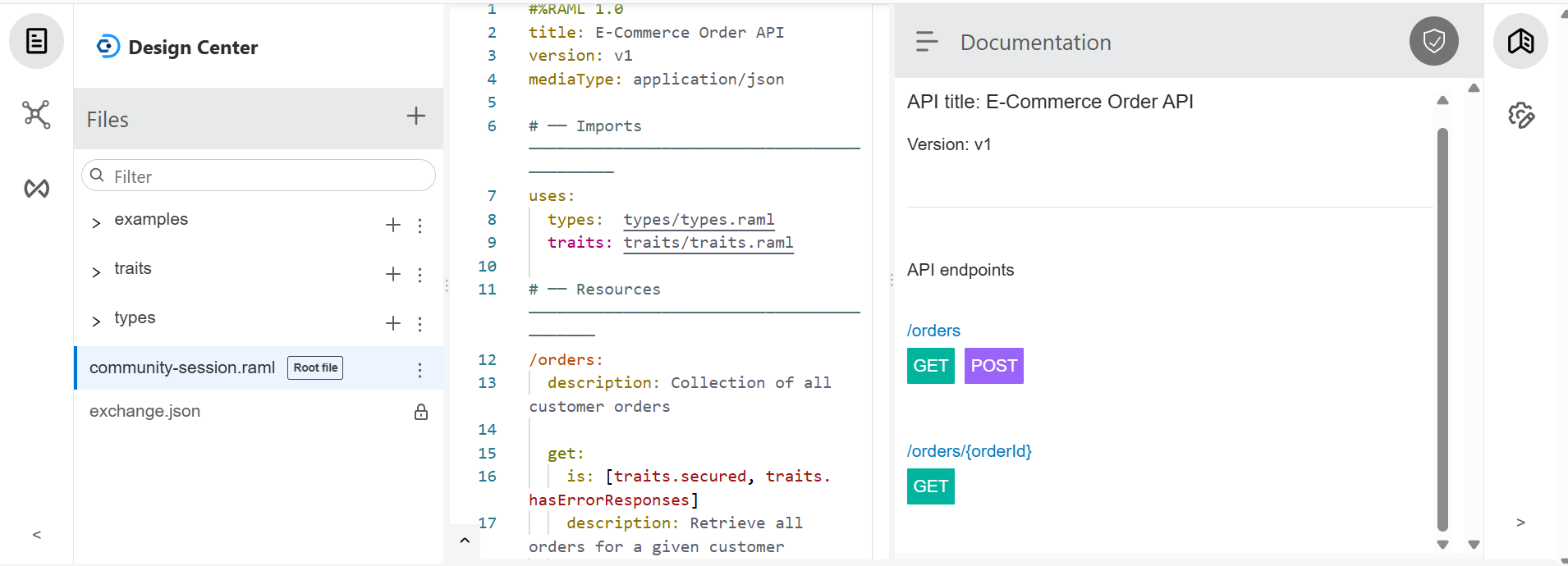
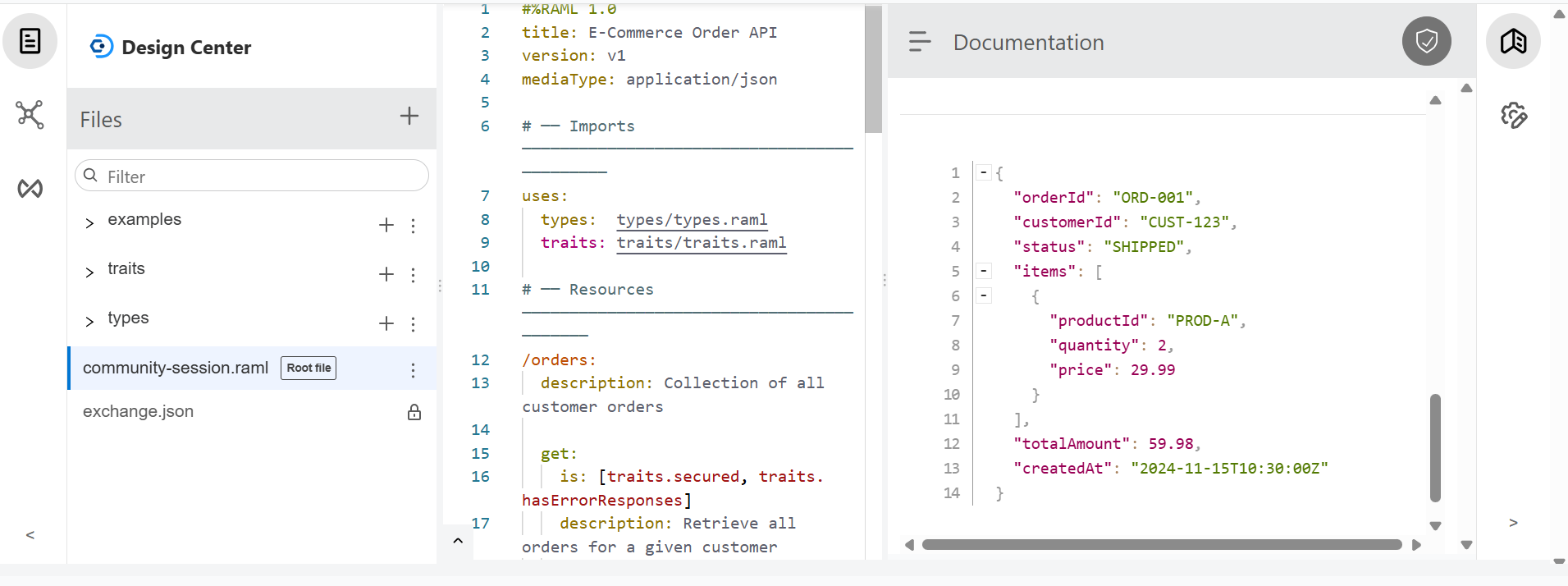
If I click the shown endpoints, it will display the response as configured. I will be showing the response for /orders/{OrderId}.
When we click the GET button, it will generate the mock URL along with the "Try It" button. Click "Try It", and below there is an option to send the request with a "Send" button. Click the "Send" button to view the sample responses.
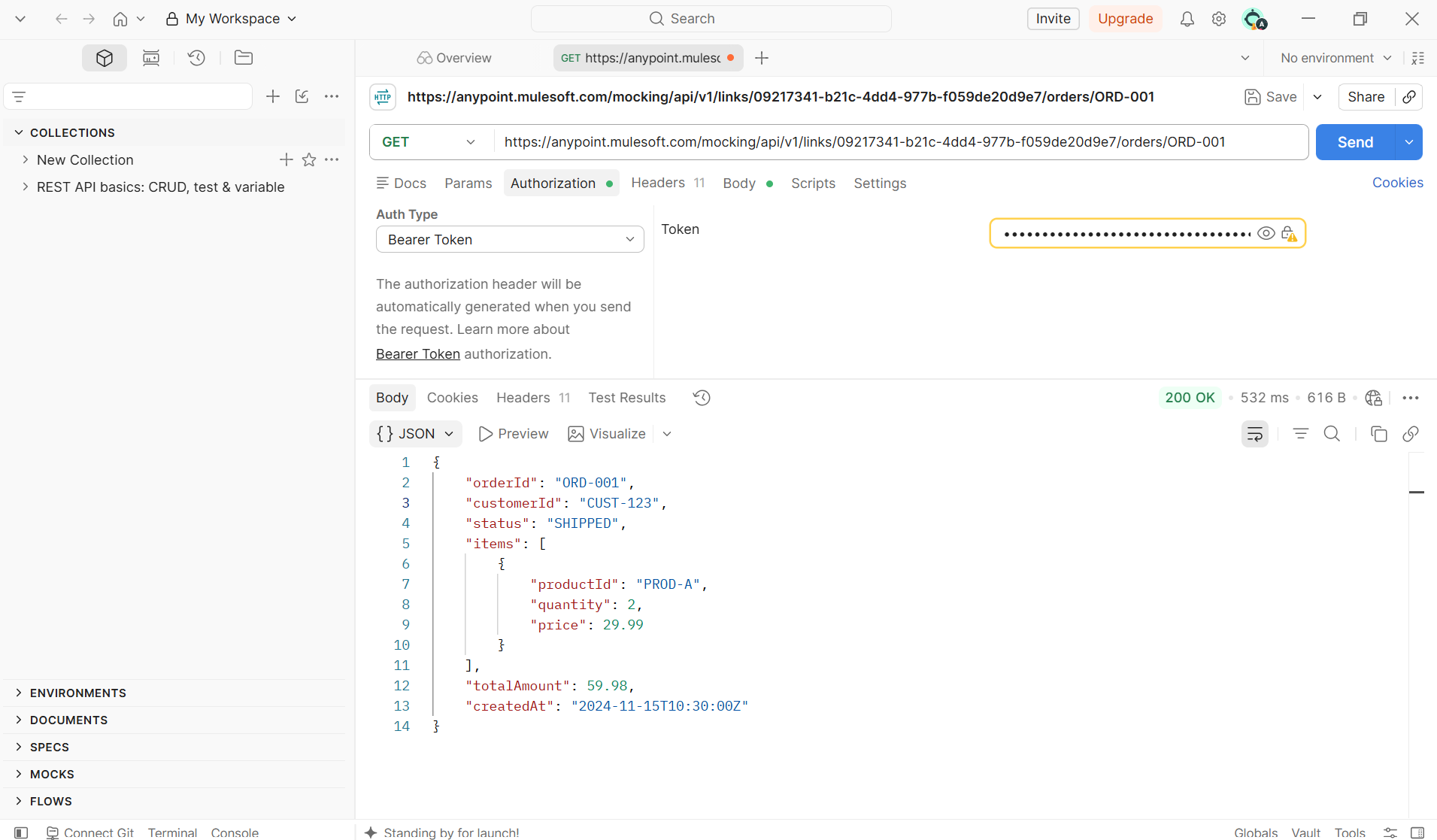
To call a MuleSoft Design Center Mocking Service endpoint from Postman:
- Open your API specification in Design Center and click the Settings icon then enable the "Make Public" and copy the displayed URL.
- Navigate to Postman and try retrieving the order details by providing the ID as a URI parameter.
I used the Bearer Token authorization method. So, I configured a dummy bearer token in Postman and sent the request. Below is the response that we configured in the examples
Key Takeaways for the Blog
Design First: Always write your RAML spec first, before touching Anypoint Studio or any backend logic.
Root file: A slim main file is easier to read, easier to review, and easier to hand off to a new team member.
Versions : Version Your API from Day One.
Organise Files : Even for small APIs, use the folder structure from the start:
types/types.raml: Define it once and reference it everywhere with.
traits/traits.raml: If more than one endpoint needs the same header, query parameter, or error response — that belongs in a trait, not copy-pasted into each method.
examples/: Examples are not optional decoration. They are what the Mocking Service serves to your consumers
order-api.raml: this stays simple. It only talks about what's special, for each endpoint. Everything else is imported from other places
Enum: Use Enums for Fields with Fixed Values.
Mocking: Always test your mock URLs using Postman or curl. They work without any extra setup and give you reliable, accurate result
Conclusion
Good API design isn’t about writing more code, it’s about making the right decisions early on, before you’ve even written any code. In this blog, we have constructed the right way of a simple E-Commerce Order API using MuleSoft’s RAML 1.0. We defined clean data types in a separate file, so our schemas are reusable and easy to maintain.
In the upcoming blog you will get to know about all the basics and core concept that need to be learn for the kicking to enter in the mule industry.
