
 Book Free Consultation

Turning Life Events into Opportunities with Salesforce FSC
Life Events and Business Milestones in Financial Services Cloud enable personalized, timely financial engagement based on key customer moments.
By Abishek Kumar
Asst. Software Developer
Life Events and Business Milestones in FSC
Imagine a customer is planning to buy a new home. Instead of waiting for the customer to approach the financial institutions at the last moment, what if an advisor connects with them earlier, assists on their goals and helps plan the journey proactively? Sounds impressive, right? This is exactly the kind of experience modern customers expect today. In today's fast-changing financial landscape, customers expect more than just basic banking or financial products. They expect their financial institutions to understand their journey, anticipate their needs, and support them during important moments in life and business. Whether it is getting married, buying a home, starting a company, or expanding a business, these moments strongly influence financial decisions.
Salesforce Financial Services Cloud (FSC) addresses this expectation through Life Events and Business Milestones features. These capabilities allow banks, insurers, and wealth management firms to capture key personal and business moments and use them to deliver timely, personalized, and meaningful financial guidance. This blog explores how Life Events and Business Milestones in FSC help transform customer interactions into long-term, trusted relationships.
What are Life Events in FSC?
Life Events represent important personal moments in a customer's life that can impact financial goals and decisions. FSC allows advisors to record these events in a structured way and associate them directly with the customer profile. Each life event creates opportunities for the financial institutions to deliver the financial guidance in a timely manner. Examples of Life Events include:
- Marriage
- Birth of a child
- Buying a house
- Career changes
- Retirement
- Higher education
If the above are logged in the system, instead of waiting for the customers to reach out to the financial institutions, advisors can initiate some meaningful discussions early. That helps them to improve the customer relationship.
What are Business Milestones in FSC?
Business Milestones capture significant turning points in a customer's professional or entrepreneurial journey. Just like Life Events impact personal finances, Business Milestones directly influence a business owner's financial strategy and product needs.
Examples of Business Milestones include:
- Business launch or incorporation
- First major hire or team expansion
- Opening a new location or branch
- Reaching a key revenue target
- Securing a business loan or investment
- Mergers, acquisitions, or partnerships
- Succession planning
- Business sale or exit
FSC allows advisors to log these milestones against the client's business account, linking them to both the individual and their associated financial goals.
How Life Events and Business Milestones Work in FSC
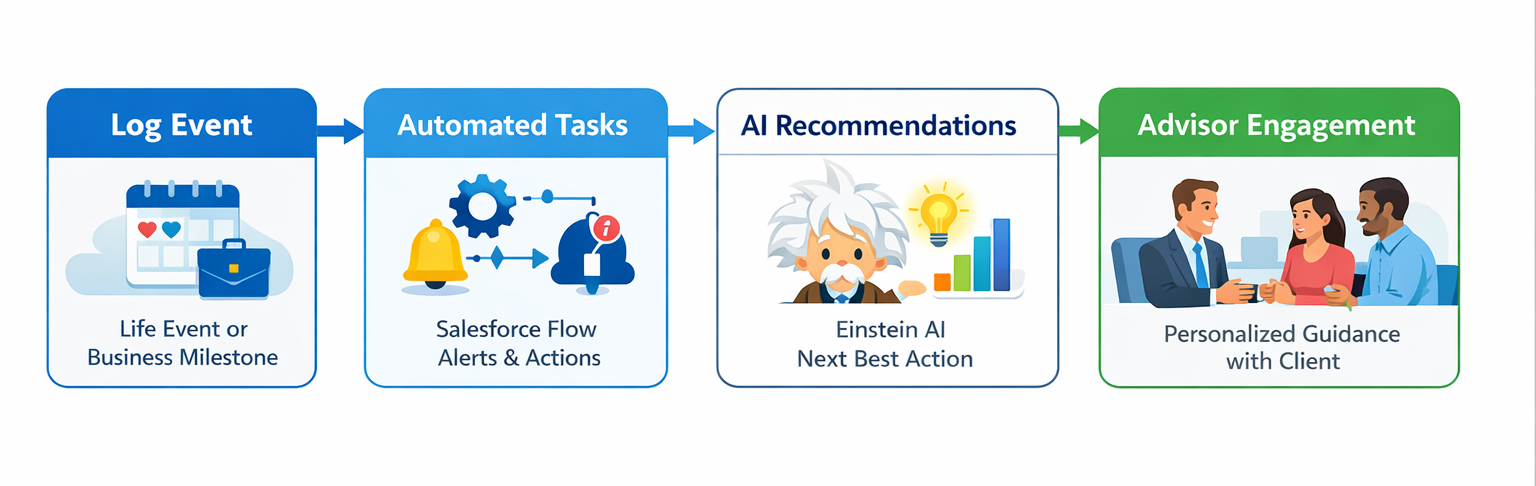
FSC provides a dedicated Life Events and Business Milestones section within the client's profile. Here is how it works in practice:
Step 1: Log the event: The advisor or the client records the event (e.g., "Started a new business" or "Recently married") directly on the client's FSC profile.
Step 2: Automated alerts and tasks: Salesforce Flow automatically creates follow-up tasks and alerts for the advisor based on the event type, ensuring timely outreach.
Step 3: Next Best Action: Einstein AI within FSC recommends relevant financial products or services based on the logged event - such as suggesting a business loan after a "New Location" milestone or a life insurance review after a "New Child" event.
Step 4: Personalized engagement: The advisor reaches out with tailored advice and product recommendations - turning a routine check-in into a meaningful, trusted conversation.
How to Configure Life Events and Business Milestones in FSC
In FSC, to set up Life Events and Business Milestones, mainly we do 5 steps. I will explain short.
- Step 1: Add Related Lists to Page Layouts: Before the component can display data, the underlying related lists must be added to the appropriate page layouts. This links the Person Life Events and Business Milestones objects to the client record.
- Go to Setup - Object Manager and search for Person Account.
- Click Page Layouts and open the relevant layout.
- In the layout editor, navigate to the Related Lists section.
- Drag and drop Person Life Events into the Related Lists section and save.
- Repeat the same steps for the Account object, adding the Business Milestones related list.
- Also add the Person Life Events related list to the Contact page layout where required.
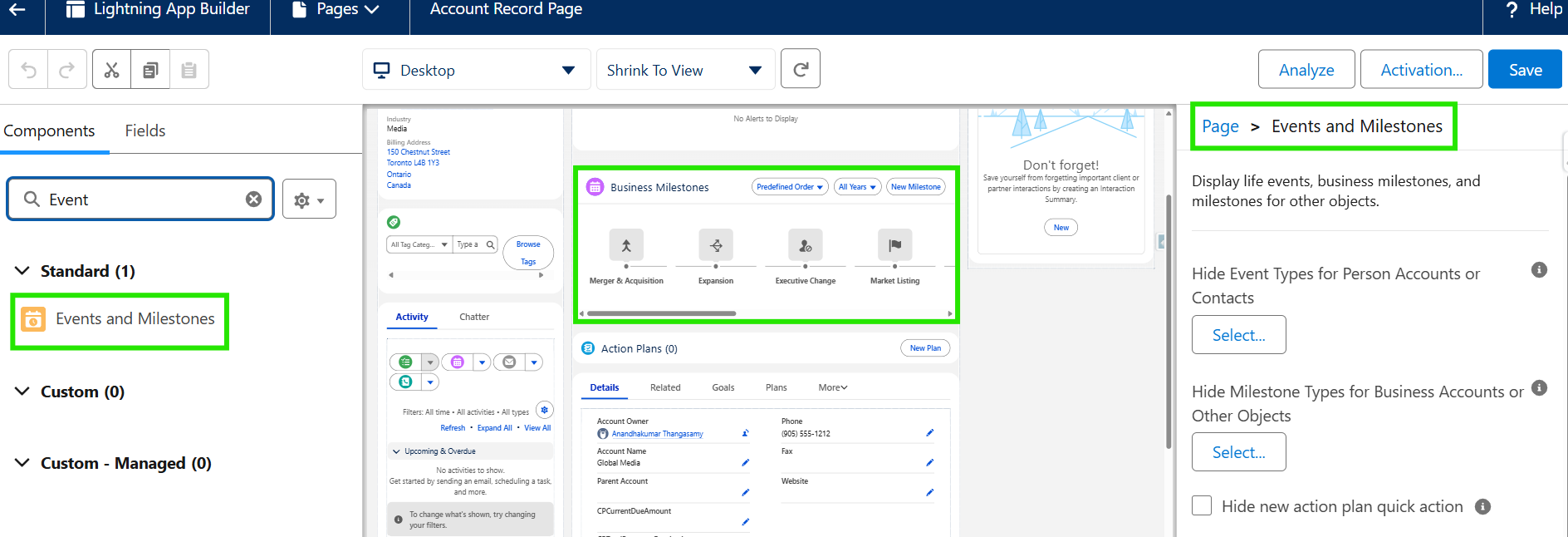
- Step 2: Add the Component to the Lightning Record Page: The Life Events and Business Milestones Lightning component must be placed on the relevant record pages using Lightning App Builder.
- Navigate to the Account record page.
- Click the Setup (gear icon) - Edit Page to open Lightning App Builder.
- In the component panel on the left, search for Event and Milestones.
- Similarly, drag the Events and Milestones component onto the canvas for the Business Account record page.
- Click Save and then Activate the page. Assign it to the appropriate app, record type, and profile as needed.
Tip: The Life Events component displays on Person Account and Contact record pages, while the Business Milestones component appears on Business Account record pages.
- Step 3: Configure Custom Event and Milestone Types
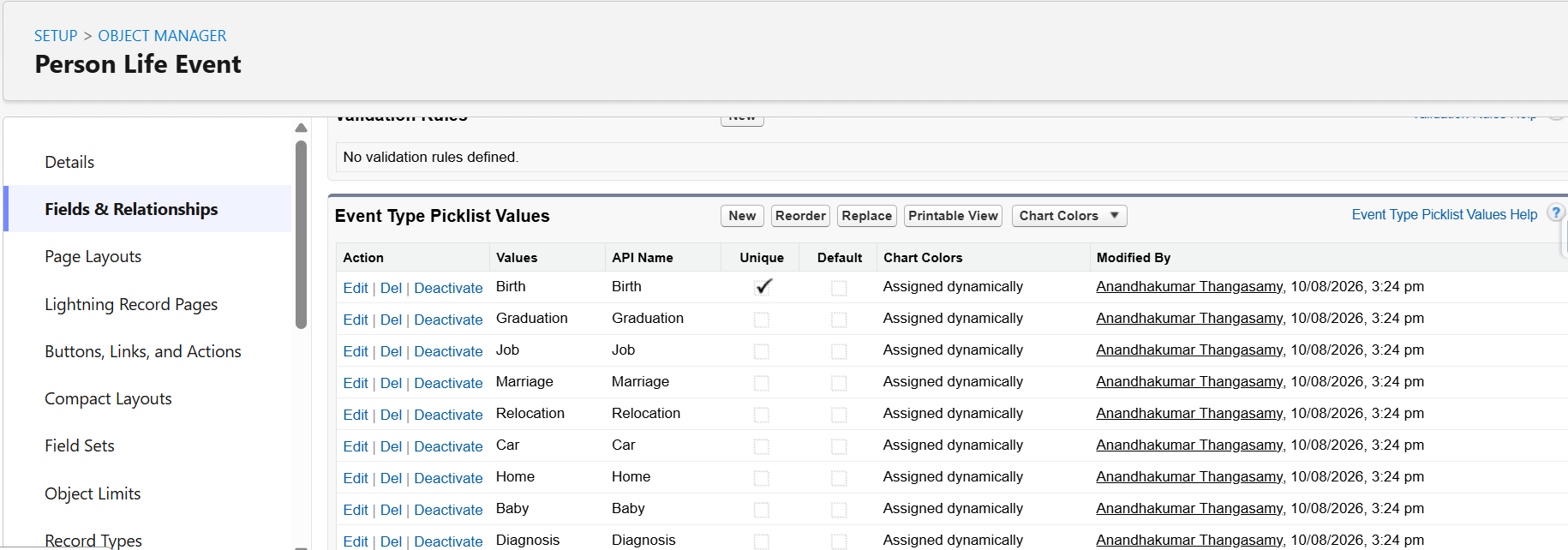
FSC comes with several out-of-the-box event and milestone types. Admins can also create custom types to match their institution's specific needs, and mark certain events as Unique to prevent duplicate entries.- Go to Setup - Object Manager.
- In the Quick Find box, type Person Life Event and select it. For milestone types, select Business Milestone.
- Click Fields & Relationships, then select Event Type (or Milestone Type for Business Milestones).
- Under the picklist values, click New to add a custom type (e.g., Business Expansion or First Property Purchase).
- Check the Unique checkbox for once-in-a-lifetime events (e.g., Marriage or Business Incorporation) to prevent duplicates.
- You can also edit the icons for each event or milestone type to make them visually distinct on the record page.
- Step 4: Configure Contextual Actions
Contextual actions allow advisors to instantly create related records such as Opportunities, Cases, or Action Plans directly from the hover card of a Life Event or Business Milestone. These records are automatically linked to the triggering event.- Go to Setup - Object Manager - Person Life Event (or Business Milestone for milestones).
- Click Buttons, Links, and Actions, then click New Action.
- In the Action Type list, select the type of action (e.g., Create a Record).
- In the Target Object list, select the object the action creates, such as Opportunity, Case, or Lead & Referral.
- Enter a label for the action, configure the action layout with relevant fields, and Save.
- Click Page Layouts, open the Person Life Event Layout, and drag the new action into the Salesforce Mobile and Lightning Experience Actions section.
- Save the layout. Advisors will now see the action in the hover card when they interact with any Life Event or Milestone on the record page.
Note: If Action Plans is enabled in your org, the New Action Plan action is available by default for both Life Events and Business Milestones. You can create Action Plan Templates for these objects so advisors can select them directly from the event or milestone.
- Step 5: Hide or Expire Events and Milestones
Not all event types are relevant to every customer, and some events may become outdated over time. FSC provides options to hide sensitive types from the component view and expire events that are no longer applicable- To hide an event or milestone type:
- On the Lightning Record Page, click the Life Events or Business Milestones component to select it.
- Click Select under Hide Event Types or Hide Milestone Types.
- Choose the types to hide and click OK. Save your changes.
- To expire an event or milestone:
- Hover over the Life Event or Business Milestone on the client record.
- Click the event to open its details, then click Edit.
- Select the Expired checkbox and save. The event will no longer appear as active on the advisor's view.
- To hide an event or milestone type:
That's it. So overall: add related list, add component, configure types, add actions and control visibility.
Benefits for Financial Advisors and Institutions
Leveraging Life Events and Business Milestones in FSC delivers measurable value:
- Proactive client engagement: Advisors can reach out at the right moment rather than waiting for the annual review cycle.
- Deeper client relationships: Clients feel understood when their financial advisor acknowledges and responds to their personal and business milestones.
- Increased cross-sell and upsell opportunities: Every milestone is a natural trigger for relevant product conversations.
- Improved retention: Clients who receive timely, relevant advice are significantly less likely to switch providers.
- Regulatory compliance: Structured event tracking creates a clear, auditable record of client interactions and needs assessments.
Conclusion
Life Events and Business Milestones in Salesforce Financial Services Cloud represent a fundamental shift in how financial institutions engage with their clients. Rather than waiting for customers to come with a need, FSC empowers advisors to show up at the exact moments that matter most, personally and professionally. For small business owners especially, where personal and business finances are deeply intertwined, this capability ensures that no critical moment goes unnoticed and no opportunity for meaningful guidance is missed. By capturing these milestones and acting on them intelligently, financial institutions can build the kind of long-term, trusted relationships that drive both client satisfaction and business growth. Salesforce Financial Services Cloud doesn't just manage data; it manages moments. Because in financial services, the right advice at the right moment changes everything!
