
 Book Free Consultation

Getting Started with API Design Using MuleSoft
Explore MuleSoft API design fundamentals with RAML and Anypoint Platform, covering best practices, scalability, reusability, and tips to design confident APIs.
By Nishanth Sargunam
Senior Salesforce Developer
Getting Started with API Design Using MuleSoft
Once again, we are here to explore the interesting topics I have prepared in this blog. My thing is to help you to take something valuable that will boost your knowledge on MuleSoft. I hope you enjoyed and learned from the previous blogs related to MuleSoft, written both by my colleagues and myself. Each of those posts was designed to make understanding MuleSoft easier and more meaningful.
Before diving into today’s content, I recommend revisiting the previous blog about the Anypoint Platform. Since designing APIs often begins with this platform, having a solid understanding of its features and capabilities will give you a strong foundation for what we will be discussing here.
In this blog, we will going to see the basic concepts, best practices, and tips that can help you:
- Build the scalable and reusable APIs.
- Where can start the designing phase.
- Understand how the MuleSoft integrates seamlessly with API design.
By the end of this blog, I hope that you’ll gain some insights but also feel more confident in designing the API on your own projects.
Introduction
In the API era and connected world, APIs are the backbone of digital transformation. It also connects multiple application, allows the seamless data exchanges, and customer experiences. MuleSoft’s Anypoint Platform helps developers design, build, and manage APIs more easily than we expected. We will walk through the API Designer tool and show how RAML plays a role in designing. Please refer to the blog “Anypoint Platform” to sign up for the Anypoint Platform with a step-by-step process, and also you can get more knowledge on this platform.
API Specifications
In MuleSoft, an API specification is the blueprint of your API. It defines the structure, behavior, and protocols of interaction, ensuring that both API providers and consumers are in same page. It outlines the endpoints, methods, data types, security requirements, and response formats, typically written in RAML (RESTful API Modeling Language) or OAS (OpenAPI Specification).
You can design these specifications in Anypoint Design Center or Anypoint Studio, clarifying how the API should behave in integrations and eliminating the difficulties during development.
It provides an understanding of how an API behaves in the integrations. It also defines what kind of request it accepts and how it returns the responses.
Core Elements of an API Specification
- Endpoints/Resource: Define the resources the API.
Example: /users, /orders - Methods: Specify the operations allowed on each resource.
Common methods: GET, POST, PUT, DELETE, PATCH - Parameters: Provide additional input to refine the requests.
Types: Query strings, headers, path variables - Request/Response Formats: Define how data is exchanged between the protocols.
Examples: JSON, XML... - Status Codes: Communicate the outcome/status of requests.
Examples:- 200 OK – Successful request
- 201 Created – Resource created
- 400 Bad Request – Invalid input
- 404 Not Found – Resource unavailable
- 500 Internal Server Error – Server-side issue
- Security Requirements: Outline authentication and authorization mechanisms.
Examples: OAuth2, API keys, JWT tokens - Examples & Schemas: Provide sample payloads and validation rules to ensure data consistency.
RAML (RESTful API Modeling Language)
RAML lets you see what your API looks like as you design it, using easy to read plain text. Without having to write a single line of code you can not only perfect your API design, but also create a fully functional mock for customers, partners, or even your own internal engineers to review and build off of.
RAML is a human-readable language designed to describe RESTful APIs and also it ensures that APIs are documented in a standardized format.
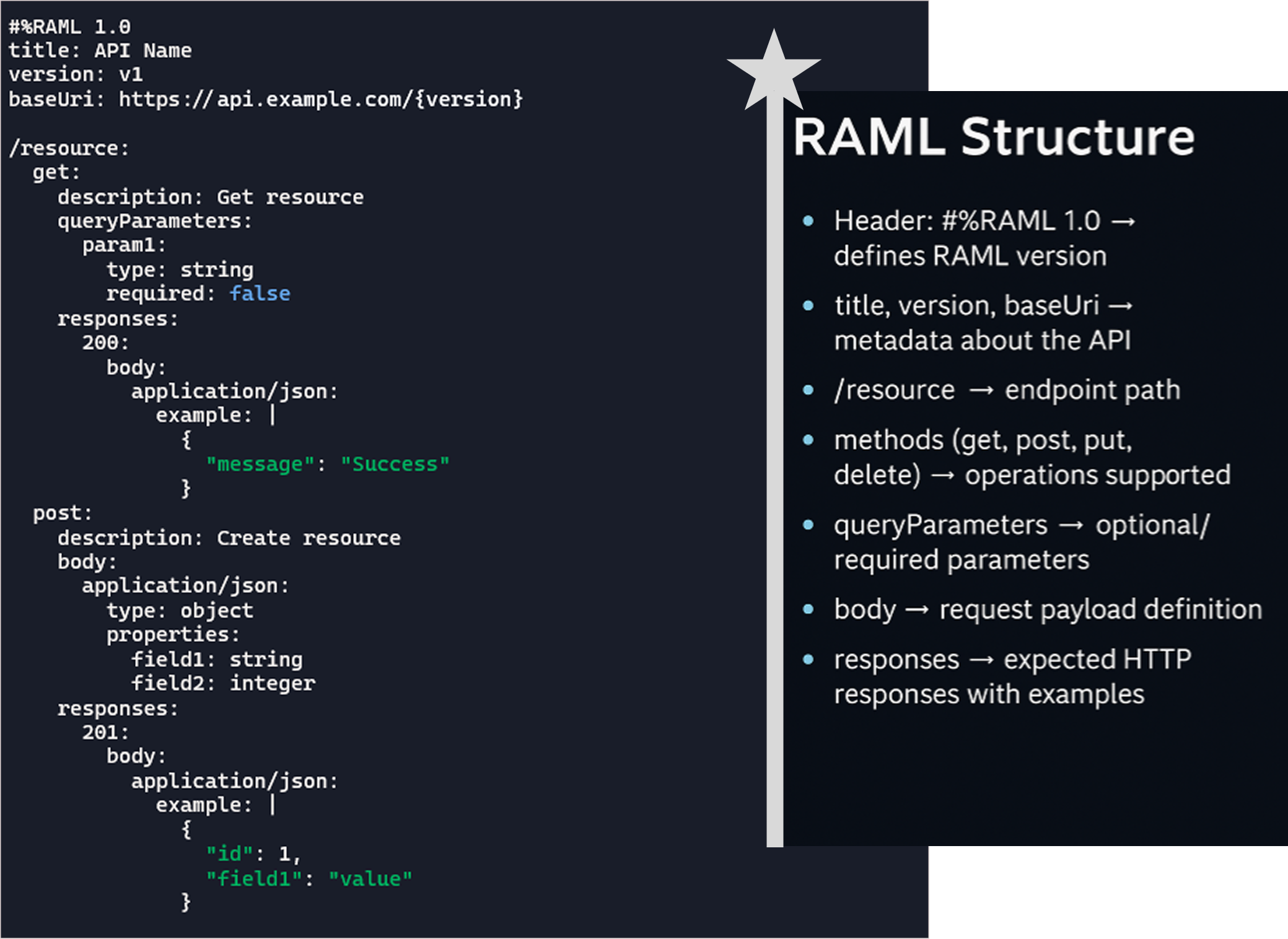
RAML Structure
Design Center
The place where we can start our designing and it helps to create API Specification in RESTful API Modeling Language (RAML). Once you complete the sign-up process in the Anypoint Platform and log in using the generated credentials, there are multiple options available, and the blog mentioned above provides a clear explanation of each option and section. Here, we can explore the Design Center.
API Specification can be published to API Exchange, and it is available to your organization.
In the URL https://www.google.com/search?q=raml+example&hl=en, /search is the resource, and ?q=raml+example&hl=en represents the query parameters key-value pairs appended to the URL to pass data to the server. Query parameters begin with a ? and are separated by &.
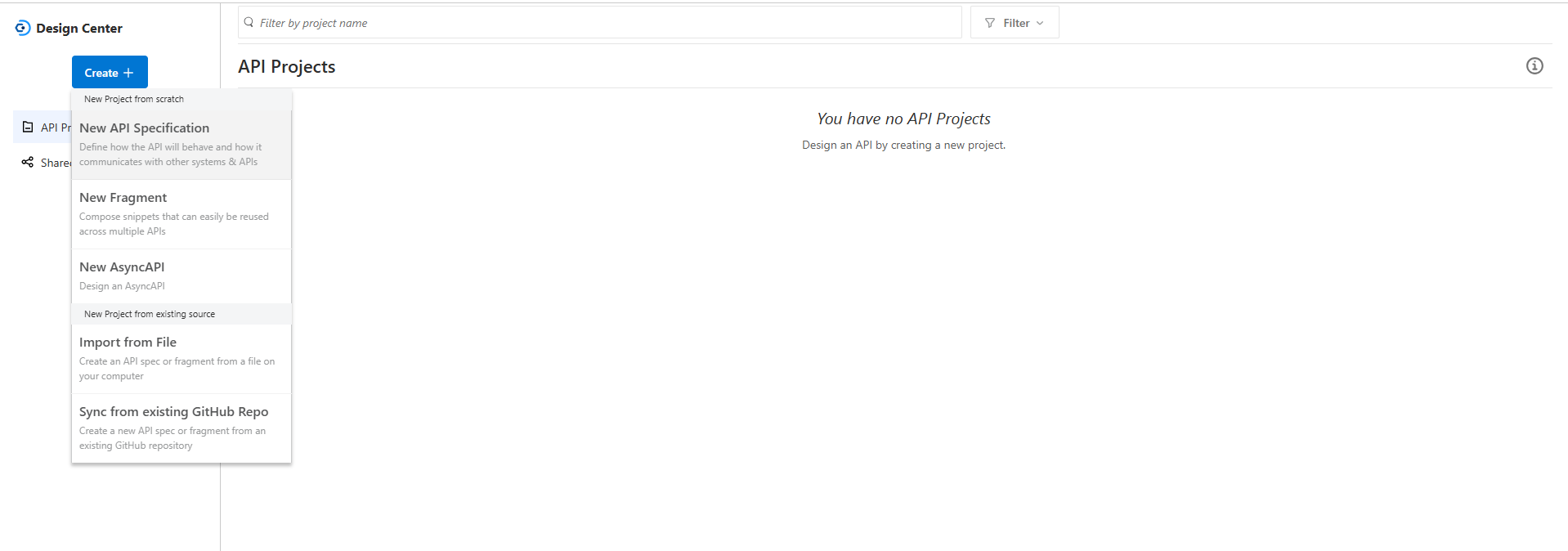
New API Specification: The option where we can start designing a new API from the scratch. use case for the option is when you want to define endpoints, methods, query parameters, request/response bodies, and documentation for a new API project.
New Fragment: Here, we can create the reusable building block like data types, resource types or security schemes. Use case of this functionality is to maintain consistency across multiple APIs by reusing the common definitions.
New Async API: Define APIs that use event‑driven architecture (publish/subscribe, message queues, streaming).
Import from File: Upload an existing API specification file (RAML, OAS, or AsyncAPI).
Sync from Existing GitHub Repo: Connect Design Center with a GitHub repository.
New API Specifications
The configuration that allows the coder or non-coders to build the API specification, if you are good at the coding you can opt for 'I'm comfortable designing it on my own', if you are from non-coding platform, we do have the option named 'Guide me through it' will give you the UI, where you can drag and drop and build the API Specs, the UI will be different for the both option.
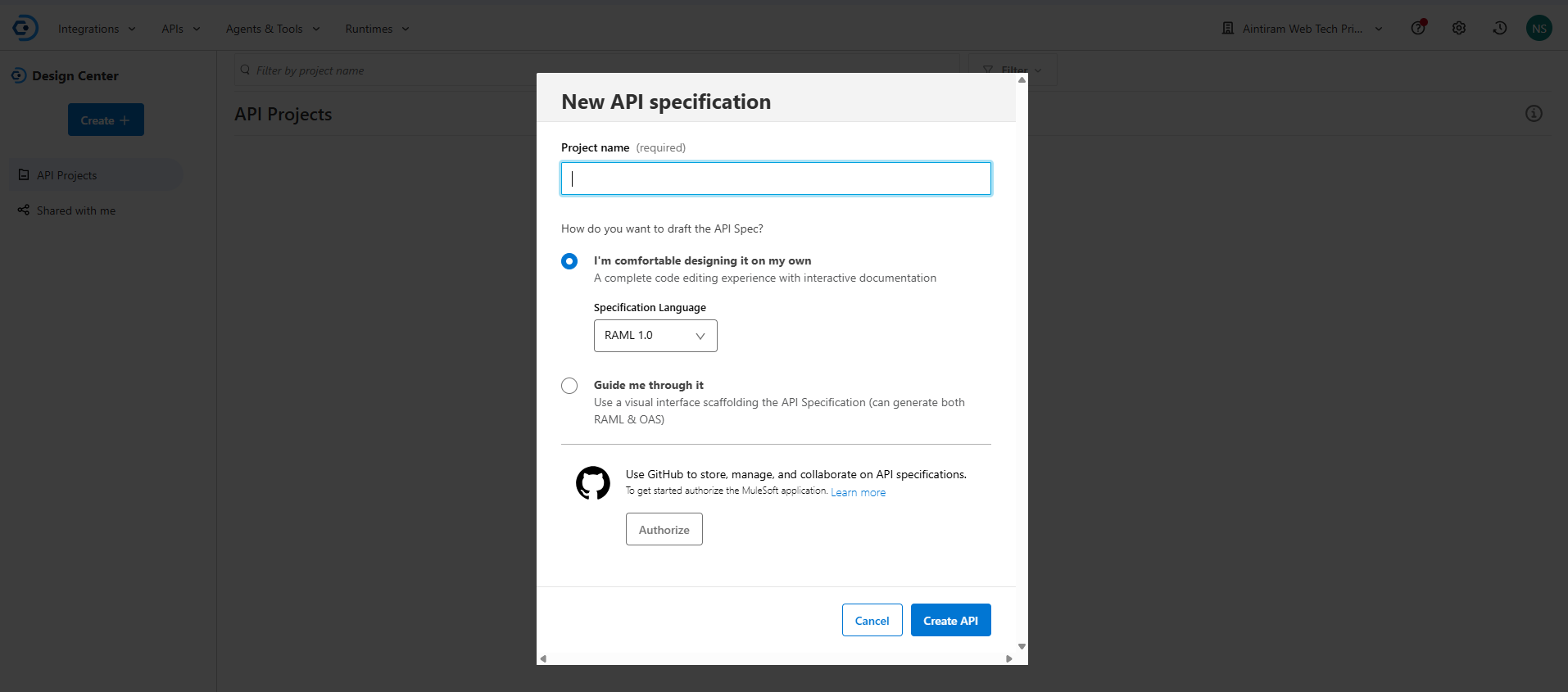
I will be proceeding with designing on my own and we have the option to select the language either you can define it by RAML/OAS and I choose the RAML 1.0.
API Designer Editor

Left Pane - Project Explorer
- Presents all your projects, including integrations, fragments, and API specifications.
- It offers the ability to import an already existing file, or you can create a new API specification:
- makes this process easy by it provides fast links to the recently changed APIs.
Center Pane - Text Editor
- A robust YAML/JSON editor for RAML or OAS specification writing.
- Features auto complete and syntax highlighting to expedite development.
- Incorporates inline error detection to help you maintain valid specifications and identify errors early.
Right Pane - Interactive Documentation
- Generates real-time documentation from your API specification.
- Updates instantly as you edit, ensuring documentation is always in sync.
- Mock service is available in pane to get the visual representation of the API that written.
Mocking Service
- Allows you to simulate the API behavior without backend implementation.
- You can send requests to endpoints and receive the responses.
- Useful for validating the API design that you have built.
- Supports behavioral headers to simulate scenarios like timeouts or error.
Conclusion
I think you now understand the fundamentals of creating APIs in the Anypoint Platform's Design Center. In my upcoming blog, I will walk you through the process of efficiently debugging APIs and conceptual insights into developing RAML specifications. I will walk-through how the RAML can help you organize your API design. In order to debug the design will get you through the mocking process for the designed part. Stay tuned for the next set of API design blog.
