
 Book Free Consultation

Know Your Customers Better: Mastering Interest Tags
Explore how Interest Tags work within Salesforce to capture customer interests, enabling businesses to deliver personalized experiences.
By John Prabhu Gnanaraj
Asst. Software Developer
Interest Tags in Salesforce FSC
Imagine our Financial Advisor John who is preparing for a client call. As an advisor, John has a detailed summary of his client such as financial holdings, transaction summary, job summary, investment profile, etc., Before the meeting, he opens the client record in Salesforce Financial Services Cloud and noticed that the section named Interest Tags which has the values of Cricket, Action Movies, Carrom and Golf.
Instead of starting the financial conversation straight away with the metrics and data numbers, John begins by asking about their recent movie experience or about the last cricket match played. The conversation will becomes more engaging and stronger which will make him to feel easy and more personal when they starts to talk about the investments. This is the kind of example for the impact of Interest tags feature in Salesforce Financial Services Cloud.
Interest tags in Salesforce enable businesses to track and capture customer preferences and their intent in a more structured way. By tagging leads, contacts, and other records with their relevant interests, organizations can deliver personalized marketing campaigns, targeted sales reach, and customer support. Beyond simple categorizations, these interest tags act as a foundation for a smarter approach towards customers and improved engagement strategies across the platform. In this blog, we'll explore what Interest Tags are, how they function within Salesforce, and how organizations can effectively use them to drive higher conversions while building trusted relationships with the customer.
What are Interest tags in Salesforce?
Interest tags play a major role in customer segmentation, engagement optimization, and data-driven decision-making within the Salesforce ecosystem. Additionally, this blog explores what interest tags are in Salesforce, how they work, and how you can leverage them for the conversion of customers and to maintain long-term customer relationships.
They help businesses to understand what products, services, or topics a customer is interested in, enabling more targeted engagement. They are not a single out-of-the-box Salesforce feature. Instead, they are typically implemented using topics, tags, tag categories, multi-select picklists, or custom objects, depending on business needs.
Why do Interest tags matter?
Interest tags really matter in Salesforce because they turn customer data into actionable insight. Instead of treating all leads and contacts the same, interest tags help you understand what each of the customers actually cares about, allowing teams to engage more effectively.
Better Customer Segmentation: Interest Tags allow you to group customers based on shared interest
Personalized Customer Experiences: Interest tags enable the marketing and sales teams to send personalized emails and recommend relevant products.
Improved Sales Effectiveness: Sales reps can quickly see customers' interest and prioritize hot leads.
Enhanced Customer Support: Support teams can route cases based on interests or expertise to provide relevant solutions.
Stronger Customer Relationships: By consistently engaging customers based on interests, the trust increases, leading to long-term relationships.
Configure Interest Tags in your organization
Interest tags work by capturing customer preferences on Salesforce records and using that information to drive targeted actions and automations. Instead of treating interests as unstructured notes, Salesforce stores them in a structured format that can be reported on. Financial relationships are non-linear; a customer might ask about retirement, ignore it for 6 months, and suddenly want a home loan. These kinds of scenarios can't be handled by traditional CRM fields because a single picklist can't represent multiple simultaneous interests. Interests change faster than opportunities or goals; here we can use the interest tags to capture signals of the customers. Before using the interest tags, we need to know about the concept of interest definitions, which is nothing but understanding "What can a customer be interested in?"
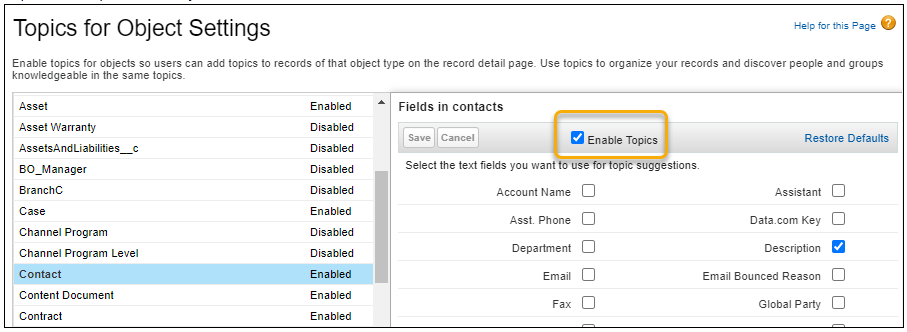
Enable Topics
From Setup, in the Quick Find box, enter "Topics," and then select "Topics for Objects."
Select the object, and then select Enable Topics.
Save your changes. Repeat this step for other objects.
Enable Interest Tags
From Setup, in the Quick Find box, enter Interest Tags, and then select Interest Tags.
Turn on Interest Tags.
Then prepare a list of interest tags, and then organize them into categories, and we can also create a hierarchy between them.
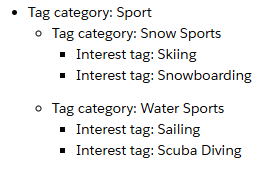
Create Categories
Select Tag Categories from the navigation bar.
In the Tag Categories list view, click New. Enter a category name, such as "Sports." Enter a description.
If you're creating a second-level or third-level tag category, select a parent category. For Level, enter 1, 2, or 3.
Select an icon to visually represent the tag category.
To activate the new category, select Is Active and then click Save.
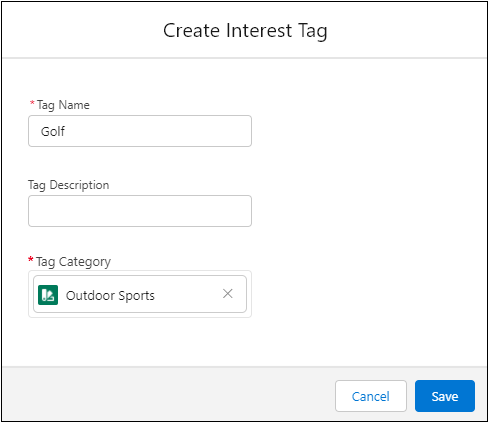
Create Interest Tags
Select Interest Tags tab from the app launcher.
In the Interest Tags list view, click New.
Enter a tag name and description. Select a tag category and click Save.
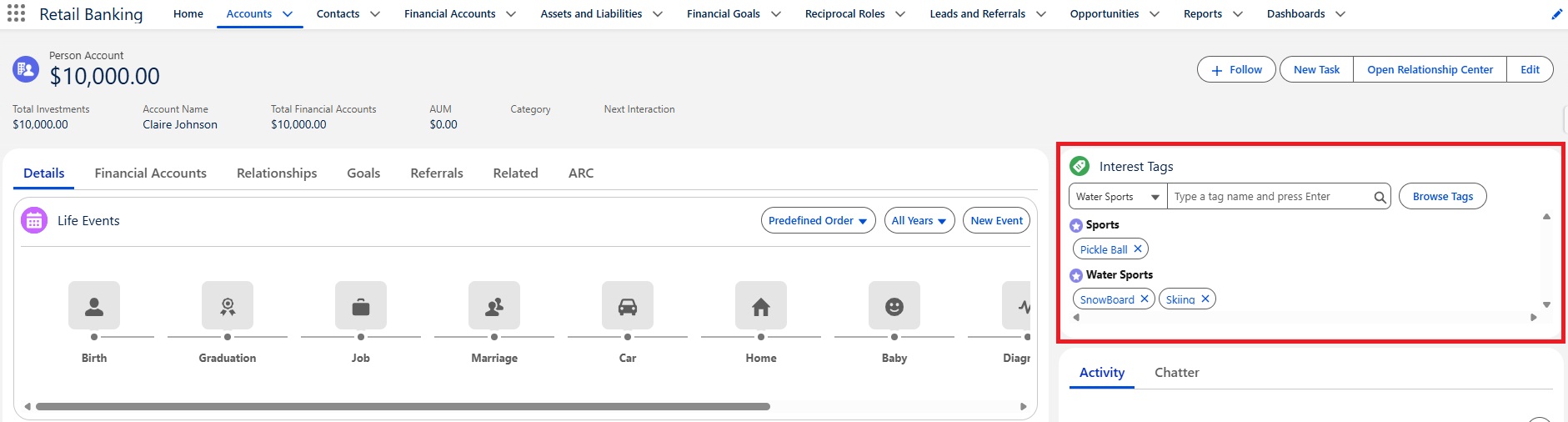
To view and add the interest tags, add the Interest Tag Component to Record Pages. After placing the Interest tag component on the record page, we can assign the Interest Tags to client records based on their interests.
Conclusion
Interest tags in Salesforce help businesses capture customer intent in a more structured way, enabling more personalized customer engagement. By leveraging interest tags, organizations can deliver targeted sales, marketing, and service experiences that improve conversion rates and strengthen customer relationships. When implemented effectively, interest tags can turn customer interactions into actionable insights that lead to smarter decisions and long-term business growth.
"When you understand interests, personalization in Salesforce become effortless."
