
 Book Free Consultation

Get Related (Child) Records Faster In Salesforce Flow
Fetch parent and child records in one step with the new Flow subquery feature
By Anandhakumar Thangasamy
Senior Salesforce Developer
Get Related (Child) Records Faster In Salesforce Flow
Introduction
Earlier, if we have to get the related child records in flow (i.e. Contacts related to Accounts), we need a separate Get Records element for each child relationship objects. Imagine if we needed to get the data across multiple child objects - two, three, or even four level of relationship, need to use multiple Get Records element for each object. This leads to enforce us to use multiple queries (Get Records) and there was no other option to fetch them with a single query call. This pain is over and now we have a feature to overcome this. From Winter'26, we can have the sub query in the Get Record element in the Auto launched Flows which means we can fetch the related records within the single Get Record element. Let's dig into this feature!
Get Related Records Faster (Beta)
Go to the Auto launched Flow and open the Get Records element and now you can notice the new option named "Also get related records (beta)". Consider a scenario, we need to process the Contacts and its related Cases tagged under the Accounts, Select the Account as Object in your Get Record element and check the new option "Also get related records". Now you can able to see an option Select Related Records and this is the are we can use it for adding the related objects.
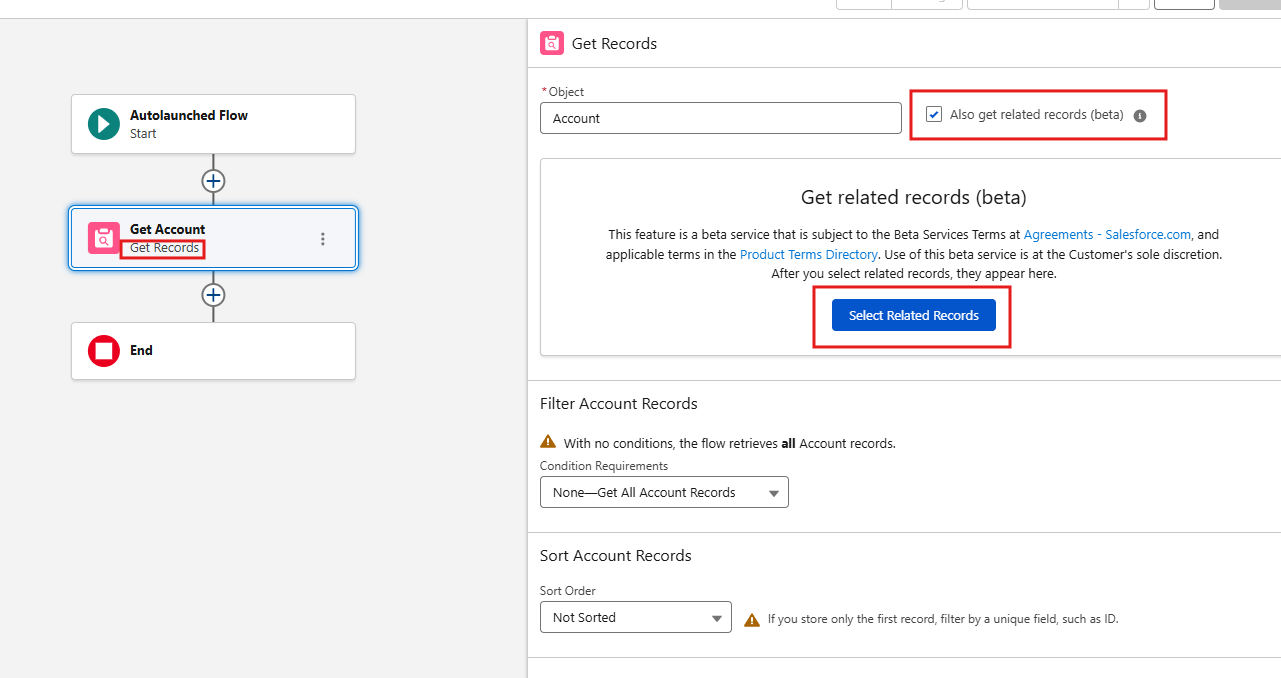
When clicking on that button, a new wizard will be opened to configure the related objects. There you can add the child records and configure each related objects by selecting the list of fields which needs to be fetched from the database, any filters to be applied, how many records to be fetched and any sorting order needs to be defined. Below are the options available in the Select Related Objects and Fields wizard
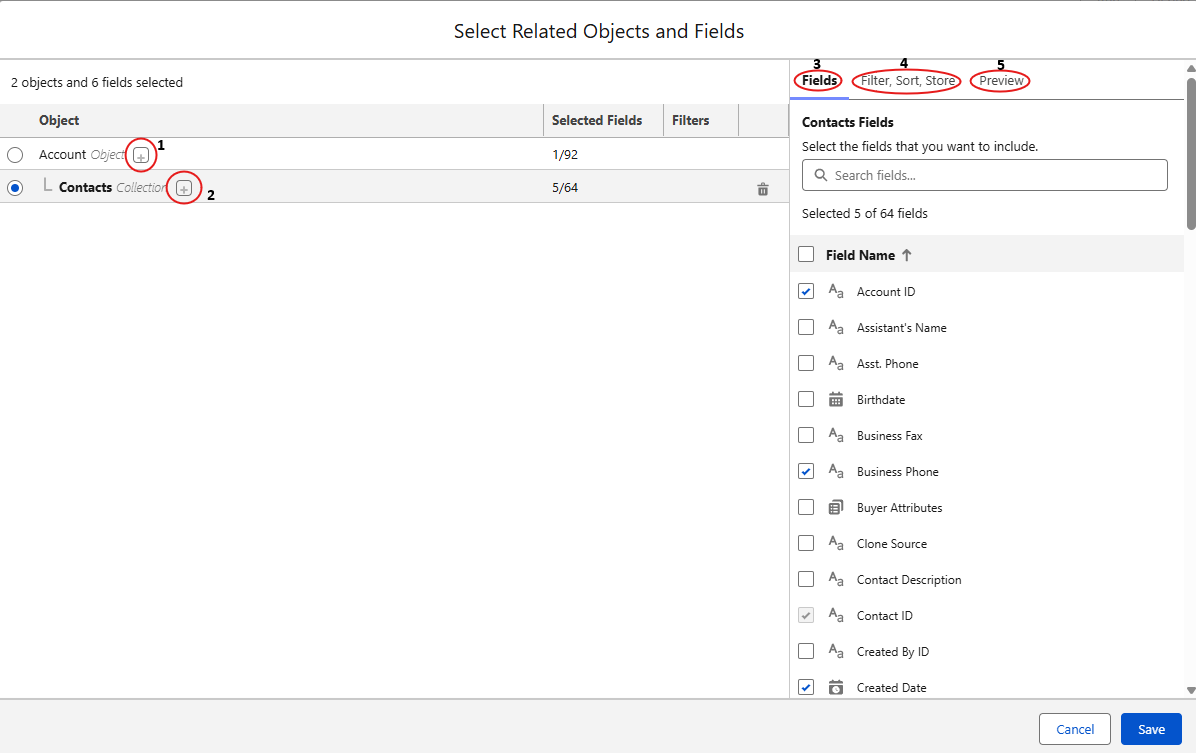
(1) Objects Related to Account: + icon nearby Account Object is to add the related object of the Account which means child records of the Account (i.e., Contacts, Cases, Orders, etc.,)
(2) Object Related to Contact: + icon nearby Contact Object is to add the related object of the Contact (i.e., Cases, Assets, Event, etc.,)
(3) Fields: This section is available for each object selected from (1) and (2). Here we can select the fields needs to be queried for the selected object (up to 50).
(4) Filter, Sort, Store: By using this option we can add the filter criteria, sort the records based on the fields and limit the records for the query.
(5) Preview: Preview is the pane where we can view the consolidated view of the configuration done.
Advantages
- No need to add the multiple Get Records element when querying the related objects.
- Getting the multiple related records in a single step makes your automation easier to read and maintain.
- Multiple queries consolidated to a single query reduces the execution time.
- With all records in a single place makes the debugging process simple and easy.
Consideration
At the same time, keep the below things in mind when using this feature,
- The feature is currently in Beta (Winter ’26) and may change in future releases.
- As of now, this is available in Auto launched Flows only.
- This feature is not supported for a collection of records at the moment. If you need to fetch the collection of records, then you can't query the child records in the same Get Records element.
- The Loop element doesn’t support nested collections in related records.
Conclusion
This new option Get Related Records in Salesforce Auto launched Flow is the powerful enhancement. This not only simplifies an automation also improves the performance, scalability of your automation. Say goodbye to multiple Get Records - hello to smarter flows.
