
 Book Free Consultation

Omnistudio Data Raptors
Using Extract and Turbo Extract Data Raptors for Faster and High-Volume Data Access Through Salesforce Omnistudio
By Nishanth Sargunam
Senior Salesforce Developer
Data Raptors
Introduction
In OmniSudio, Data Raptors/Data mappers is the tool that provides the way to get data from the database, write data into the database and for transforming the data. As the business explanation, get the data from database for customer interaction and committing the changes into database when the customer changes. DataRaptors are a low-code alternative to Apex for handling data operations, making them easier to maintain and faster to implement. This chapter is described with the detailed explanation of Turbo Extract and Extract data mappers.
Data Flow
Data Mappers/Raptors supply data to OmniScripts and FlexCards from Salesforce and write updates from OmniScripts and FlexCards back to Salesforce. They typically do this via OmniStudio Integration Procedures. Below are the types of data raptors,
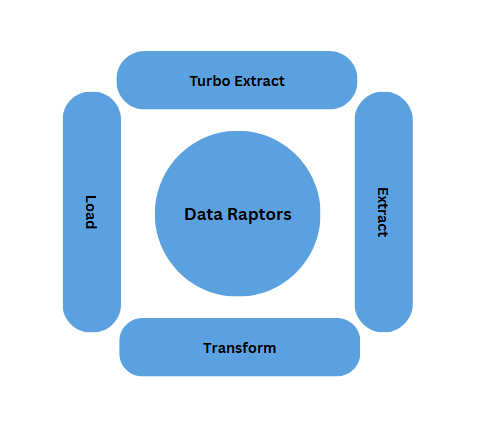
Turbo Extract
In Omnistudio, Turbo Extract Data Mapper/Raptor gets data from a single Salesforce object, and you can filter the data and select the fields to return. It will support only to access the parent level field hierarchy and not about the child level. It does not support formulas and complex output mappings. I have provided the sample SOQL query below that will shows the level of access which Turbo Extract acts.
SELECT Id, Contact.FirstName FROM Contact Where IsActive = trueWe have the Turbo Extract data raptor explained below with getting the data from the Contact object. Also got the data form the Account level which is parent to the Contact and the extracted data is stored in the variable to access from the place where we are calling this Data raptor.
EXTRACT Tab:
On the Extract tab, you specify the Salesforce objects you want the Omnistudio Data Mapper to query and the filters that determine the data to be returned from the object.
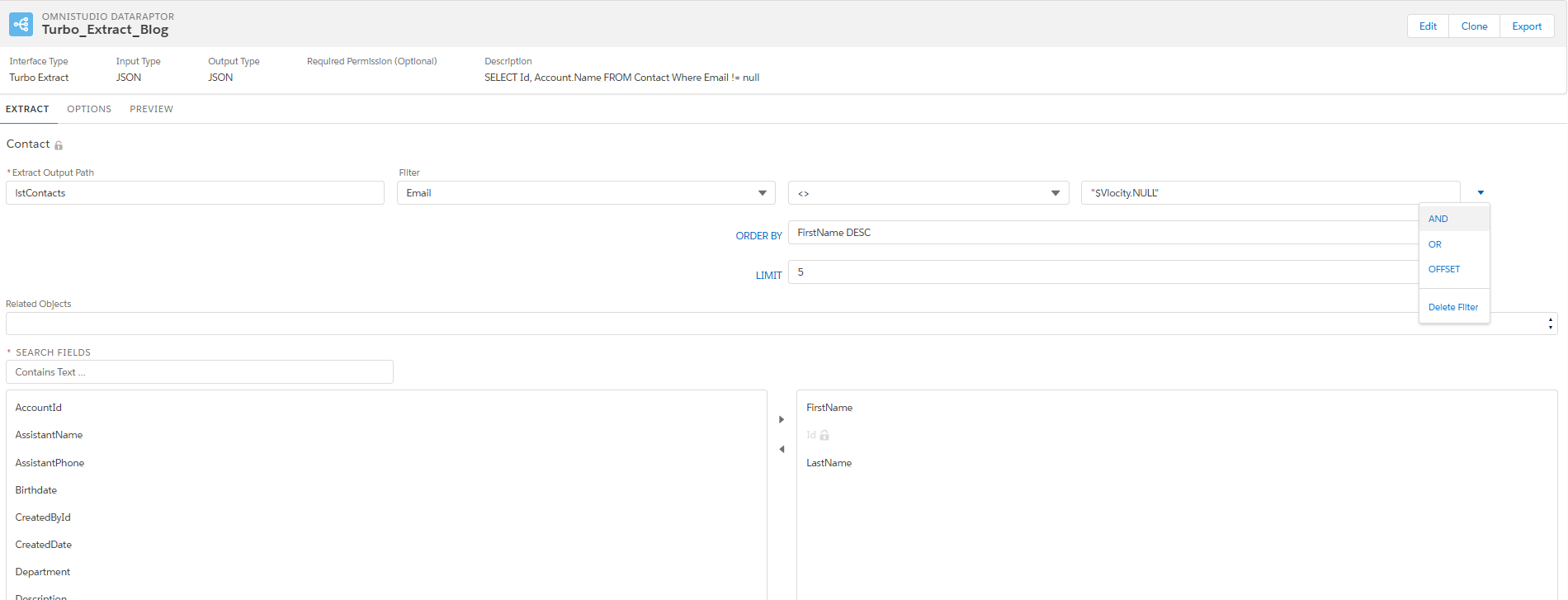
- Contact is the object, which is to extract the data from the source.
- Extract Output Path: Variable that needs to store the Extracted data and specifies the top-level JSON node in the output.
- Filter: The place where we can filter the data.
- Logical Operators: It is to apply the Logical Operators between the filters and also for applying the LIMIT, Offset and Order By.
- Related Objects: This is to access the Parent Level objects data
- Search Fields: This is to filter the field list which needs to be retrieved
OPTIONS Tab:
On the Options tab, we can set advanced options such as whether to check the user's access permissions for the fields.

- Time to Live in Minutes setting determines how long the data remains in the cache.
- Check Field Level Security such as whether to check the user's access permissions for the fields before executing the Omnistudio Data Mapper.
- Salesforce Platform Cache Type to Session Cache for data related to users and their login sessions, or Org Cache for all other types of data.
PREVIEW Tab:
On the Preview tab, we can test the output of the Omnistudio Data Mapper. You provide input parameters as Key/Value pairs and then click Execute. The result is displayed in the Response section.
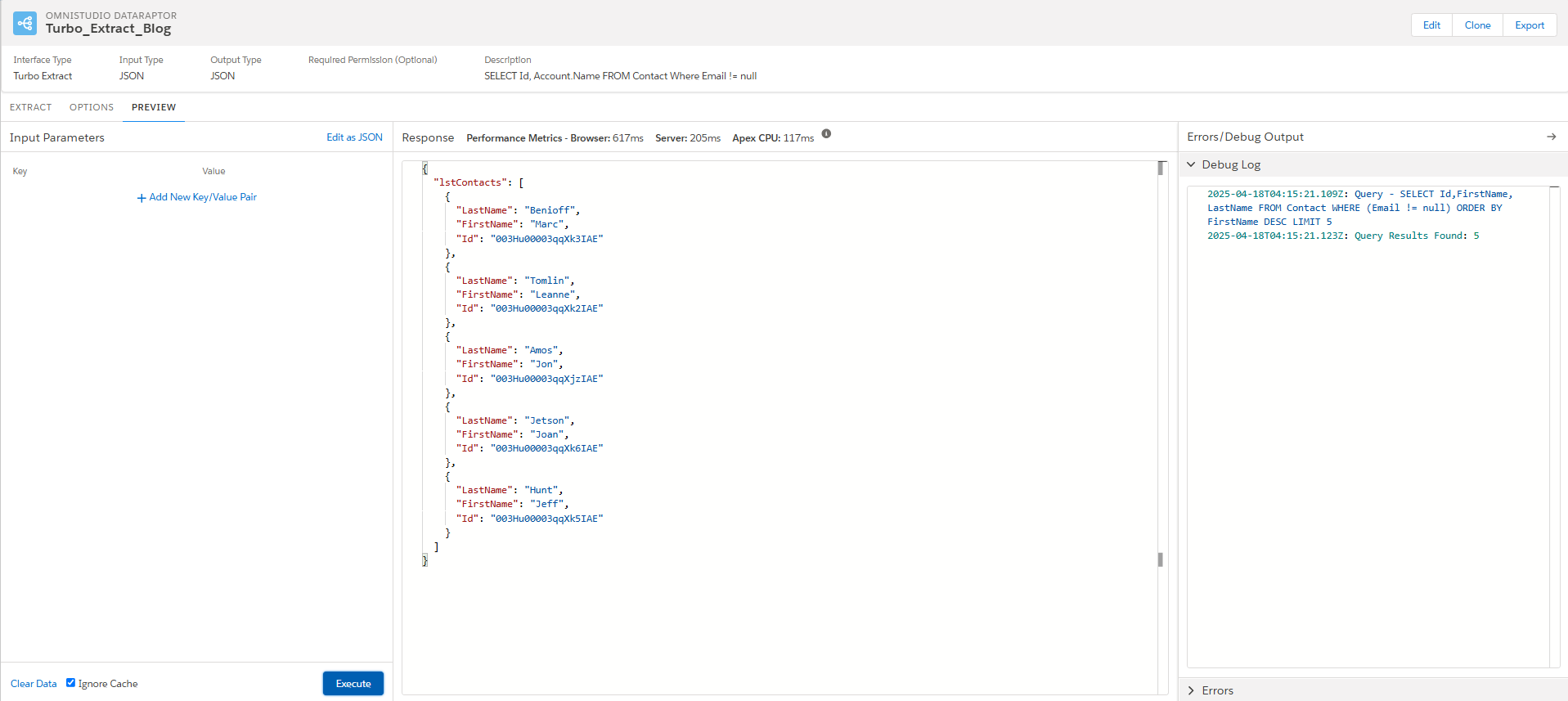
In the PREVIEW tab you can view the preview version of the work done.
- Input Parameters (1): We can create the key value pair to filter the data.
- Response (2): Upon clicking the execute, we can see the output in JSON format which is configured previously.
- Errors/Debug Output (3): All the debug and Errors will be shown on the column.
Extract
In Omnistudio, Extract Data Mapper/Raptor gets data from one or more Salesforce objects and returns results in JSON, XML, or custom formats via complex field mappings. It supports formula and complex output mappings, and I have provided the sample SOQL query below that will shows the level of access which Turbo Extract acts.
SELECT Id, (SELECT Id FROM Contacts),(Select Id FROM Cases) FROM Account Where Rating = 'Cold'We have the Extract data raptor explained below with getting the data from the Account object also extracted the Contacts and Case related to the accounts. The extracted data will be stored in the new JSON as expected format to return and this can be accessed form the place where we are invoking this Data Raptor.
EXTRACT Tab
On the Extract tab, you specify the Salesforce objects you want the Omnistudio Data Mapper to query and the filters that determine the data to be returned from the object.
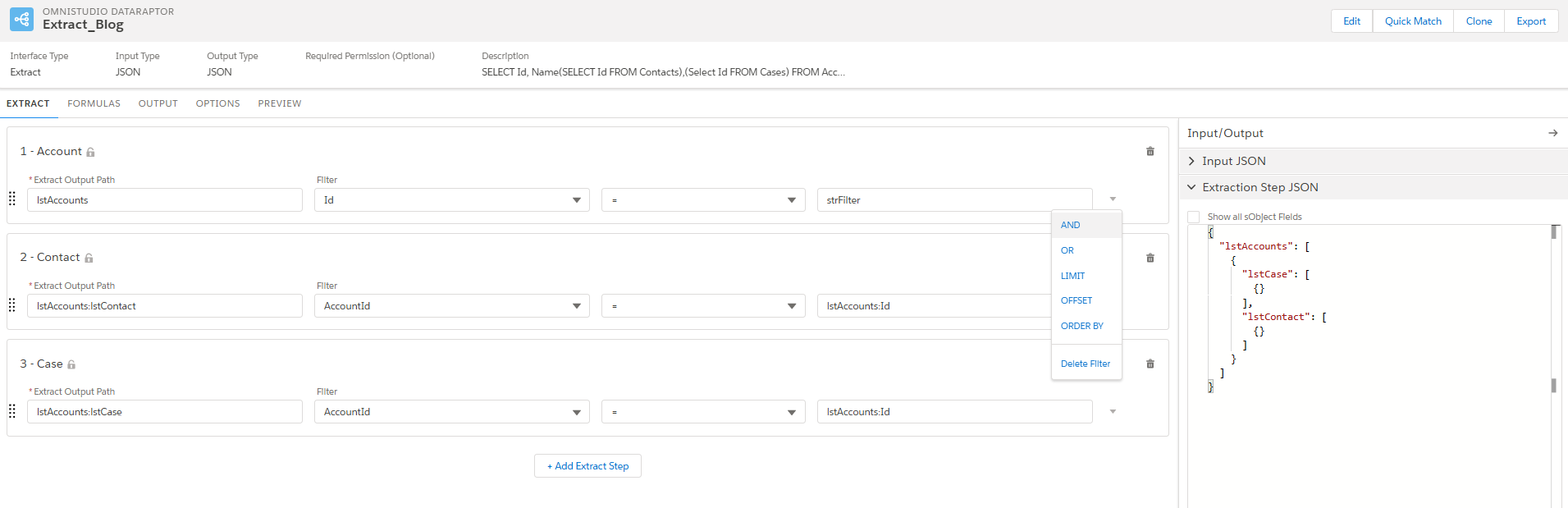
- 1-Account: It is the Account object that needs to extract from the database:
- Extract Output Path (1): Variable that needs to store the Extracted data and specifies the top-level JSON node in the output.
- lstAccounts is the variable which holds the accounts data.
- Interface Field API Name (2): Field name that needs to filter the Account data.
- Operators (3): It is to apply the Logical Operators between the filters and also for applying the LIMIT, Offset and Order By.
- Filter (4): Filter value for that account data that needs to be filtered. 'strFilter' is the variable we can pass the value.
- 2- Contact: It is the Contact object which is get the contacts under the Accounts.
- lstAccounts:lstContact is the variable which holds the contact data under the accounts.
- AccountId is the field from the contact which is expecting the Id from lstAccounts
- 3-Case: It is the Case object which is get the contacts under the Accounts.
- lstAccounts:lstCase is the variable which holds the case data under the accounts.
- AccountId is the field from the case which is expecting the Id from lstAccounts
- Extraction Step JSON: Show the JSON Structure of the current configuration.
FORMULAS Tab
On the Formula tab, we can configure the formula that needs to be calculated in the runtime.
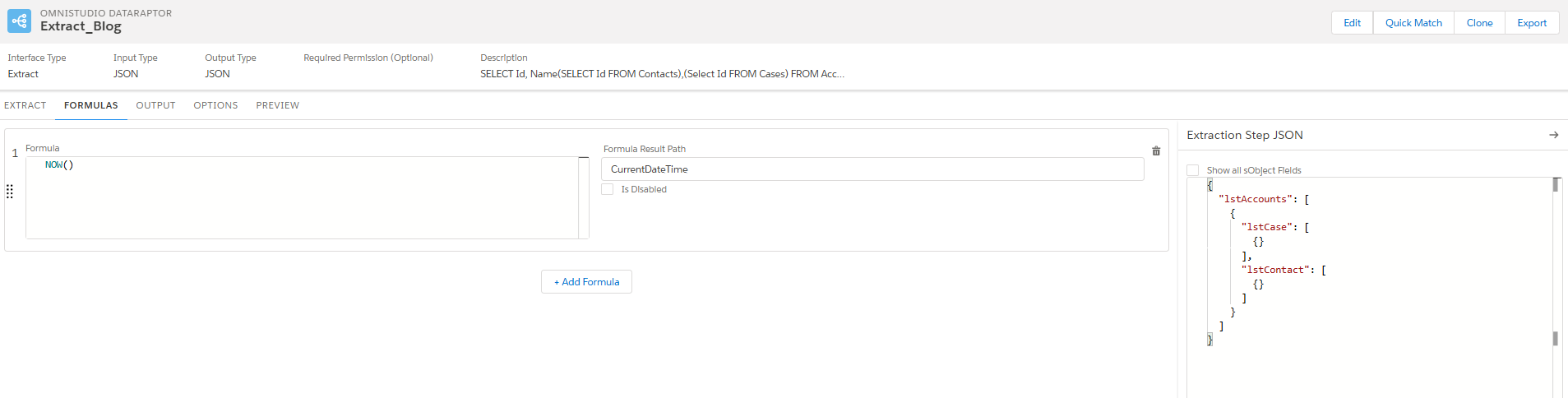
- Formula: The place we can write the formula to get the desired value. I have attached the Salesforce Function reference documentation.
- Formula Result Path: The results from the formula will be stored in the variable.
- Extraction Step JSON: The Schema of the JSON We configured.
OUTPUT Tab
On the Output tab (3), you can map data from the extract step JSON to the output JSON.
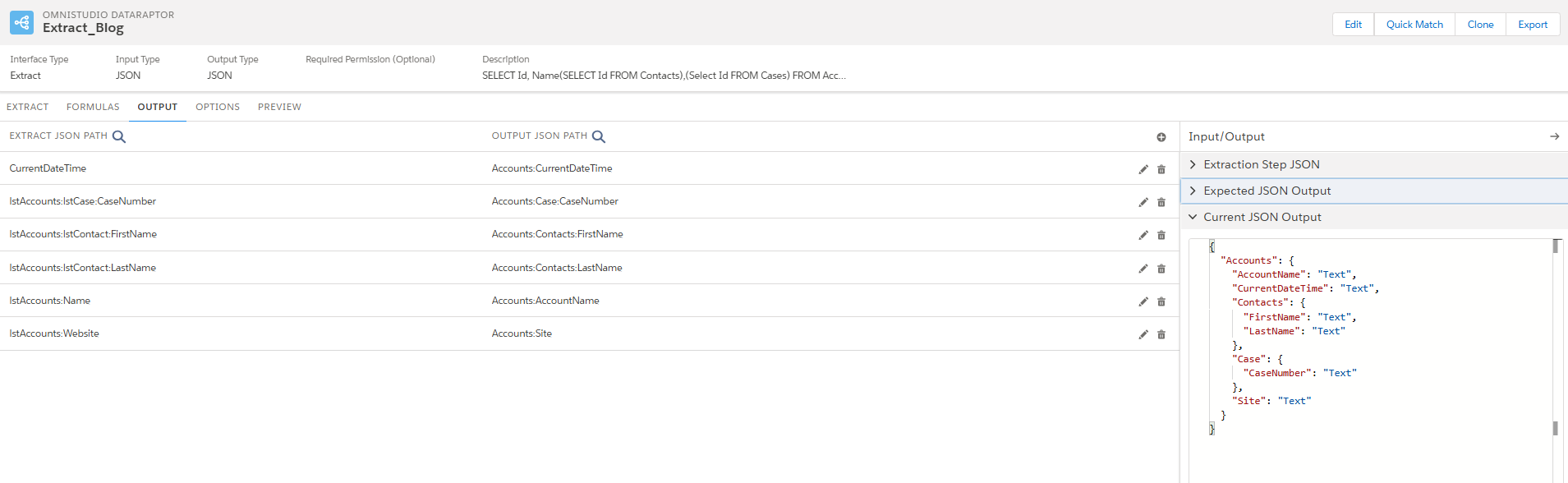
- EXTRACT JSON PATH: This is the path where we created the variable in the Extract Tab to get the data from database.
- OUTPUT JSON PATH: The extraction path will be mapped to the output JSON path which is going to be a return variable.
- CurrentDateTime which is the formula variable where we configured in the formula tab and that is mapped to the Accounts node in the JSON.
- Extraction Step JSON: Schema of the extract JSON path will be shown.
- Current JSON Output: The Schema of the output JSON will be shown.
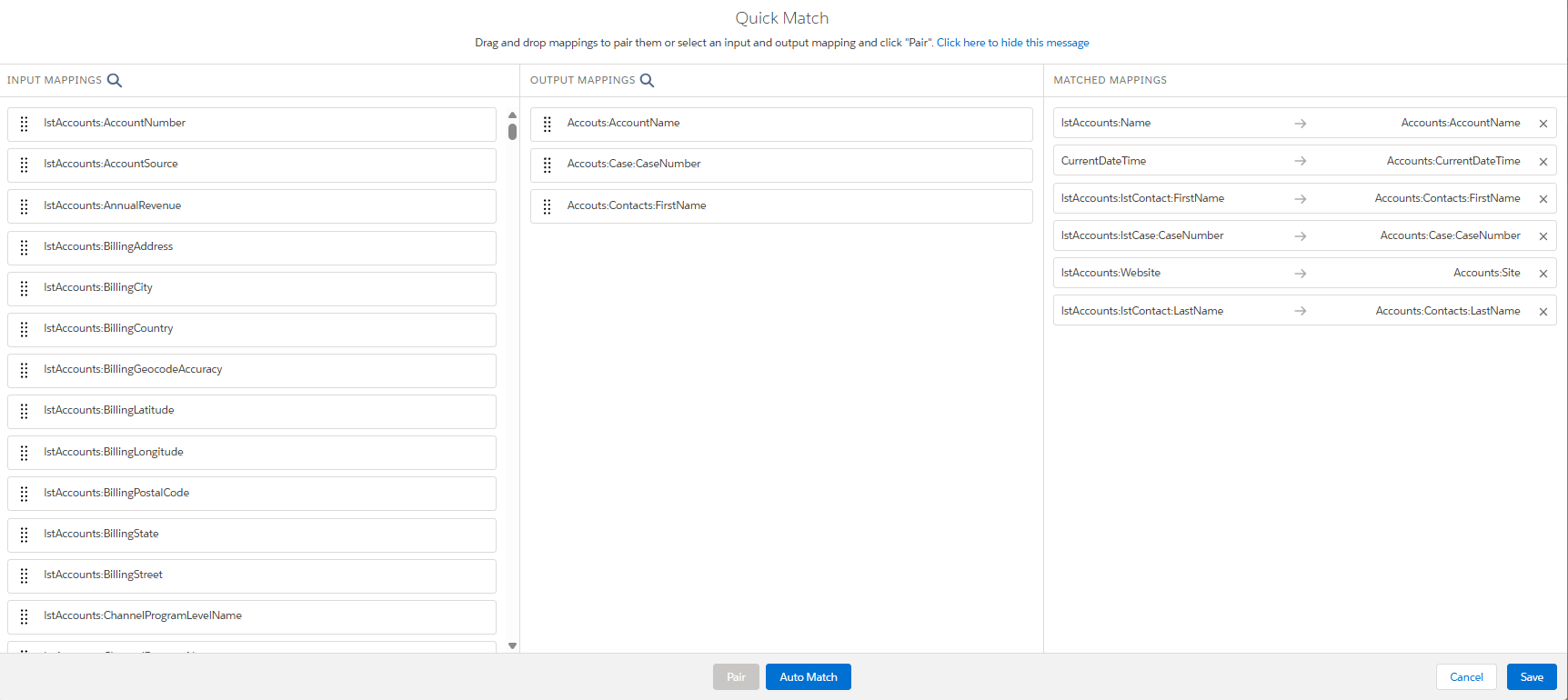
- Expected JSON Output: We can provide the JSON format as per our expectation and click the 'Quick Match' button to map the extracted JSON value to the expected provided JSON.
PREVIEW Tab
On the Preview tab, we can test the output of the Omnistudio Data Mapper. You provide input parameters as Key/Value pairs and then click Execute. The result is displayed in the Response section.
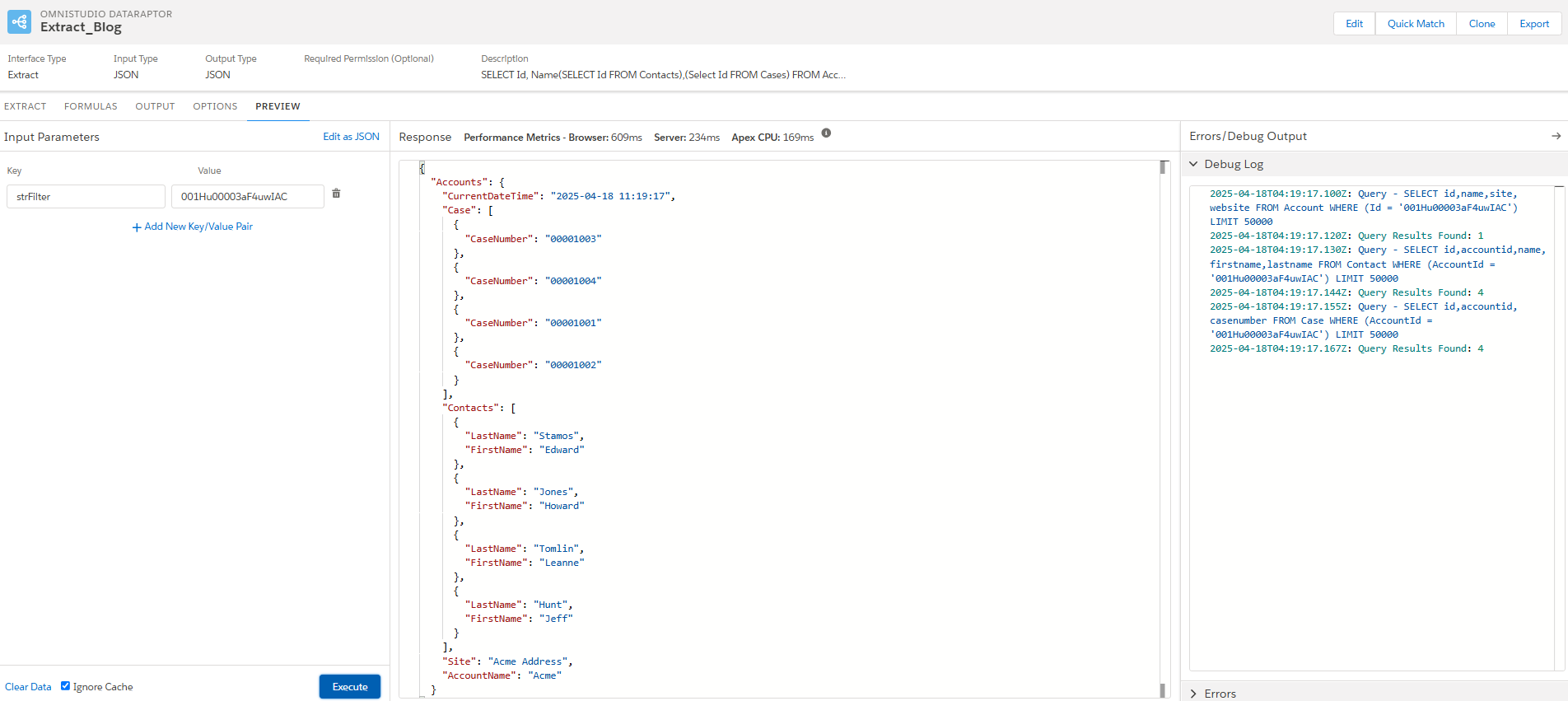
- Input Parameters: As a key value pair, we can pass the parameter value which is configured in the Extract tab.
- Response: The extracted data will be displayed based on the filter provided in the section with the expected output mapping.
Conclusion
In summary Data Raptors provides the low code, declarative and efficient solution to managing Salesforce data. By using its features Turbo Extract and Extract businesses can deliver the faster and smoother customer interactions.
