
 Book Free Consultation

How To Build Relationship In Salesforce Marketing Cloud
In this blog, we explore building relationships in Salesforce Marketing Cloud and why they are essential for creating connected, data-driven experiences.
By Surya Vijayakumar
Salesforce Developer
How To Build Strong Customer Relationships In Salesforce Marketing Cloud
When you work in Salesforce Marketing Cloud, one of the most important things you will set up is the relationship between data extensions. These relationships help you connect your customer data, run personalized journeys, send targeted messages, and keep everything structured. Without proper relationships, your whole data model becomes confusing, and your personalization efforts fall apart.
In this blog, I will walk you through what data extension relationships are, why they matter, and how to build them clearly and simply. Whether you are new to Marketing Cloud or trying to level up your understanding, this guide will keep things easy. Take a breath, sit back, relax and dive in...
Data Extension
In Salesforce Marketing Cloud, a Data Extension (Data Extension) is like a table in a database. It stores customer information such as names, emails, purchase history, preferences, or anything your business needs to personalize communication. While a single data extension can store basic details, real personalization begins when you connect multiple data extensions. That is where relationships come in. Building relationships between Data Extensions allows Marketing Cloud to understand how different pieces of data are linked together - like connecting a customer to their orders or connecting an email address to their subscription preferences.
Why Do We Need Data Extension Relationships?
Marketing Cloud doesn’t automatically understand how your data is connected. You have to teach it.
- Build smarter audience segments - You can filter Contacts based on their Account data.
- Personalize emails & messages - Pull Account-level data directly into your emails for each Contact.
- Use complex queries inside Automation Studio - Relationships let you join multiple Data Extensions and extract meaningful, accurate results.
- Avoid duplicated data - Instead of storing account info in every Contact row, you store it once (Parent Data Extension) and reference it.
- Build scalable data models - Your Marketing Cloud will perform better, look cleaner, and support future use cases.
Types of Relationships in Marketing Cloud
One-to-One Relationship
This means one record in Data Extension A relates to one record in Data Extension B.
Example: Customer Data Extension ↔ Preference Data Extension (each customer has only one preference record)One-to-Many Relationship
This is the most common relationship type. One record in Data Extension A can relate to many records in Data Extension B.
Example: Customer Data Extension ↔ Orders Data Extension (one customer may have many orders)Many-to-Many Relationship
Used rarely in SFMC. You’ll need a bridge Data Extension to support this.
Note: Marketing Cloud does not support many-to-many relationships directly, but you can design a workaround using a middle Data Extension if needed.
Steps to Build a Relationship
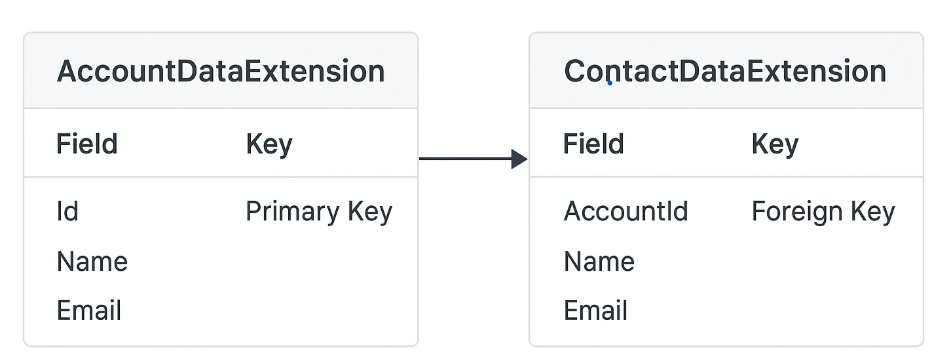
In this case, I have created the two data extensions, one is an AccountExtension and the other is a ContactExtension. If you don't know how to create the Data Extension, Click Here after that, and we will move forward!! In AccountExtension and ContactExtension, I created the Fields
Step 1
Select the Audience Builder → Click Contact Builder

Step 2
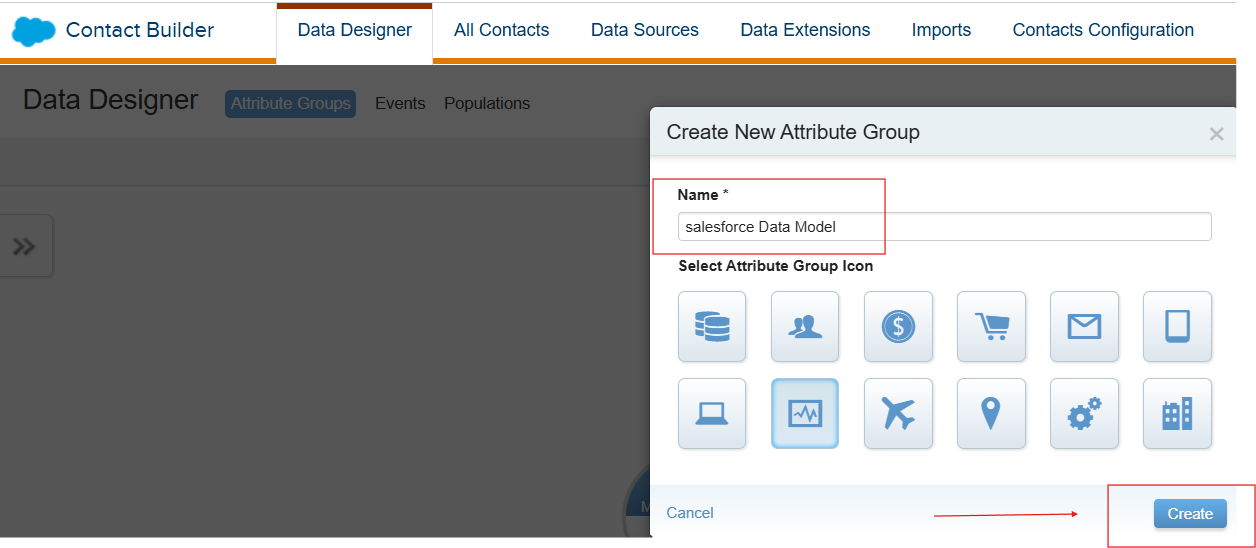
Select the Data Designer → +Create Attribute Group → Create New Attribute Group → Create
Purpose of Attribute group: To organize and link data extensions, creating a "mini data model" that connects a contact's information from different sources
Step 3
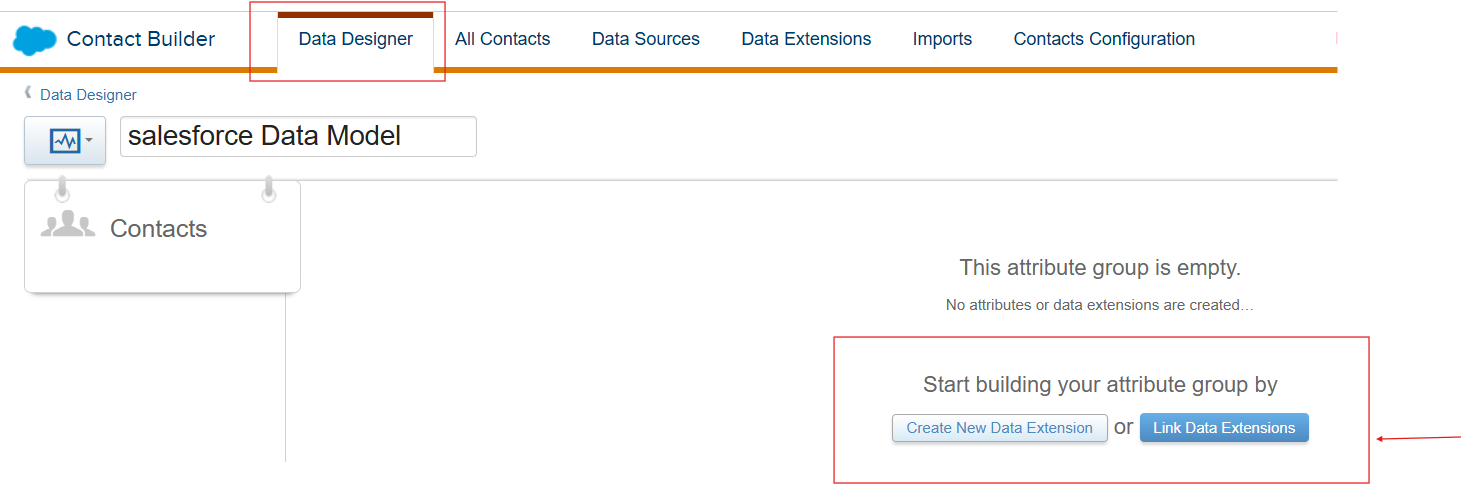
To start building your data extension and click the Link data extension. I have already created the two data extensions, one is an AccountExtension, and the other is a ContactExtension. The first step is to link your data to the Contacts. Only after that should you relate your other Data Extensions.
Purpose:
- In Salesforce Marketing Cloud, every customer is treated as a Contact. That’s the main record that identifies a person.
- So before you link any other Data Extension- like Orders, Preferences, or Activity - you must first connect everything to the Contact. This helps Marketing Cloud understand which customer the data belongs to.
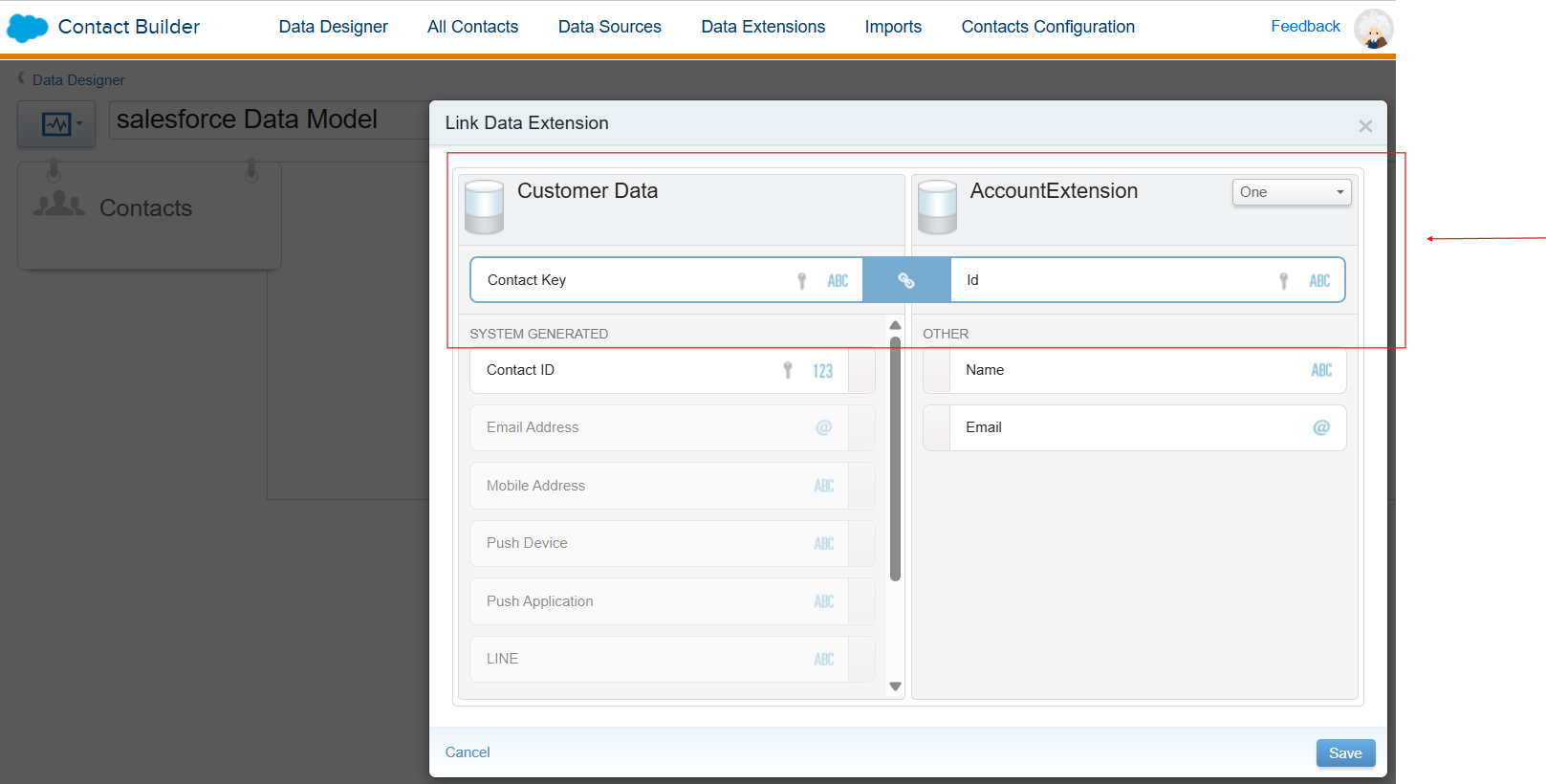
After that, I added the other data extension and set the one-to-many relationship. It looks like a Salesforce Account and Contact Object Structure.
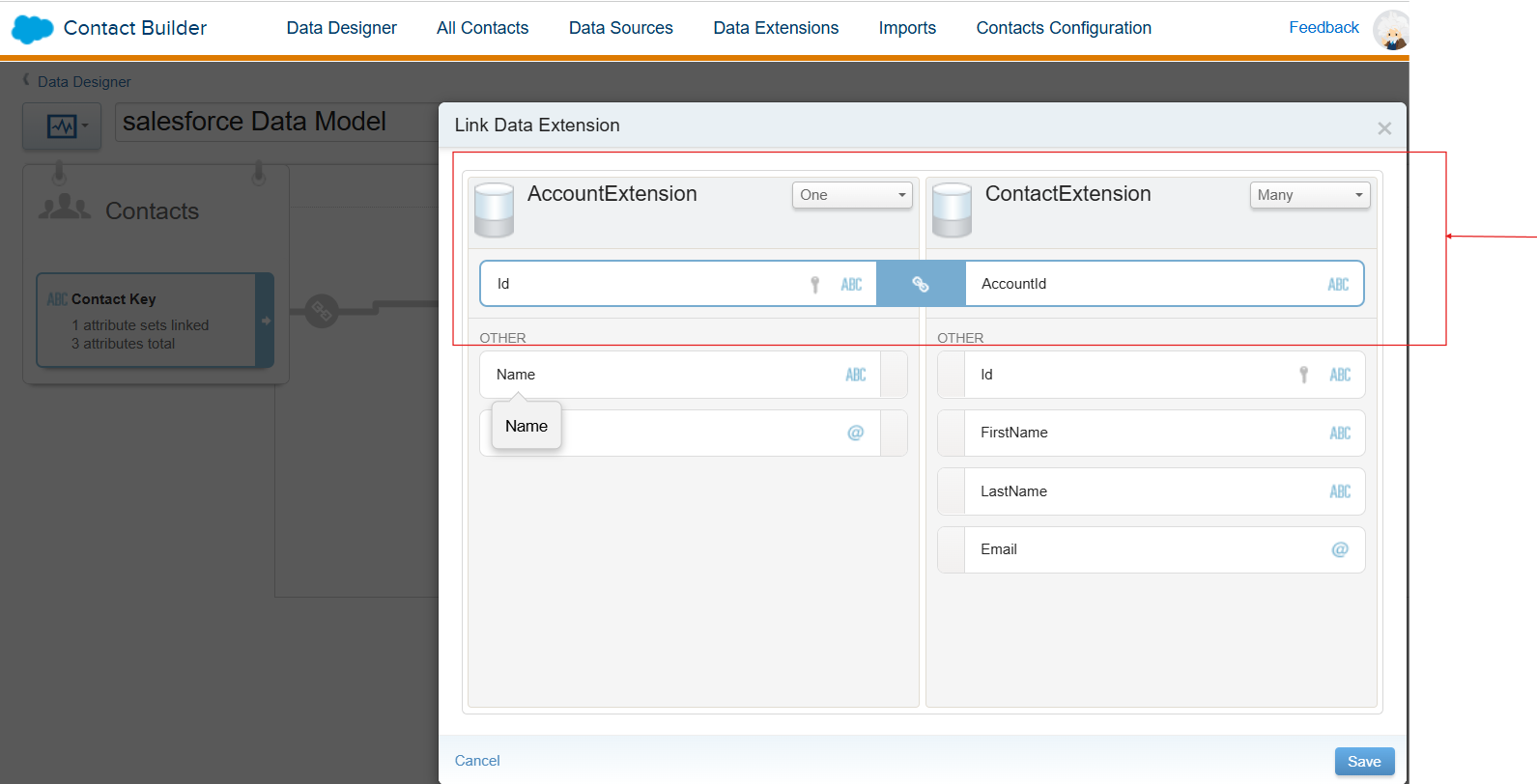
Once you link the two fields, and after clicking Save. Here I am linking the AccountExtension (ID) → ContactExtension(AccountId). That means One AccountExtension has multiple ContactExtensions records.
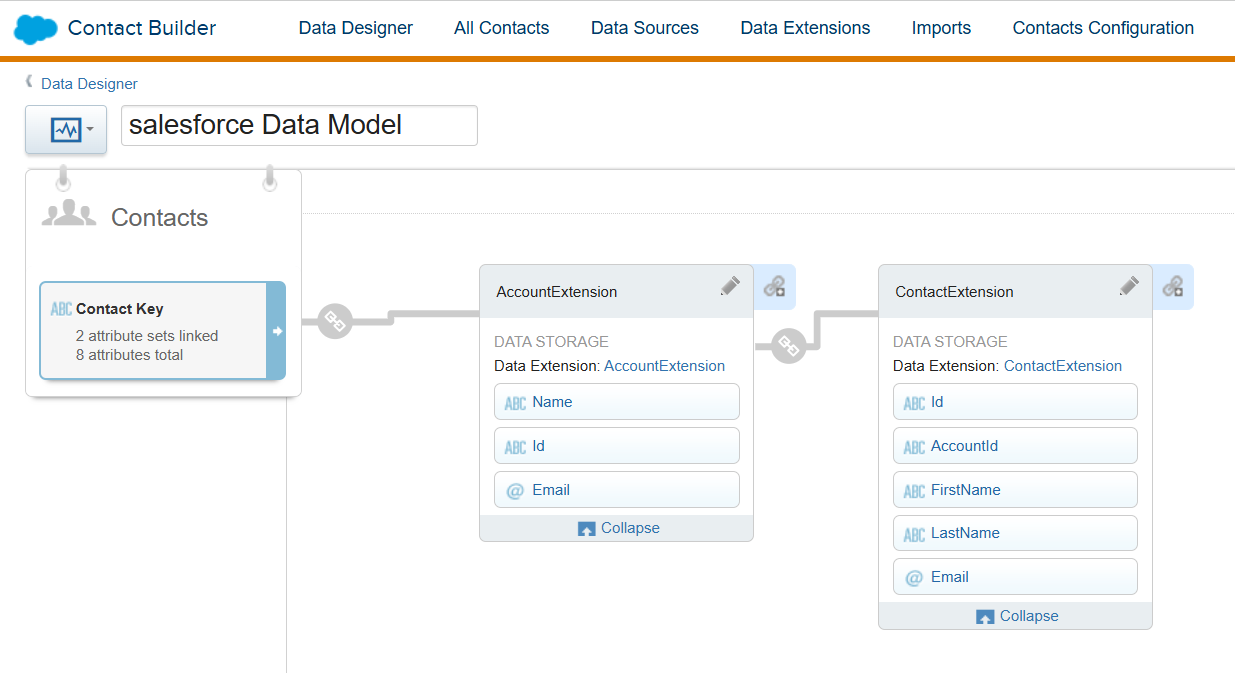
How to query the two Data Extensions?
SELECT
    c.Name AS ContactName,
    c.Email AS ContactEmail,
    a.Name AS AccountName,
    a.Email AS AccountEmail
FROM ContactExtension c
INNER JOIN AccountExtension a
ON c.AccountId = a.Id
Best Practices for Data Extension Relationships
- Always define a Primary Key
- Use consistent naming
- Avoid duplicate rows
- Don’t over-complicate your model
- Test everything in Data Designer
- Keep Field Types Consistent
- Avoid Storing the Same Information in Multiple Data Extensions
Conclusion
Hope this blog gives the better idea for building relationships between Data Extensions in Salesforce Marketing Cloud and how it makes your data smarter and more connected. Instead of keeping information in separate tables, relationships help you link everything together so you can understand each customer better. This leads to stronger segmentation, better personalization, and smoother journeys. When your data is connected, your marketing becomes clearer, faster, and more effective. In short, good Data Extension relationships help you deliver the right message to the right person at the right time. Follow us to get our upcoming blog updates.
