
 Book Free Consultation

New In Apex: Understanding Salesforce Apex Cursors
Explore how Apex Cursors help Salesforce efficiently handle large data sets and keep SOQL queries performant and limit-friendly.
By John Prabhu Gnanaraj
Asst. Software Developer
New In Apex: Understanding Salesforce Apex Cursors
Consider a Salesforce developer working on a task that needs an update of a few fields for the hundreds of thousands of records. The first approach is to write the SOQL queries directly to fetch the data, iterate through the loop, perform any necessary manipulations, and then execute the DML. However, when tested, the code failed to process successfully due to the heap size and the governor limit on the number of records that can be fetched in a single SOQL query. A developer now realizes he/she needs an efficient solution to handle the bulk data without loading the memory to avoid heap size. This is where Apex Cursors comes into play.
Apex Cursors are an advanced data-handling mechanism introduced by Salesforce to help developers work with huge volumes of data efficiently. Basically in an SOQL query, Salesforce loads all queried records into memory at once, making it easy to hit limits like heap size, CPU time, or the query's row limit of 50000. Apex Cursors overcome this challenge by streaming records from the database in small, controlled chunks, and Apex can easily process them. Because of this, Apex Cursors become a game-changing alternative to Batch Apex when you need real-time processing, synchronous execution, or control over how data is retrieved and processed. In simple terms, Apex Cursors help to fetch huge data sets safely, efficiently, and without hitting the limits.
Why Should We Use Apex Cursors?
Apex Cursors provide a low-level, server-efficient mechanism for iterating over huge datasets without hitting governor limits. Unlike standard SOQL, which retrieves the full result set in memory, Apex cursors stream data in controlled segments. One of the biggest advantages of using Apex Cursors is that it can even be used in synchronous Apex; now developers can easily process large datasets without the need for Batch Apex or Queueable Apex. Apex cursors are especially useful for,
High-volume ETL operations where large datasets must be transferred or moved.
Heavy integration workloads can process millions of records in real time.
Synchronous transactions where Batch Apex is not an option.
Processing sequential data sets while respecting the governor limits.
Because Apex Cursors handle data in small, efficient chunks, they maintain the governor limit violations, making them an excellent fit for processing massive data sets.
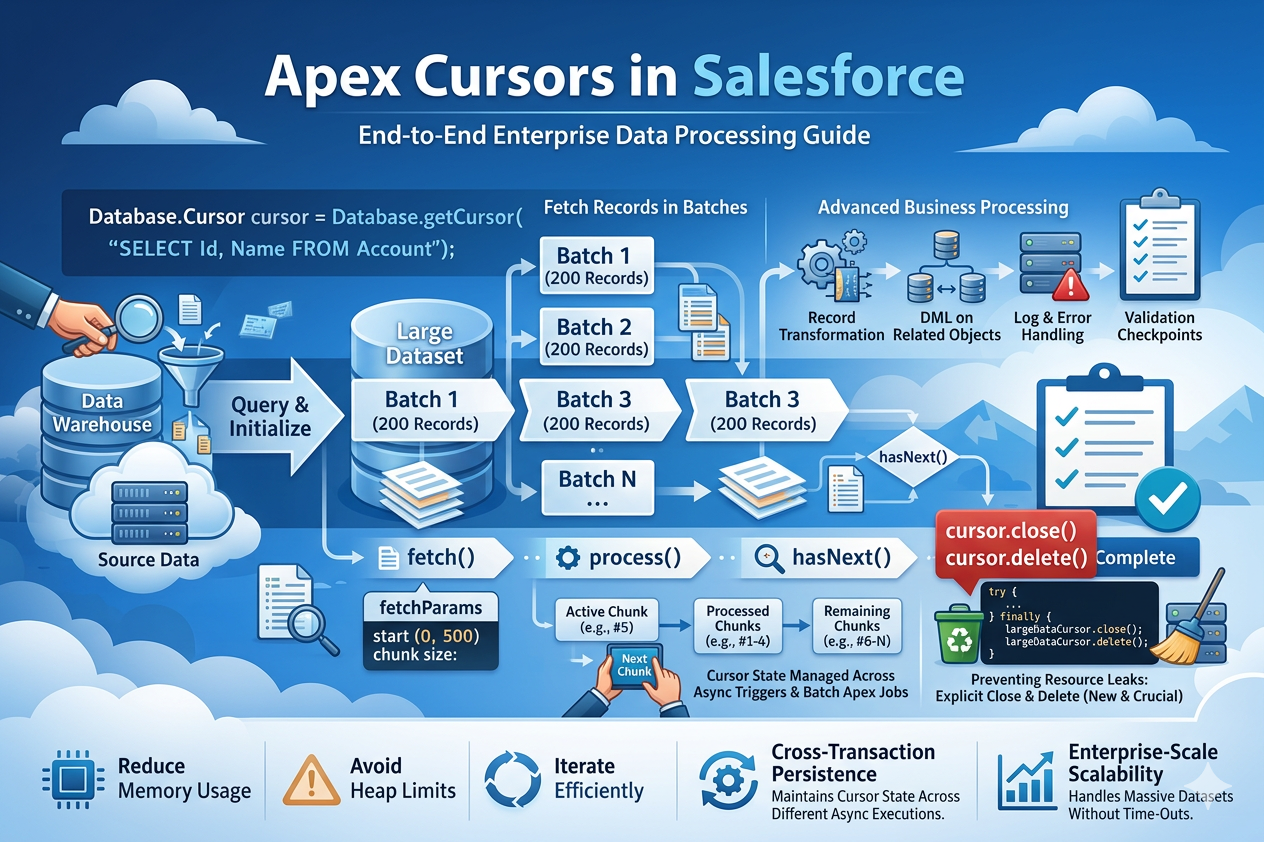
Apex Cursors Methods
Let's see about the standard database methods, which are specific to Apex cursors.
Database.getCursor(String strQuery)
This method accepts a query as a parameter and returns a Database.Cursor, This method will initialize a cursor based on the query that is specified in the parameter.
This method allows the record to be fetched in streaming mode rather than loading all results into memory at once.
Example:
Database.Cursor cursor = Database.getCursor('SELECT Id, Name FROM Account ORDER BY CreatedDate');
Cursor.fetch(Integer intPosition, Integer intCount)
This method retrieves data starting from a specified position (OFFSET) and fetches the defined number of records (COUNT).
Since the Apex cursor is stateless, meaning it does not maintain any information about previous interactions, it's important to track the offset to manage data retrieval efficiently.
This method gives more control than basic streaming of records because you can specify the starting index.
Example:
List<Account> lstAccount = cursor.fetch(0, 200);
Cursor.getNumRecords()
This method returns the total number of records that the query will return.
This information is crucial for planning the data processing strategy.
This is useful when you want to understand the size of the dataset before streaming.
Example
Below is an example for the implementation of the Apex cursor functionality.
public with sharing class ApexCursorClass {

    public static void processContacts() {

        Database.Cursor locator = Database.getCursor(
            'SELECT Id FROM Contact WHERE LastActivityDate = LAST_N_DAYS:365',
            AccessLevel.USER_MODE
        );

        Integer position = 0;
        Integer totalRecords = locator.getNumRecords();

        while(position < totalRecords){

            Integer remainingRows = totalRecords - position;

            // Ensure we don't fetch beyond available records
            Integer fetchSize = Math.min(200, remainingRows);

            List<Contact> scope = locator.fetch(position, fetchSize);

            position += scope.size();

            // Process records
            // Example: delete or update
            // delete scope;

        }
    }
}
Initially, an Apex cursor is created, executes an SOQL query once, and returns data that is not loaded into memory, unlike normal SOQL queries that load all data at once. The Apex Cursors know the total count of records without loading the rows of data; the getNumRecords() method returns the total records that matched the query, and it does not consume SOQL rows.
Once the cursor is created, the records can be fetched through the fetch method provided above by passing the start and end indexes, typically in chunks. Once processed, the cursor can move to the next set of records until all records in the one chunk are processed. This feature will be used to control the heap size and allow large datasets to be handled effectively.
Benefits of Apex Cursors
Heap memory reduction: Apex cursors fetch records in small chunks, preventing loading the entire result data set into heap memory, thus reducing the risk of heap size limit exceptions when working with large queries.
Fine-grained control: Methods like fetch(position, count) let you choose how many records to pull in every iteration, enabling you to tune the resource consumption based on every use case.
Ability to process large datasets: Cursors make it practical to iterate millions of records sequentially without trying to hold them all in memory.
Server-side efficiency: Cursors avoid creating large temporary result sets on the server of the application, which improves server resource usage and which can benefit multi-tenant performance
Faster time to first record: Because the cursor returns the first batch immediately, you can start processing sooner instead of waiting for a full query to complete and transfer all rows.
Limitations
While Apex cursors provide a powerful and efficient way to process huge datasets, they come with several limitations that developers must understand before implementing them in production. These limitations exist due to governor limits, cursor lifecycle, and their data streaming nature.
| Description | Limit / Explanation |
| Maximum number of Apex cursors per day | 10,000 |
| Maximum number of fetch calls per transaction | 10 fetch calls |
| Maximum cumulative number of new cursor rows retrieved per 24-hour period | 100 million |
| Limited to SOQL | Apex cursors support SOQL queries only and do not support SOSL. |
| No random access | Apex cursors return records sequentially and do not support random access of records. |
| Cursor Timeout | Apex cursors operate with a session-tied lifecycle, meaning the cursor may time out if too much time passes between fetch calls. |
Conclusion
Apex cursors offer a modern, efficient, and highly scalable approach for handling massive data volumes in Salesforce. Instead of loading an entire SOQL (Salesforce Object Query Language) result data set into memory, cursors stream records in controlled chunks, which keeps heap usage low and ensures compliance with governor limits. However, Apex cursors also come with some limitations, such as supporting SOQL only, cursor timeout, etc. Apex cursors remains one of the most optimized ways to work with millions of records safely.
Apex Cursors - When your data is huge, but your limits aren't!
