
 Book Free Consultation

Actionable Relationship Centre in Salesforce FSC
Actionable Relationship Centre in Salesforce FSC
By Anandhakumar Thangasamy
Senior Salesforce Developer
Actionable Relationship Centre in Salesforce FSC
Meet Jason, a financial advisor facing a familiar problem. One of his clients holds a long list of financial products with the bank such as multiple investment accounts, a family trust, insurance policies, loans, and other assets. On top of that, the same client belongs to several household groups, each carrying its own set of financial relationships.
So when this client calls to talk about their investments, Jason faces a time-consuming work. Information is scattered across different systems and classifications. Pulling everything together quickly - and accurately - is a constant struggle. For many advisors, this isn’t just an inconvenience; it’s a daily pain point.
This is where the Actionable Relationship Center (ARC) steps in as the ultimate remedy. ARC brings every account, relationship, and financial detail into a single, unified view which making it easier for advisors to understand the full picture instantly and deliver smarter, faster guidance.
What is an ARC?
Before diving into the Actionable Relationship Center (ARC) that is a powerful feature exclusive to Financial Services Cloud, it’s important to understand the foundation it builds on: Households in Salesforce FSC. A Household is a special type of Account designed to group individuals who share financial, personal, or advisory relationships. Think of it as a structured view of a family or any group whose finances are interconnected. With Households, advisors can easily visualize relationships through horizontal or vertical charts, making conversations smoother and insights clearer. If you’d like a deeper breakdown, be sure to check out our dedicated blog post on FSC Households.
While Households provide relationship visualization between Accounts and individuals, they do come with limitations - they’re restricted to those specific objects. This is where ARC truly shines. ARC takes the Household concept further by allowing visualization across any object in Salesforce. Whether you're mapping relationships between accounts, policies, loans, trusts, or custom data models, ARC offers a dynamic and flexible way to represent complex financial ecosystems. Lets back to the ARC.
ARC, short for Actionable Relationship Center, is a powerful graph designer within Financial Services Cloud. It allows advisors to visualize client-centric data such as financial accounts, loans, credit cards, policies, investments, and more that are pulled from multiple objects into a single, intuitive view.
In simple terms, ARC serves as a one-stop hub for understanding and managing everything related to your client: their accounts, relationships, assets, liabilities, and key connections. By turning complex data into a unified visual map, ARC helps advisors work faster, make better decisions, and deliver more meaningful guidance.
Configure ARC Graph
Use Case
Let’s take a simple scenario, Jason, a financial advisor, needs a 360° view of his client’s household - every relationship, financial account, opportunity, and case -along with the ability to take quick actions, such as creating or updating financial account records. This is exactly where an ARC Graph becomes the advisor’s best tool.
Step 1: Create ARC
Follow these steps to configure the ARC graph in FSC:
- Navigate to Setup and search for Actionable Relationship Center in Quick Find box.
- Click New Relationship Graph.
- Choose a template if one fits your scenario; otherwise, select Start from Scratch.
- Enter your Graph Properties (name, description, etc.).
- Select the Root Object - this will serve as the parent object where the graph will appear.
- For this example, select Account.
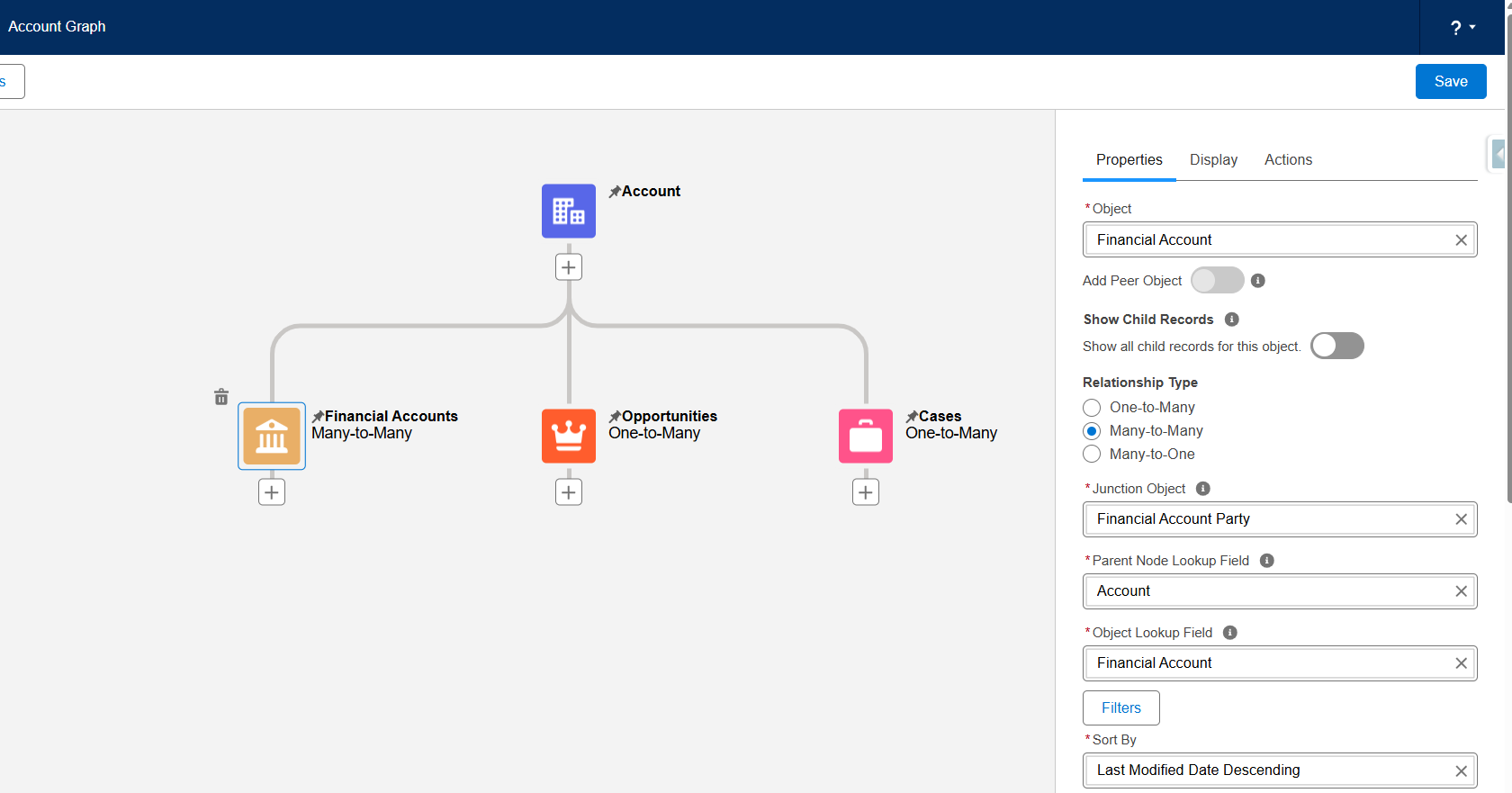
- Click the + icon to add a child object. Select Financial Account.
- Configure the following properties:
- Object: Financial Account
- Show Child Record: Toggle Off
- Relationship Type: Many-to-Many
- Junction Object: Financial Account Party
- Parent Node Lookup Field: Account
- Object Lookup Field: Financial Account
- Go to the Display tab and add the fields to show in the ARC chart:
- Financial Account Number
- Type
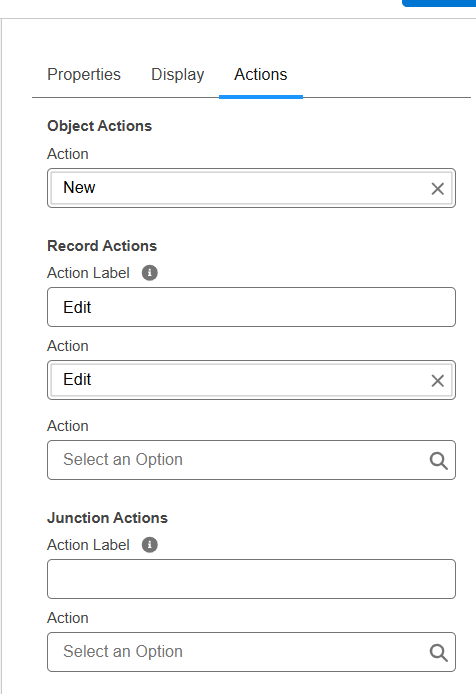
- In Actions tab and enable the below actions to create and edit the Financial Accounts,
- Object Action: New
- Record Action: Edit
- Repeat the above steps to add additional related objects:
- Opportunities (with the below fields)
- Amount
- Stage
- Close Date
- Cases (with the below fields)
- Subject
- Status
- Opportunities (with the below fields)
- Once all nodes are configured, click Save. Your ARC graph is ready now.
Step 2: Add ARC Graph to the Account Page
Now that the graph is created, let’s make it available to end users:
- Open the Account Record Page from the Lightning App Builder.
- Add a new tab with the label as ARC.
- From the components panel, drag the ARC Relationship Graph component and drop it under the ARC tab.
- Select your graph (e.g., Account_Graph) from the dropdown.
- Save and Activate the page.
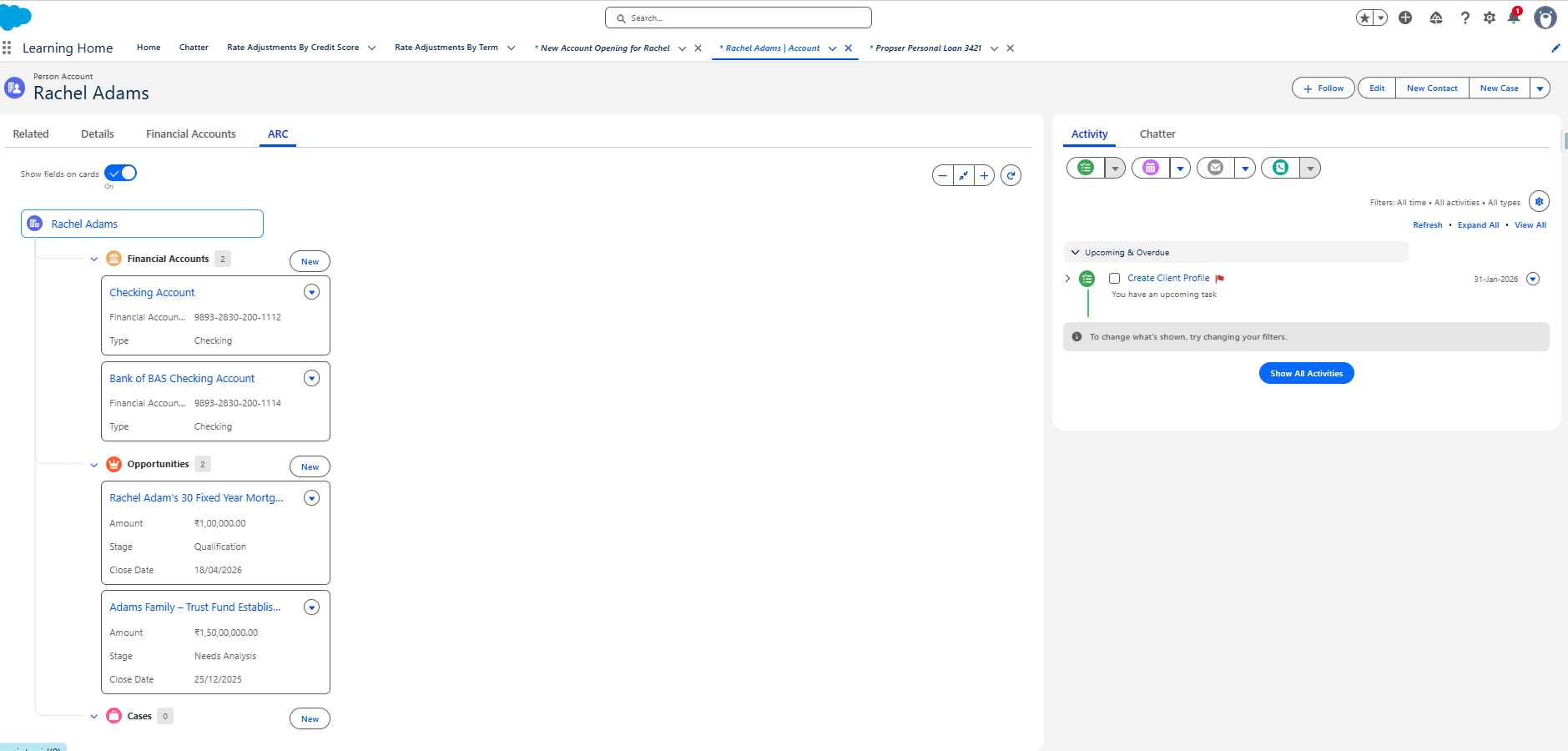
Navigate to any Account record and open the ARC tab. You will now see a unified graph showing:
- Financial Accounts
- Opportunities
- Cases
All in a single visual view, fully interactive with New and Edit actions. Cool!
Benefits of ARC
- 360° client view: Instead of navigating through multiple related list or object tabs, the users now see the related/configured child records within the parent object as a clean and visual map.
- Do it quick: Within the map itself the object and record actions such as New, Edit, Delete can be invoked.
- Increased Efficiency and Productivity: By accessing the all information in a single page along with the actions, ARC helps to saving the time and reducing the manual errors.
- Improved Collaboration: ARC promotes seamless information sharing across cross functional teams within the organization.
- Fully Configurable: ARC graphs can be tailored to fit various use cases such as Wealth Management, Retail Banking, Insurance and Lending. System Admins can choose objects, fields, actions and relationships - making ARC flexible enough for diverse financial models.
Conclusion
By combining visual relationship mapping with real time actions, Actionable Relationship Center(ARC) not only simplifies complex data but also elevates the productivity of the end users and client engagement. If your goal is to provide the 360° view of the clients, streamline operations your go to stop is ARC. It's not just a feature, it's a comprehensive advantage of the Financial Services Cloud product.
See everything. Understand faster. Act smarter - with ARC!
