
 Book Free Consultation

Mastering Time-Based Automation in Salesforce
This blog breaks down how time‑based automation works in Salesforce using Flows, Paths, and Apex, highlighting how it improves processes and reduces manual work
By Vijay Raju Kumaravel
Salesforce Developer
Mastering Time-Based Automation in Salesforce: Flows, Scheduled Paths, and Apex
Salesforce offers a variety of scheduling capabilities that can seamlessly support your organization behind the scenes. They tackle many tasks with routine cleanups, reminders, and follow-ups so your team can focus on more important matters. The key is to determine which tool suits each specific task. Once you nail that down, crafting and managing automation becomes significantly simpler. In this guide, we will explore three of the most frequently utilized time‑based automation features in Salesforce, and those are Schedule‑Triggered Flows, Scheduled Paths within Record‑Triggered Flows, and Scheduled Batch Apex. Each option addresses a distinct type of challenge, and grasping those distinctions can make a significant difference.
Let's get started!
Schedule Triggered Flow
Ideal for: Administrators who need something to operate on a schedule independent of record changes.
Overview: Schedule Triggered Flows run at defined intervals daily, weekly, or once without needing a record change to initiate the process.
What it is: A Schedule‑Triggered Flow is essentially Salesforce’s equivalent of a recurring background task. You specify when it should run daily, weekly, or just a one-time occurrence and Salesforce manages the execution. How it functions:
- You select the start date, time, and frequency.
- The flow operates discreetly in the background and processes any records that meet your criteria.
Where it assists:
- Nightly cleanup of old or inactive leads
- Sending follow‑up emails after a designated number of days
- Automatically escalating overdue cases or tasks without manual monitoring
If you’ve ever wished Salesforce could “just take care of this daily,” this is the tool you need.
Scheduled Path in Record-Triggered Flows
Ideal for: Actions that are delayed, contingent on a record being created or updated.
Overview: A Scheduled Path allows you to delay actions within a record-triggered flow. It’s perfect for automations that need to wait before executing.
What it is:
A Scheduled Path allows you to incorporate a pause directly within a record-triggered flow. Instead of executing immediately, Salesforce delays for a few hours or days before proceeding with the automation.How it operates:
- A record's creation or update triggers the flow to start.- The Scheduled Path suspends the next actions until the specified time has elapsed.
- After the delay period, the flow resumes.
Where it assists:
- Sending a reminder email two days after a case has been opened
- Following up with a customer one week after a quote is sent
- Changing a record’s status after a predetermined time frame
This is perfect when timing is essential, yet the automation is still reliant on a record event first.
Scheduled Apex
Ideal for: Developers managing substantial datasets or intricate logic.
Overview: Scheduled Batch Apex lets you run batch jobs at specific times using Apex code. It’s ideal for complex or high-volume operations.
What it is:
Scheduled Batch Apex is the stronger choice when you need to process large volumes of records or run complex logic that flows can’t handle. It’s built for heavy workloads and gives you more control over how and when your automation runs.
Before going to see the schedule options, we have to see what needs to be scheduled right? yes it is batch or any kind of script can be scheduled in the scheduled apex. Here, provided some insights about batch class and how it is scheduled. Let see...
Batch Class
Create a Batch Class
- Implement the Database.Batchable interface.
- Define the three required methods: start, execute, and finish.
Write Your Logic
- In start(), define the query to fetch records.
- In execute(), process records in batches.
- In finish(), perform post-processing (like sending emails or logging).
Example Code:
      global class AccountBatchProcessor implements Database.Batchable<SObject> {
         global Database.QueryLocator start(Database.BatchableContext bc) {
           return Database.getQueryLocator([SELECT Id FROM Account WHERE CreatedDate = LAST_N_DAYS:30]);
         }
         global void execute(Database.BatchableContext bc, List<Account> scope) {
              for (Account acc : scope) {
                   acc.Name += ' - Scheduled Update';
              }
         update scope;
         }
       global void finish(Database.BatchableContext bc) {
              System.debug('Scheduled batch job completed.');
       }
}- Execute the Batch
- Use Database.executeBatch(batchInstance, scopeSize) to run the batch.
Example:
Database.executeBatch(new AccountBatchUpdate(), 200);
- Monitor the Job
- Go to Setup → Apex Jobs to check progress and logs.
By creating and executing the batch class, we can get the actual results what we need for our business. Yes, if the result is fine, then we have to run the process for the required frequency. In that case, we have the option to schedule the batch by using this options.
Scheduled Class
- Implement the Schedulable interface.
- Define the execute() method with your logic.
Example Code:
 		global class AccountBatchScheduler implements Schedulable {
            global void execute(SchedulableContext sc) {
                 AccountBatch Processor batch = new AccountBatch Processor();
                 Database.executeBatch(batch, 200); // Adjust batch size as needed
            }
        }
How it operates:
- You create a Batch Apex class by using Database.Batchable.
- You schedule it with System.schedule() or via the user interface.
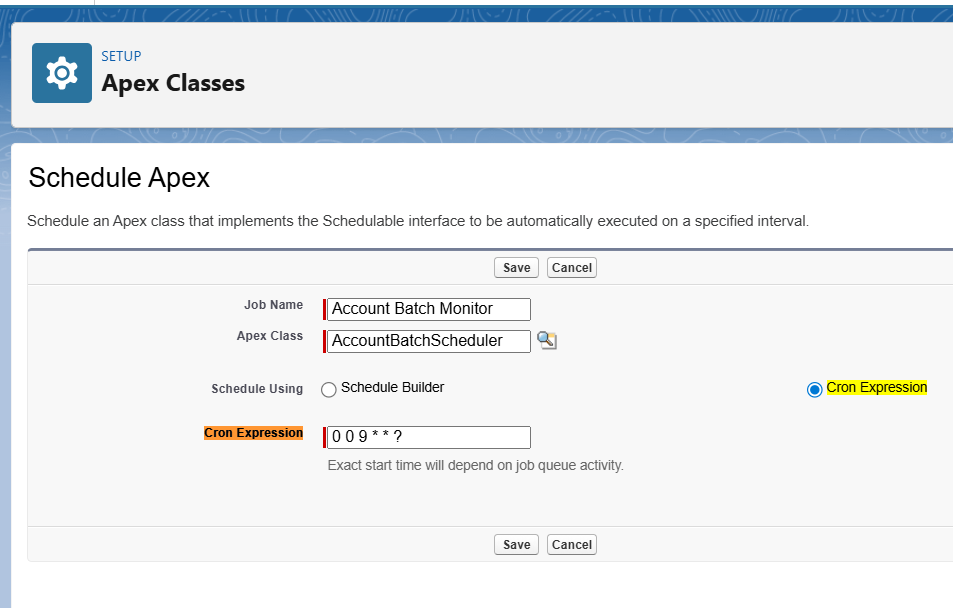
- A cron expression allows you to precisely dictate when it runs.
Example:
String cronExp = '0 0 2 ? * MON-FRI'; // Executes at 2 AM, from Monday to Friday
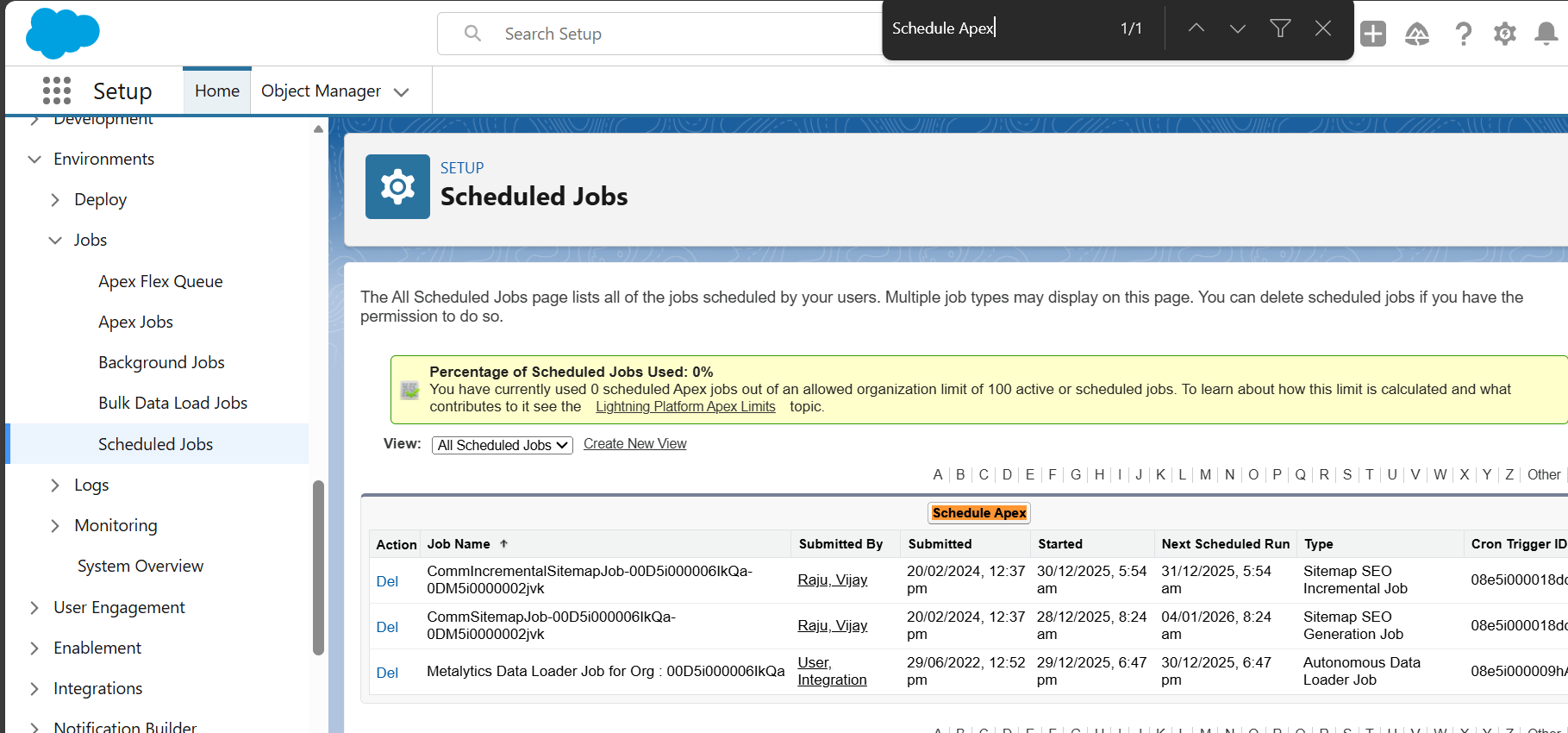
System.schedule('Weekly Account Batch', cronExp, new AccountBatchScheduler());- Verify the Schedule - Go to Setup → Scheduled Jobs to confirm the job is queued.
Where it assists:
- Weekly maintenance or archiving of significant data volumes
- Recalculating metrics across thousands of records
- Synchronizing Salesforce data with external systems
If your automation requires substantial processing power, Batch & Schedule Apex is the solution.
Another way from Setup for scheduling the batch class,
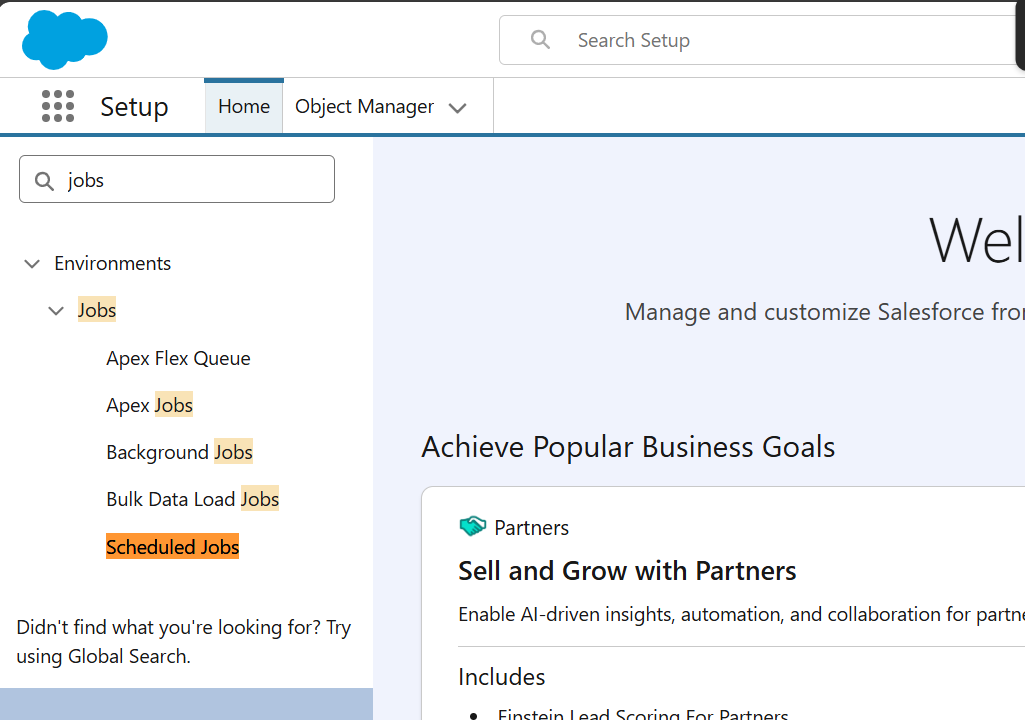
- In Salesforce, go to Setup.
- Search for jobs in the Quick Find box.
- Click the Schedule Apex button.
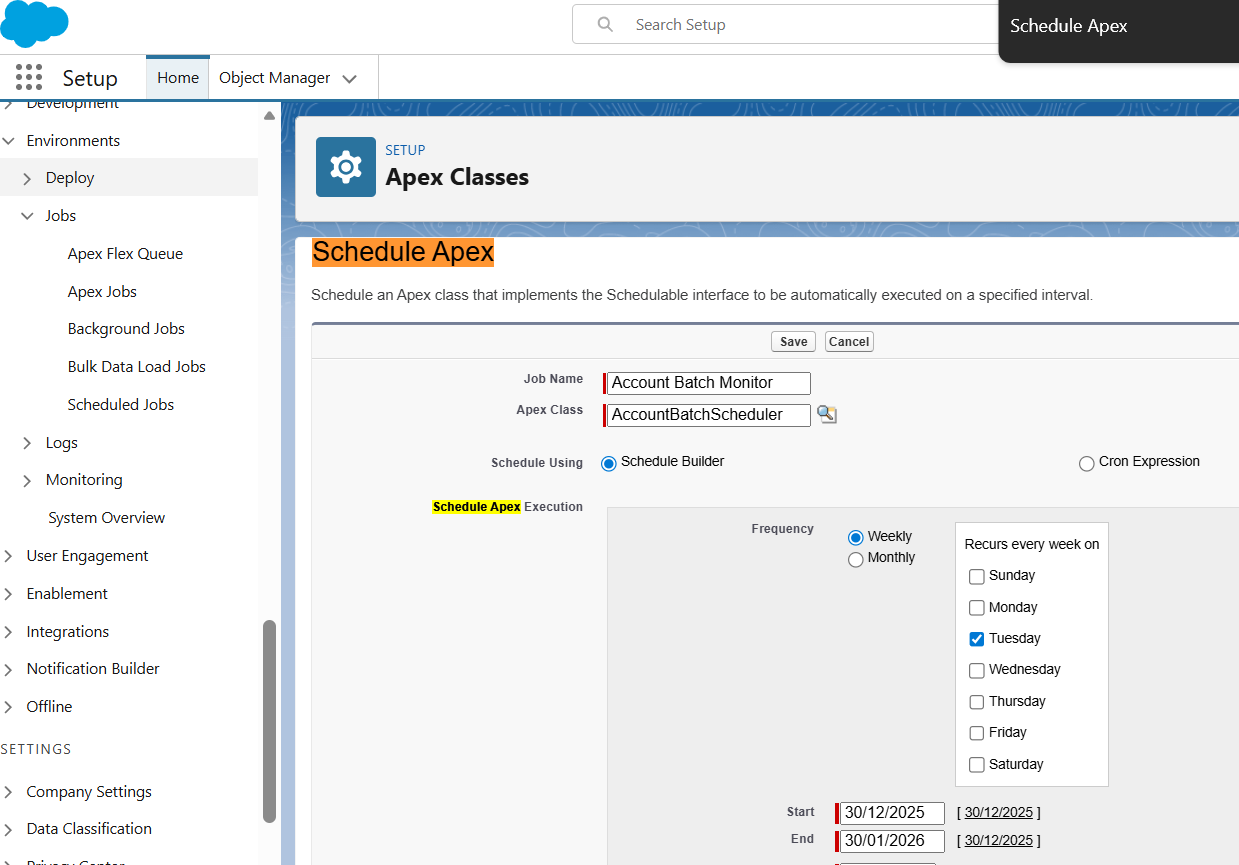
Fill in the form:
- Job Name: e.g., “Account Batch Scheduler.”
- Apex Class: select your schedulable class (like AccountBatchProcessor)
- Frequency: daily, weekly, or monthly
- Start/End dates and Preferred Start Time
Schedule using Cron Expression.
If clicking the Save, Salesforce will now run your job according to the schedule and run the business process that you expected.
Please find the below picture which gives you the high level note for the scheduling options with the compaisons.
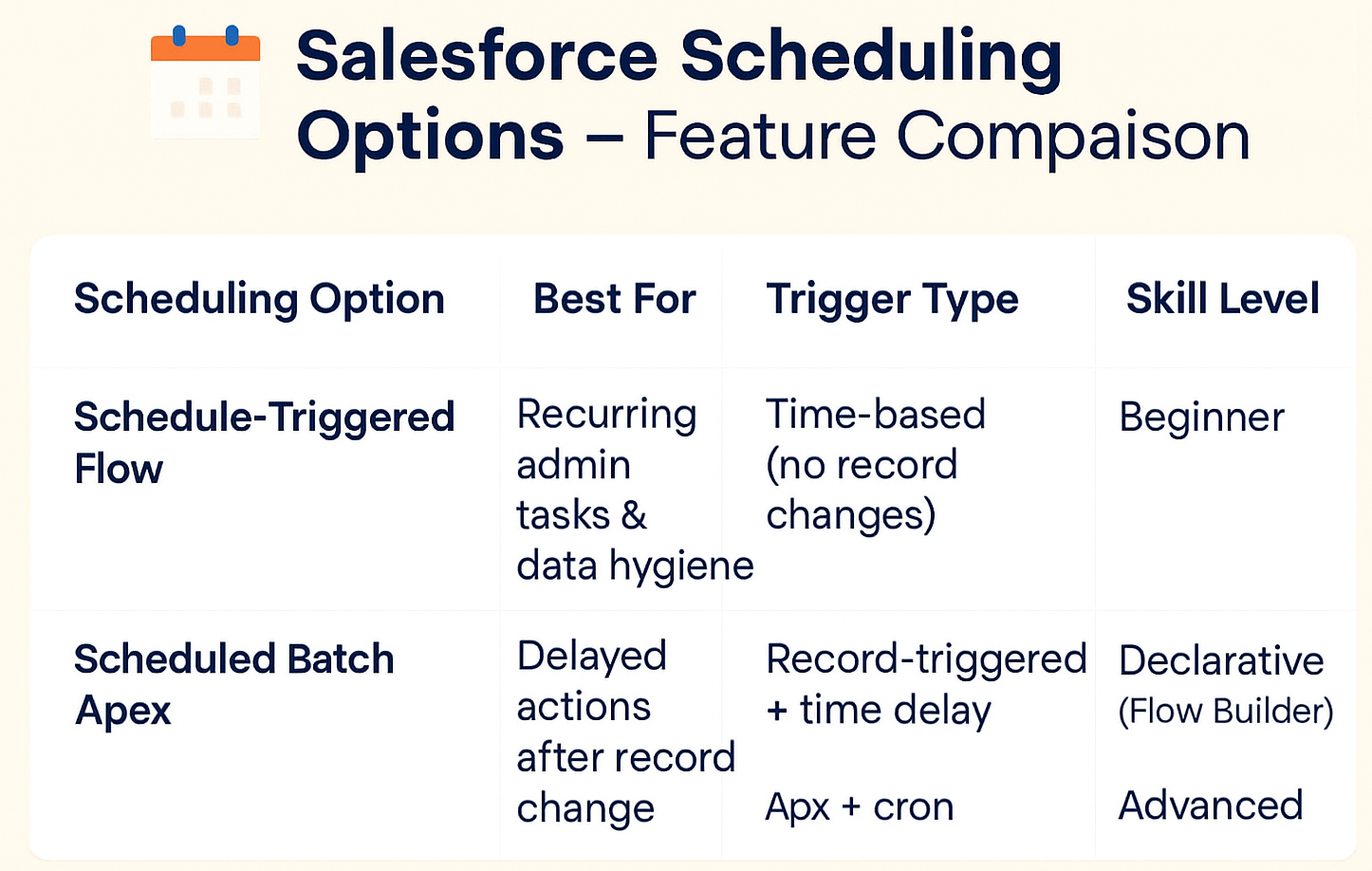
Conclusion
Choosing the appropriate scheduling tool in Salesforce goes beyond just technical aspects it involves understanding your business requirements, the complexity of the task, and who will be responsible for its upkeep. Schedule‑Triggered Flows are excellent for regular administrative functions, Scheduled Paths enable you to create deliberate, time-delayed procedures and Batch Apex addresses large, intricate tasks that necessitate custom coding. Hope you get the idea about the options we have for scheduling in Salesforce and follow our upcoming blogs to know more...
