
 Book Free Consultation

Understanding Households in Financial Services Cloud
Learn how Salesforce Financial Services Cloud uses Households to unify client relationships, accounts, and goals for better insights.
By Abishek Kumar
Asst. Software Developer
Understanding Households in Financial Services Cloud
Introduction
A Household in Financial Services Cloud is a smart way to manage clients as a family unit instead of treating everyone as separate records. It brings all related people together so advisors can clearly see their combined finances their assets, loans, investments, and goals in one single view. This helps advisors understand not just an individual’s situation, but the entire family’s financial life. With this grouped view, decision-making becomes easier, planning becomes more accurate, and advisors can give guidance that actually fits the family’s real needs and future plans.
Real-Time Example: Hari Krishnan Household
Let’s take a simple example to understand how households work in Financial Services Cloud (FSC).
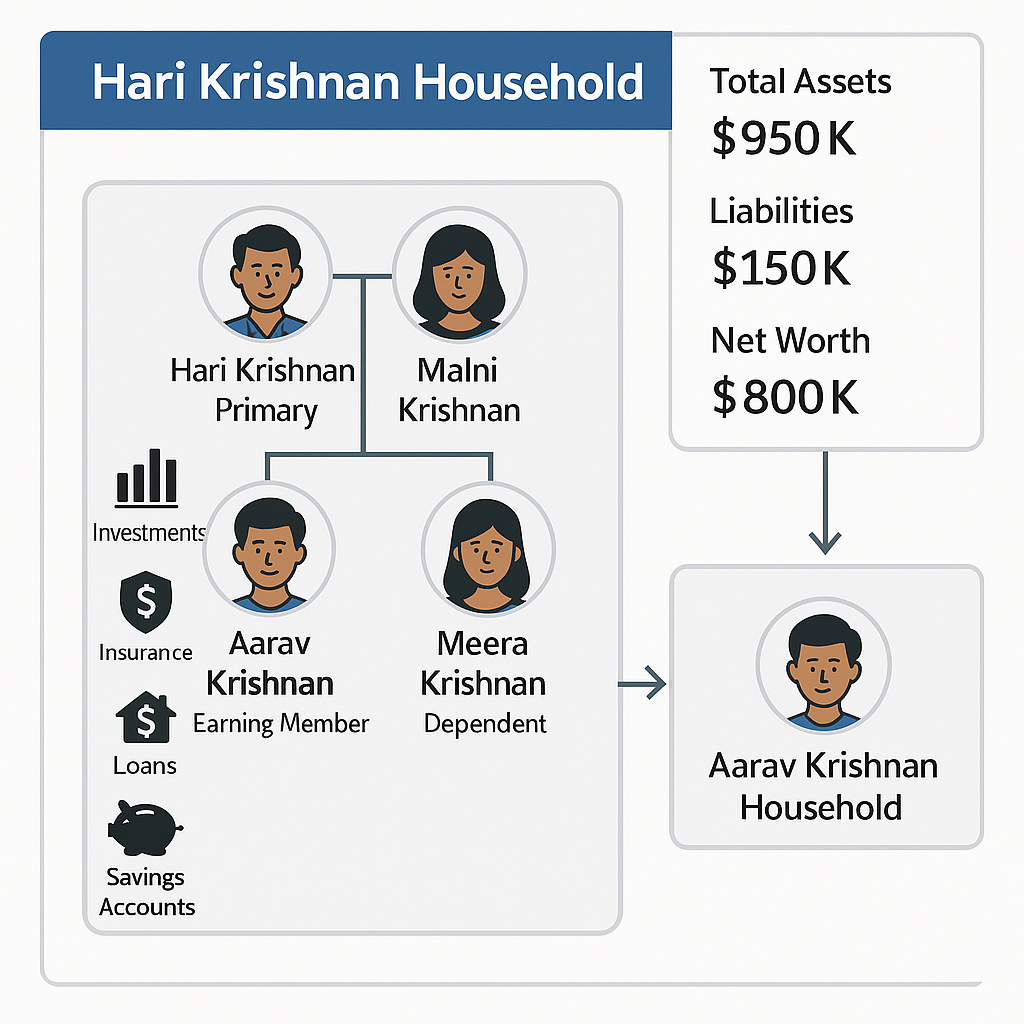
- An advisor creates a Household named “Hari Krishnan Household” for Hari Krishnan and his wife Malni Krishnan. Both are added as members - Hari as Primary and Malni as Spouse. Their children, Aarav and Meera, are added as Dependents.
- All their investments, insurance, loans, and savings accounts are linked to this Household. FSC automatically rolls up these details and shows the total assets, liabilities, and net worth for the entire family.
- Later, when Aarav starts his first job, the advisor updates his role from Dependent to Earning Member. FSC recalculates the Household’s total wealth in real time.
- After a few years, when Aarav moves out, he gets his own record as “Aarav Krishnan Household,” while still staying linked to his parents’ Household for tracking and compliance.
This real-time example shows how FSC helps advisors manage family changes, track financial goals, and always maintain an accurate 360° view of the client’s overall financial picture.
How Households Work in FSC
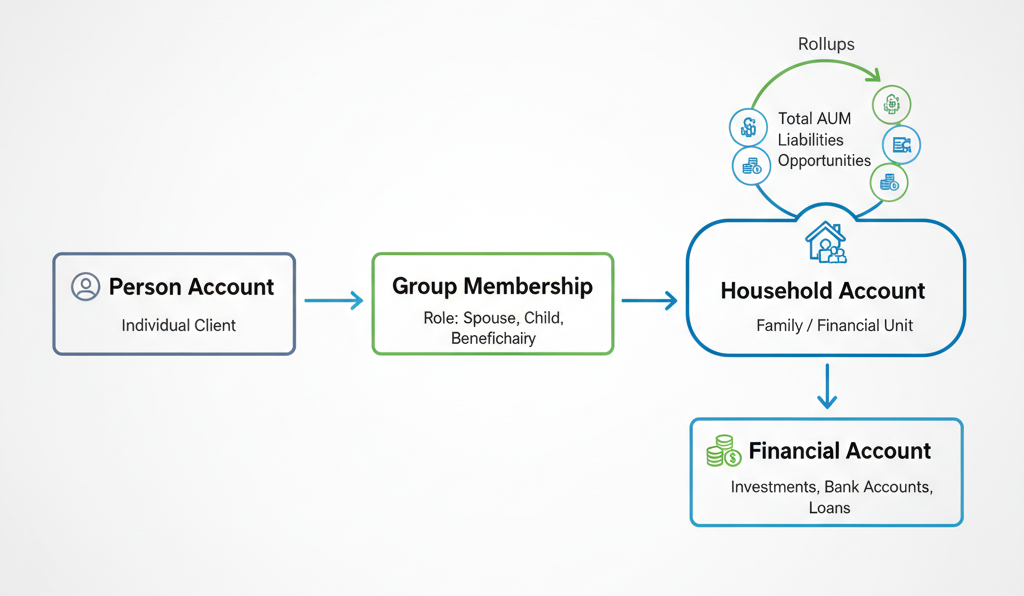
Salesforce FSC builds on the regular Salesforce data model but adds a few extra objects and relationships for financial tracking.
Here’s how it works:
- Person Account: Represents an individual client.
- Household (Group Account): Account record type that represents the family or group as a whole.
- Group Membership: Connects each Person Account to the Household, defining their role (Spouse, Child, Beneficiary, etc.).
- Rollups: Collect and summarize financial data like total assets, liabilities, and opportunities for the entire household.
This model helps advisors easily see all key information during meetings like total investments, upcoming opportunities, or risk coverage without switching between multiple records.
Lifecycle of a Household
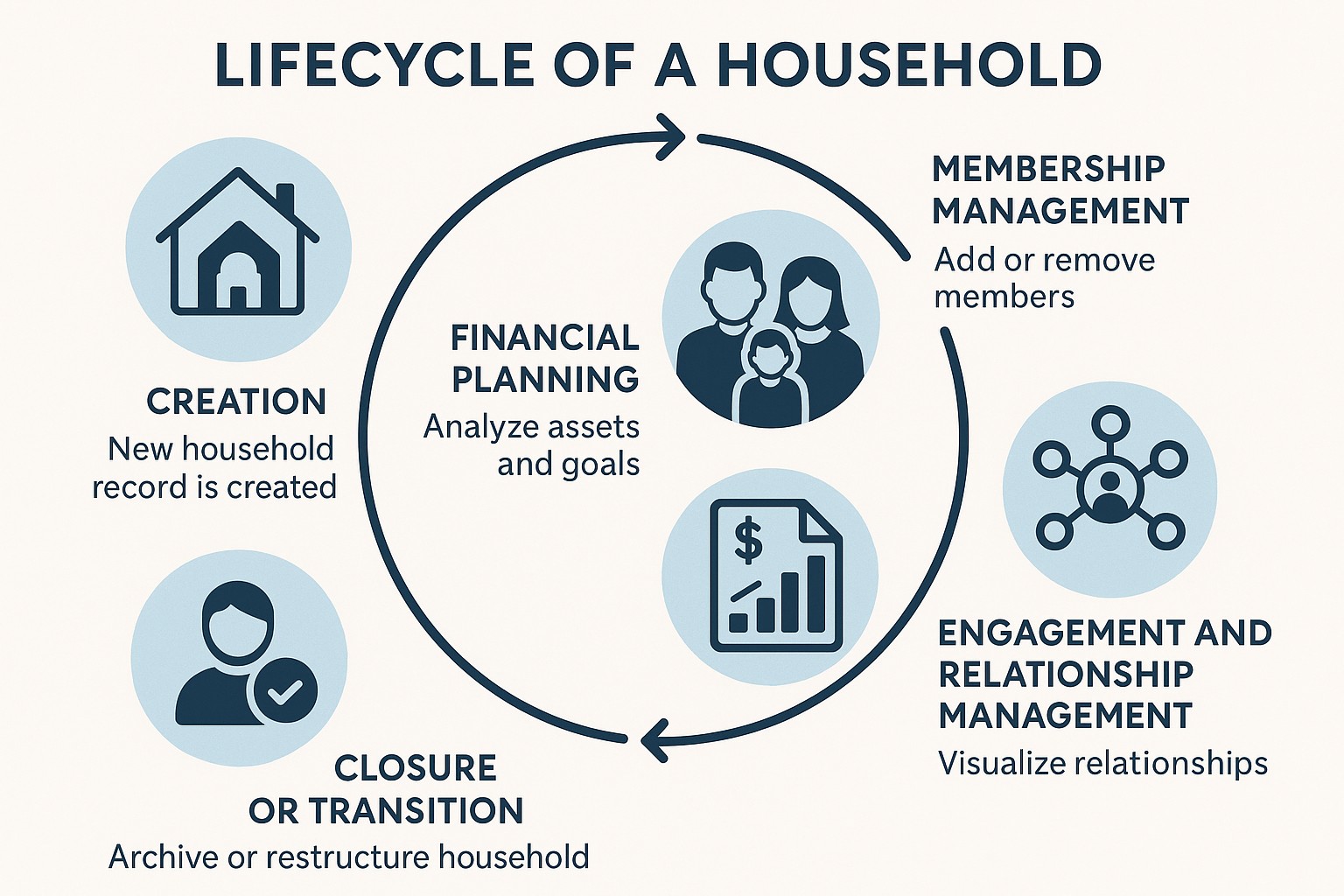
A household goes through several stages during its lifetime. Let’s walk through the typical lifecycle:
When a new client joins, FSC automatically creates a household record. If multiple clients are part of the same family, they can be added manually or using automation tools.
- Membership Management: Over time, relationships evolve as new members join (like marriage or children), or members may move to their own household (like a grown child starting independent financial planning). FSC lets you easily add, remove, or reassign members.
- Financial Planning: Advisors use household data to review combined assets, liabilities, and goals. For example, if one member takes a home loan, the impact can be seen on the entire household’s net worth.
- Engagement and Relationship Management: Salesforce provides tools like the Actionable Relationship Center (ARC) and Relationship Map to visualize how people are connected. You can see all relationships family, business, and external — in one interactive graph.
- Closure or Transition: When clients leave or their financial relationship ends, households can be archived or restructured while maintaining data history for compliance.
This lifecycle approach helps advisors handle real-world family dynamics efficiently without losing data integrity.
Create Household
Consider the same example Hari Krishnan household and follow the steps below to create the household and add its members.,
- Go to Accounts list view and click New to create the Household account.
- Select the record type as Household and click Next.
- Enter the name as Hari Krishnan Household and Save.
Your household account is now created.
- On the Household record, Select Relationships tab.
- Under the Harikrishnan Household, click + Add Relationship.
- Add Harikrishnan to the household using the below values,
- Member Name: Harikrishnan
- Role in Group: Client
- Primary Member: Enabled
- Primary Group: Enabled
- Click Save.
Repeat the same steps to add the other household members Malni Krishnan, Aarav, and Meera assigning each their appropriate role.
Benefits of Using Households in Financial Services Cloud
- The Household model in FSC is not just for organizing data it brings real business advantages for advisors and financial institutions.
- 360° Client View: Will See all relationships, assets, liabilities, and goals in one place.
- Better Financial Advice: Advisors can give more accurate recommendations by understanding the full family picture instead of just one person.
- Simplified Reporting: Rollups automatically calculate the total Amount, opportunities at the household level.
- Operational efficiency automates or integrates the management of related client records, reducing manual up keep.
This unified structure helps both advisors and firms deliver smarter, more connected financial experiences.
Conclusion
Understanding Households in Financial Services Cloud is key to managing client relationships effectively. It helps advisors look beyond individual clients and focus on the entire financial picture of families or groups. By using Household features wisely like rollups, group memberships, and relationship maps financial firms can build stronger relationships and deliver more personalized advice.
A household in FSC brings the entire family’s financial picture together, helping advisors give clearer and more personalized guidance!
