
 Book Free Consultation

Rotate Marketing Cloud Engagement Client Secret Expiration
This blog gives you the insights of how the Marketing Cloud Engagement Client Secret Expiration and how to Rotate Your API Credentials in Marketing Cloud
By Sharan Kumar Mariappan
Assistant Software Developer
Salesforce Marketing Cloud API Security Update: Why Client Secret Rotation is Important
A month ago, Salesforce sent an email to all marketing cloud users / customers named “Marketing Cloud Engagement Secret Expiration and Time-To-Live (TTL)”. If your Marketing Cloud environment is connected with external systems through APIs, This is more common in the implementations. So, this update is very important for those who integrating the system through API. Salesforce has recently announced that existing client secrets used in Marketing Cloud Engagement Installed Packages must be rotated that should be before September 30, 2026. If not updated before the deadline, integrations using those integration credentials will get expired.
It is important to understand some basics around APIs, client credentials, and how integrations work in Marketing Cloud. Let's get started with this blog so that you can understand how to rotate the secret key expirations.
Why Are API Calls Used?
In many organizations, Marketing Cloud does not work separately. It usually connects with CRMs, websites, mobile apps, data cloud, and other third party tools. These systems communicate with other systems using APIs. An API call is simply a request sent from one system to another system to perform an action automatically. It will reduces the human interference by automatically sending the data from one system to another using an internet.
Please refer the below examples for an API call-outs.
- Create or update contacts from the CRM to the Marketing Cloud
- Insert records into Data Extensions
- Start sending an emails from the Marketing Cloud
- Start Journeys in the automation studio
- Retrieve the data automatically when file drop
- Syncing data from the Sales cloud
These actions impacts customer communications and data. Marketing Clouds needs a secure way to verify it, so that no external user will misuse the data. Only with the correct authorization one can do the API callouts from the SFMC.
Where to Locate Client Secret Key?
In the setup, under the platform section we can select the integration. In the integration, we need to select the server to server integration. Add the scope and click on save. We will receive an client secret key for that server to server integration. Please refer the screenshot below.
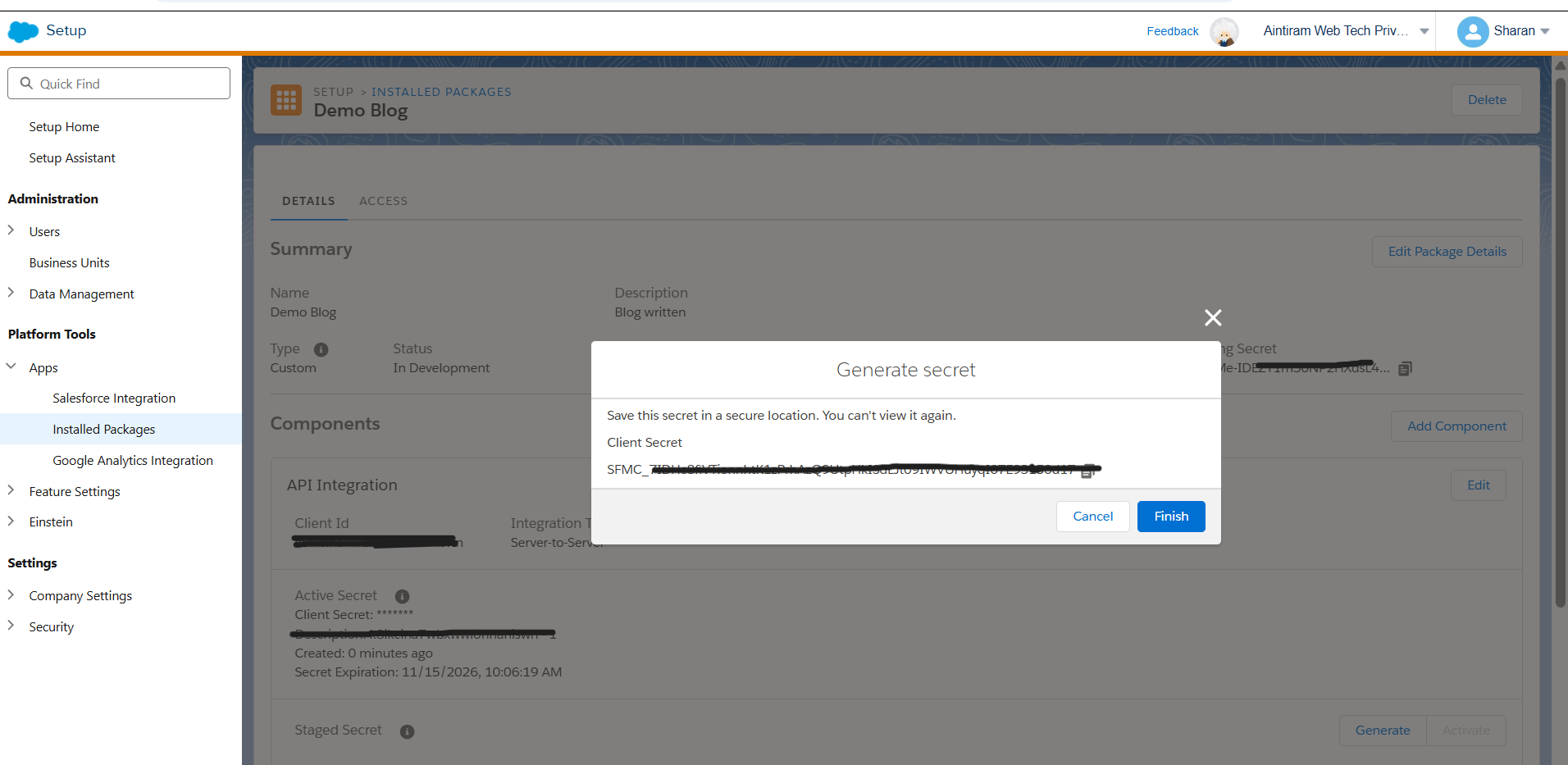
Understanding Client ID and Client Secret
Marketing Cloud basically uses OAuth 2.0 credentials for API authentication. These credentials are generated using installed packages.
The two main components of the API integrations are:
- Client ID - identifies the connection between two systems
- Client Secret - act as security authentication key
In simple way Client ID is a kind of username and Client Secret is a kind of password that required for login into an account.
When an external system wants to access Marketing Cloud APIs, it will send these credentials to request an access token. If the credentials are valid, Marketing Cloud returns a token that allows the system to perform actions based on the permissions assigned to that integration. Because the Client Secret works like a password, it should always be kept secured. If exposed or available for all users, someone could use it to access the environment, trigger sends, modify subscriber data, or retrieve sensitive information.
Installed Packages and Server-to-Server Integrations
In Marketing Cloud Engagement, API integrations are configured using Installed Packages. An Installed Package acts as a container that defines:
- how to connect external systems,
- what APIs it can access, and
- what permissions it has.
The most commonly it is used setup is Server-to-Server Integration. This allows systems to communicate directly with Marketing Cloud without requiring any user login or manual interaction. This integration type is widely used for:
- backend systems,
- middleware platforms or third party platforms,
- automated data sync processes,
- cloud services, and
- enterprise integrations.
Please refer the usual setup process below.
- Go to Setup
- Open Installed Packages
- Create a package
- Add an API Integration component
- Select Server-to-Server Integration
- Assign required scopes and permissions
- Save the configuration
Once saved, Marketing Cloud will generates:
- Client ID
- Client Secret and
- Authentication endpoints
These credentials are then configured in the external systems that need API access.
What Is Changing?
Earlier, many client secrets remained active indefinitely unless manually changed. Salesforce is now introducing a mandatory expiration policy as part of a security improvement. Under the new model:
- Client secrets will have a 180-day Time-To-Live (TTL) -> We should have to change the client expiration key after 180 days.
- Existing secrets must be rotated before September 30, 2026 -> If you have any integration from your end, you should have to make sure the client expiration key is rotated or changed before September 30, 2026.
- Some inactive integrations may already have been invalidated -> Automatically inactivated will no longer exists after September 30, 2026 as part data retention norms.
- Newly generated secrets follow a new format starting with SFMC_ -> Say for example SFMC_112xyaaasp34xyp32p
The main reason behind this change is security. Credentials that is available for more number of days in the system will cause risk. Especially, if they are accidentally exposed, stored insecurely, or forgotten over time. According to Salesforce, expired or leaked credentials have increasingly become a security concern across integrated platforms.
Why It is important to Plan the Rotation of Secret Key
In many environments, the same client secret may be used in multiple places. For example: middleware tools, custom applications, cloud functions, ETL processes, automation scripts, AWS Secrets Manager, sometimes third party sticky notes or third-party integration platforms. It is not a marketing cloud tasks. Multiple systems and teams may be involved. If even one application continues using an expired secret, API authentication will fail and related processes may stop working. Sometimes these failures are not immediately visible. Data sync jobs, triggered sends, or Journey entry events may silently fail in the background. Recommended Approach for Secret Rotation The safest approach is to treat secret rotation like a planned deployment activity.
Secret key Expiration:
- Review all the Installed Packages that been mainly used for integrations
- Identify active integrations
- Find where each client secret is currently used
- Generate a new staged secret key as indicated in the official documentation (attached at the end)
- Update all dependent systems
- Test authentication and API calls
- Activate the new secret key for authentication
- Monitor integrations after deployment
One useful improvement is that Salesforce now supports staged secrets. This allows organizations to test the new secret before fully activating it, reducing the risk of downtime during rotation. It is also important to remember that newly generated secrets may take a few minutes before becoming active across the platform.
Best Practices Going Forward
This is also a good opportunity to review overall integration governance. Many Installed Packages were created years ago and may no longer be actively maintained. Some integrations may not even be required anymore. During the rotation process, organizations should consider: removing unused integrations, reviewing permissions that has been provided, make sure you have documented the secret key an dprovided the ownershp for that, and using centralized secret management solutions that should be not an unautherized third party softwares or tools. Salesforce also recommends rotating secrets regularly instead of waiting until the expiration date.
Conclusion
This update does not introduce new functionality, but it is an important security practice: credentials should not remain valid forever. For organizations using multiple Marketing Cloud integrations, the September 30, 2026 deadline should be consider this as an opportunity to review integration architecture, improve documentation, and strengthen security practices. The technical steps are straightforward. Identify the bigger challenge is identifying every system where the credentials are used and co-ordinating updates properly with your team members. If your Marketing Cloud environment depends on APIs, which is true for most companies that uses SFMC implementations and planning the rotation process early will help avoid authentication failures and service issues later. I have attached official documentation link please review and stay tuned for more marketing updates.
Official documentation: Rotate an OAuth 2.0 Secret
